How Does Shopify Work? A Complete Guide for Beginners
If you've ever wondered how Shopify actually works — not just the marketing pitch, but the real mechanics behind it — you're not alone. Shopify is one of the most popular e-commerce platforms in the world, powering over 4 million online stores. But for anyone just starting out, the whole thing can feel like a black box.
This guide breaks down exactly how Shopify works, how it connects to business models like Shopify dropshipping, and what you actually need to do to get started.
What Is Shopify, Actually?
Shopify is a hosted e-commerce platform. That means it provides everything you need to sell products online — a website, payment processing, inventory management, and order tracking — all in one place. You don't need to build a website from scratch or worry about hosting servers.
Think of it like renting a fully furnished shop on a high street, rather than buying a plot of land and building one yourself. Shopify handles the infrastructure; you focus on the business.
What makes Shopify different from building your own site is that it's designed specifically for selling. Every feature — from the checkout flow to the inventory system — is built with commerce in mind. That's why it's become the default choice for independent merchants, growing brands, and even enterprise retailers.
Understanding Shopify: The Building Blocks
Before getting into the mechanics, it helps to understand what Shopify is actually made of. There are four core layers to the platform:
Your storefront — the website your customers see. Built using a theme (a pre-designed template), customised with your branding, products, and content. No coding required for most stores.
The admin dashboard — the back end only you see. This is where you manage products, orders, customers, discounts, analytics, and settings. Everything runs through one interface.
The payment system — Shopify has its own built-in payment processor (Shopify Payments) which accepts credit cards, Apple Pay, Google Pay, and more. You can also connect third-party gateways like Stripe or PayPal if you prefer.
The app ecosystem — Shopify's real power comes from the thousands of apps that extend what it can do. Shipping automation, loyalty programmes, email marketing, AI chatbots, product reviews — almost any functionality you need has an app built for it.
Understanding Shopify means understanding that the platform itself is the foundation, and apps are how you build on top of it.
How Does the Platform Actually Work?
Here's what happens under the hood when someone visits your Shopify store:
- A customer lands on your store URL. Shopify's servers host the site globally, so it loads fast regardless of where the visitor is in the world.
- They browse your products. Your catalogue, images, and pricing are all managed through your admin dashboard — updated in real time.
- They add something to their cart and check out. Shopify's built-in payment system (or an integrated gateway like Stripe or PayPal) processes the transaction securely. Shopify is PCI-compliant, so card data is handled safely without any extra work on your end.
- An order is created. You receive a notification, the order appears in your dashboard, and you can fulfil it — yourself, through a fulfilment centre, or automatically via a dropshipping app.
- Post-purchase communication is triggered. Shopify automatically sends the customer a confirmation email and shipping updates. Any follow-up questions — about their order, returns, sizing — come in through your customer service channels.
That last step is where a lot of stores lose ground as they grow. The platform handles the transaction beautifully, but customer questions after the sale are still largely a manual process unless you set up the right tools.
Understanding how Shopify works at this level is critical because it helps you see where automation can fit in — and where it can't. The platform handles the technical side, but customer communication, product selection, and marketing still require your input (or the right tools to automate them).
Shopify and Dropshipping: How They Work Together
Shopify is the platform of choice for most dropshipping businesses — and for good reason. Shopify dropshipping means you sell products without holding inventory. When a customer orders, the item ships directly from your supplier. Shopify makes this model easy because it integrates with apps that automate the whole process: finding products, syncing inventory, and forwarding orders to suppliers.
The appeal is obvious. You can start a dropshipping store with very little upfront capital. No warehouse, no bulk buying, no shipping logistics to manage yourself. Shopify handles the storefront; dropshipping apps handle the fulfilment.
If you're wondering how to start dropshipping, the first step is understanding how Shopify works as the foundation. You can build a profitable dropshipping business without ever touching inventory — but you still need to understand the flow of data, orders, and customer communication.
What Does It Cost to Start?
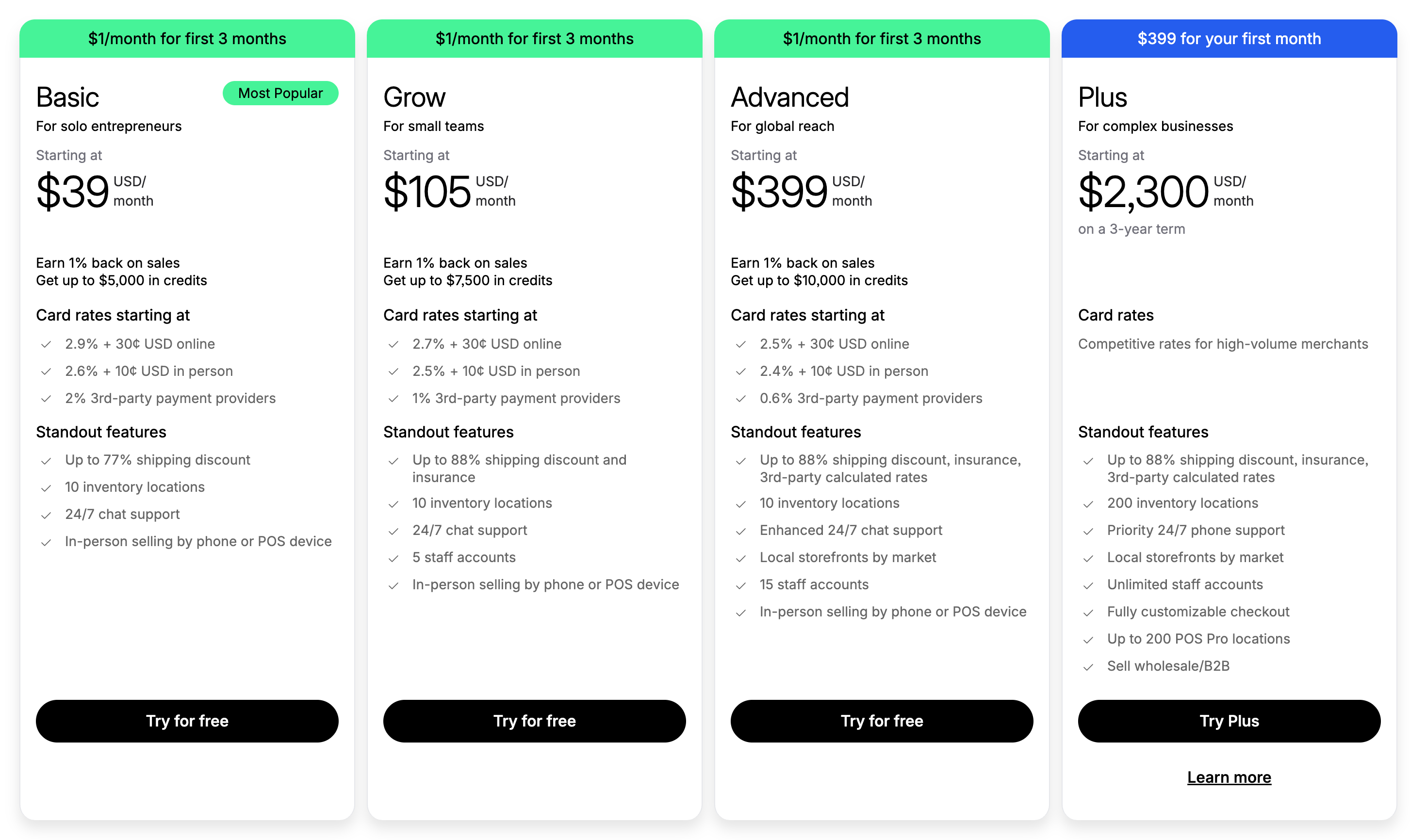
Shopify's pricing starts at around $39/month for the Basic plan, which gives you everything you need to launch a functional store. There's also a free trial period so you can set things up before committing to a plan.
Beyond the platform subscription, the main costs are apps (many are free or cheap), a domain name, and any marketing spend you put behind driving traffic to your store. If you're learning how to start dropshipping, the initial outlay is significantly lower than traditional retail — usually just the Shopify subscription and maybe $50–100 on apps and a domain.
The Part Most People Overlook: Customer Service
Here's the thing nobody talks about when they explain how Shopify works: as your store grows, so do the questions. Where's my order? Can I return this? Does this come in another size? These questions come in at all hours, and if you're a one-person operation or a small team, answering them manually becomes a full-time job fast.
Shopify includes a free tool called Shopify Inbox, which centralises customer messages. But Shopify Inbox isn't an AI chatbot — it's a messaging interface. You still have to respond to every question manually. That works fine if you're getting 5 messages a day. It doesn't scale when you're getting 50.
This is where a Shopify chatbot changes the game. AI-powered tools like Marvyn (which is completely free) sit directly inside your Shopify store and handle routine customer questions automatically — 24/7, without you lifting a finger. Unlike Shopify Inbox, a Shopify AI chatbot learns from your product catalogue, shipping policies, and FAQs, then answers questions in natural conversation.
The key difference: Shopify Inbox requires a human behind every response. An AI chatbot for Shopify handles the routine stuff automatically and only escalates complex issues to you. For Shopify dropshipping stores where margins are tight and time is limited, this automation is one of the fastest ways to keep customers happy while you focus on growing the business.
How to Start a Shopify Store: The Basic Steps
Guiding steps:
- Sign up for a Shopify account. Use the free trial to explore how Shopify works before committing.
- Pick a theme. Shopify has dozens of templates — choose one that fits your brand.
- Add your products. If you're running Shopify dropshipping, install an app to import products from your supplier.
- Set up payments. Connect Shopify Payments or a third-party gateway.
- Connect a domain. You can buy one through Shopify or bring your own.
- Install a Shopify chatbot. Set up automation for customer service from day one — tools like Marvyn are free and take 5 minutes to configure.
- Launch and start marketing. Social media, paid ads, and SEO are the main channels.
The Bottom Line
Shopify works by giving you a fully managed storefront, payment processing, and order management — all in one dashboard. Pair it with a dropshipping model and the barrier to entry drops significantly. The key is understanding that the platform handles the technical side, but scaling the business — especially customer communication — requires the right tools in place from the start.
Tools like Shopify Inbox are a good starting point, but they don't scale. A Shopify AI chatbot automates the repetitive questions so you can focus on the strategic work. And because Marvyn is completely free, there's no reason not to set it up from day one.
If you're building a Shopify store and want to automate your customer support without adding to your costs, take a look at Marvyn — it's a free AI chatbot for Shopify built specifically for merchants.
Questions & Answers
Useful resources

Best Shopify Chatbot: Top 10 Apps Compared (2026)
Find the best Shopify chatbot for your store. We compare the top 10 chatbot apps including Marvyn AI (free, 70% automation), Shopify Inbox, Gorgias, Tidio, and more.

Chatty vs Marvyn AI: Best Shopify AI Chatbot Comparison (2026)
A comprehensive comparison of features, pricing, and performance between Chatty and Marvyn AI for e-commerce businesses.

Gorgias vs Marvyn AI: Shopify AI Chatbot Comparison (2026)
Choosing between fully automated AI and a helpdesk with human agents? Compare features, pricing, and find the best fit for your Shopify store.

How to Increase Shopify Sales with AI Chatbot: 15 Proven Strategies (2026)
Discover 15 proven strategies to increase Shopify sales with AI chatbot. Learn how the best Shopify AI chatbot drives conversions, automates customer service, and boosts revenue 24/7.
How Fashion Stores Are Increasing Sales by 28% with AI Chatbots
The practical playbook behind how real Shopify fashion brands are turning conversations into conversions.
Shopify Customer Service: Complete Guide to Support Automation (2026)
Master Shopify customer service with our complete automation guide. Discover how AI chatbots, help centers, and automation tools can reduce support costs by 70% while improving customer satisfaction.