Mastering Order Management for Ecommerce in 2026
Ever wondered what happens after a customer clicks "buy"? That's where order management comes in, and it's far more than just taking the order.
Think of your ecommerce business like a busy restaurant kitchen. Order management for ecommerce isn’t just the waiter taking the order—it's the entire system. It’s the ticket printing, the chefs coordinating dishes, the server delivering the meal, and even handling a plate that gets sent back. It’s the whole, messy, wonderful process that ensures a customer gets what they ordered, smoothly and on time.
The Blueprint for Modern Ecommerce Order Management
In today's market, a slick post-purchase experience isn't just a nice-to-have; it's the absolute backbone of a successful direct-to-consumer (DTC) brand. Solid order management acts as the central nervous system for your operations, tying together your storefront, inventory, warehouse, and couriers into a single, coordinated flow. Without it, you're essentially flying blind.
Picture this: you launch a flash sale. Orders flood in, but your inventory doesn't sync in real time. Before you know it, you've oversold your most popular product. What follows is a wave of angry customers, cancelled orders, and a seriously damaged reputation. This is a common nightmare for brands still relying on spreadsheets or disconnected apps.
Why a Solid System Is Non-Negotiable
A robust order management process is your best defence against operational chaos. It makes sure every single order is picked, packed, and shipped accurately and efficiently, creating the kind of reliable customer experience that builds loyalty and brings people back. For any ambitious brand looking to scale, getting this right is non-negotiable. As platforms evolve to meet this demand, some have even detailed their enhanced order management features to tackle these exact challenges.
A structured approach helps you sidestep the common pitfalls that kill growth:
- Shipping errors that frustrate customers and flood your support inbox.
- Inventory discrepancies that lead to overselling during crunch times like Black Friday.
- Manual data entry that eats up valuable time and is riddled with human error.
- Inefficient fulfilment that causes slow delivery times and drives up your costs.
The goal is to build a system that works for you, not one that you constantly have to work for. It should automate the boring, repetitive tasks, give you a clear view of every order's status, and arm you with the data to make smarter decisions. This is the operational excellence that separates thriving brands from those just struggling to keep up.
This guide is your blueprint to achieving that. We'll walk through the entire order lifecycle, from the moment a customer pays to the final delivery and any potential returns. Whether you’re just starting out or looking to optimise your current setup, you'll find practical strategies to build a resilient and scalable operation. You can also check out our rundown of the best ecommerce tools to help you get there.
Decoding the Five Stages of Order Management
Great order management for ecommerce isn’t one single task. It’s a series of critical handoffs, like a relay race where every pass of the baton has to be perfect. If one step falters, the entire customer experience is at risk.
By breaking down the process, you can spot the weak links in your own operation and build a system that’s robust enough to handle growth. Let’s walk through the five core stages every order goes through, from the moment a customer clicks "buy" to the package landing on their doorstep.
This is the journey in a nutshell:
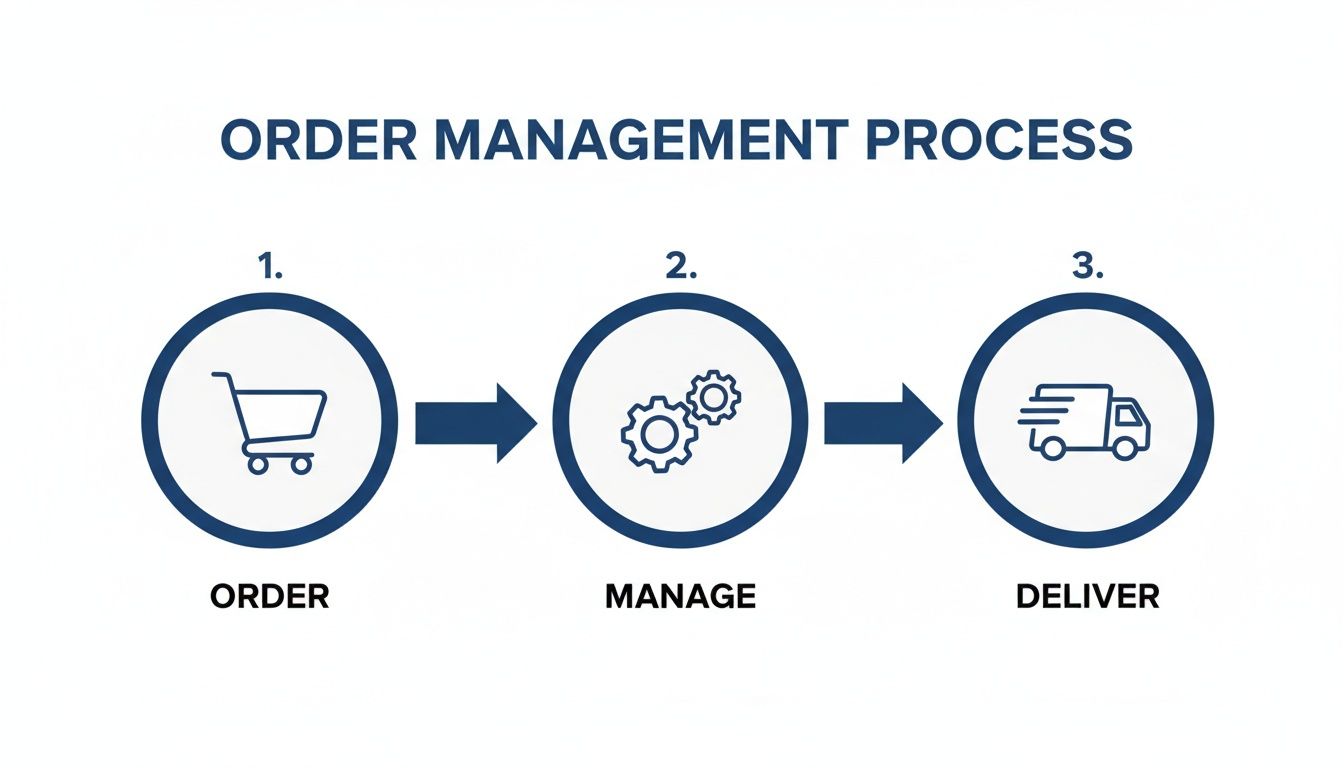
At its heart, the process is simple: receive the order, manage its journey through your system, and get it delivered. The magic is in making those three functions feel like one seamless motion.
Stage 1: Order Capture and Verification
The race starts the second a customer hits "Buy Now." An order is created in your ecommerce platform, like Shopify, and the payment gets processed. But this isn't the time to celebrate just yet. This first step is all about verification.
Your system should automatically scan the order for any potential fraud flags and confirm the payment has actually cleared. This is also where you validate customer details. Getting the shipping address right at this stage is crucial for avoiding costly delivery failures later on.
Stage 2: Real-Time Inventory Syncing
Once an order is verified, your system needs to talk to your inventory—immediately. This is probably the most important handoff in the whole process. Your Order Management System (OMS) must deduct the purchased items from your available stock levels in real time.
Why is this so vital? Without an instant update, you run the risk of overselling. This is a huge problem if you’re selling across multiple channels, like your website, Amazon, and a physical pop-up shop.
Think about it: a customer buys the very last jumper on your Shopify store. If your inventory doesn't update instantly across all channels, another customer could buy that same "in-stock" jumper on Amazon just seconds later. Suddenly, you have a stockout, an angry customer, and a logistical nightmare.
This real-time sync ensures your storefront is an honest reflection of what’s actually on your warehouse shelves.
Stage 3: Order Fulfilment
With stock levels confirmed, the order is passed to the warehouse for fulfilment. This is the physical side of the operation, often called "pick, pack, and ship."
- Picking: A member of your warehouse team gets a picking list and heads out to find the items for the order. Accuracy here is everything. Picking the wrong size or colour is a common mistake that costs time and money to fix.
- Packing: The items are then packaged securely using the right materials, along with an invoice or packing slip. If you want to make this part of the process a bit smoother, you can create an invoice with our free generator.
- Shipping: Finally, the correct shipping label is printed and stuck on the package. The parcel is then sorted and ready for the courier to collect.
Stage 4: Shipping and Last-Mile Delivery
The moment the package leaves your warehouse, the shipping stage begins. A good OMS will automatically update the order status to "shipped" and fire off a tracking number to the customer. This kind of proactive communication is key to a good experience and cuts down on those "Where is my order?" (WISMO) support questions.
This last-mile delivery is the final sprint. Your couriers are now responsible for getting the package to the customer's front door, on time and in one piece.
Stage 5: Returns and Reverse Logistics
The journey doesn't always end with delivery. Customers will inevitably want to return or exchange items. This process, known as reverse logistics, is the final—and often most neglected—stage of order management.
In the UK's booming ecommerce scene, where 508,000 businesses now operate, getting this flow right is the difference between profit and loss. During the 2025 BFCM week, UK retailers hit an average cart value of €151.2. Managing profitability while offering free shipping on 54.9% of those orders, as many did, shows just how much a streamlined process impacts your bottom line. You can dive deeper into the UK market's growth and trends with IBISWorld's comprehensive industry report.
Choosing Your Order Management System
Picking the right way to manage your orders is one of those defining moments for a growing brand. It’s a bit like choosing the engine for your race car. The one that got you off the starting line might not be the one that gets you over the finish line first as you start to pick up speed.
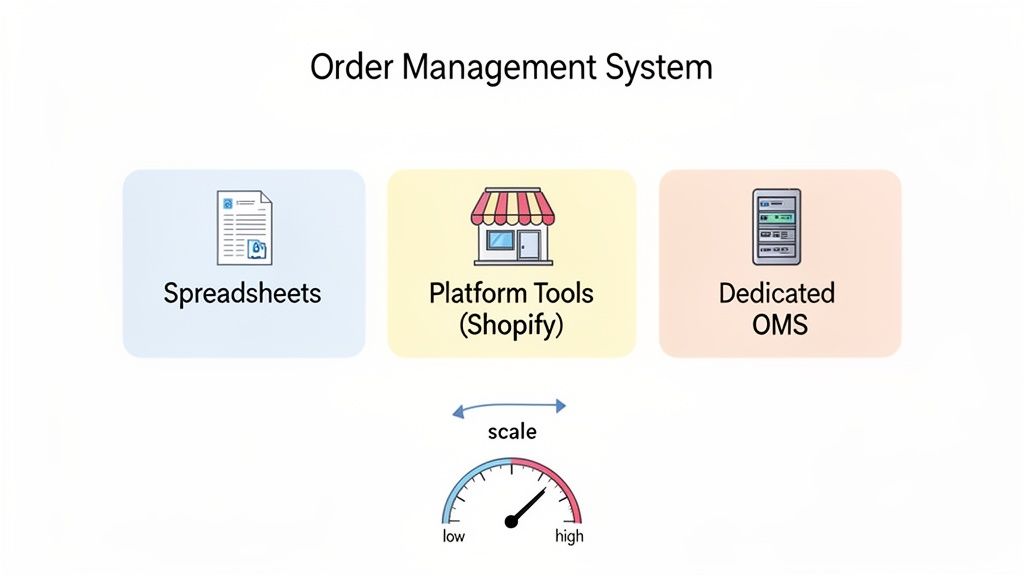
You need a simple way to figure out what your business actually needs right now, beyond just generic feature lists. For most merchants, the options fall into three distinct stages. Each has its place, but sticking with one for too long can seriously pump the brakes on your growth.
Stage 1: The Spreadsheet Starter Pack
When you’re just starting out, maybe shipping a handful of orders a day from your living room, spreadsheets are a perfectly sensible way to manage everything. You can track orders, update your stock levels by hand, and keep an eye on what’s been shipped without spending a penny on software. It’s the go-to for a reason.
But this manual approach has a very low ceiling. As your order volume climbs, that trusty spreadsheet quickly turns into an operational bottleneck. It’s wide open to human error, offers zero real-time inventory updates, and creates data silos that make getting a clear picture of your business impossible. If you're spending hours every day just updating cells, that’s a blaring alarm that you’ve outgrown it.
Stage 2: Native Ecommerce Platform Tools
The next logical step for many merchants, especially on Shopify, is to use the built-in order management tools. Shopify’s native system is a huge leap from spreadsheets. It gives you a central dashboard to see orders, manage fulfilment, and handle basic stock adjustments. It works beautifully for businesses with one sales channel and a straightforward shipping process.
The cracks start to show when your operations get more complicated. The moment you start selling on other marketplaces like Amazon or TikTok Shop, or you bring on a third-party logistics (3PL) partner, these native tools just can't keep up. They don't have the advanced features needed for multi-warehouse routing or keeping inventory synced across all your channels. For more on this, check out our guide on how a strong CRM in ecommerce can work with your operational tools.
Stage 3: Dedicated Order Management Systems
A dedicated Order Management System (OMS) is software purpose-built to handle complexity at scale. This is the big league—the solution for ambitious brands that are serious about growth. An OMS becomes the central nervous system of your operations, plugging into your entire tech stack: your ecommerce platform, your 3PL, your couriers, and your accounting software.
A true OMS brings mission-critical features to the table that you just won't find in native tools:
- Multi-Channel Inventory Sync: Real-time stock updates across every single sales channel to finally put an end to overselling.
- Automated Order Routing: Smart rules that automatically send orders to the most efficient warehouse or 3PL based on customer location or stock levels.
- Advanced Reporting: Deep, actionable insights into your fulfilment speed, order accuracy, and inventory turnover.
When you're looking at different OMS options, a key thing to consider is how well it supports a seamless [CRM and Order Management Integration](https://snappycrate.com/crm-and-order-management/). Tying customer data together with order workflows creates a powerful feedback loop between your sales and your operations.
A dedicated OMS is an investment in pure efficiency. It automates the repetitive, soul-crushing tasks that drain your team's time, minimises costly errors, and gives you the operational control needed to deliver a world-class customer experience, order after order.
To help you figure out where you fit, it's useful to see these options side-by-side.
Comparing Order Management Solutions for Your Ecommerce Store
This table breaks down the three main approaches to managing orders. Think of it as a guide to match the right solution to your store's size, order volume, and operational complexity.
Ultimately, the right choice comes down to your business’s current order volume and complexity. By honestly assessing where you are today and where you plan to be in 12 months, you can avoid two common traps: overinvesting in a complex system too soon, or, more dangerously, waiting too long to upgrade and letting operations hold your brand back.
The KPIs That Truly Matter for Order Management
"If you can't measure it, you can't improve it." It’s an old saying, but for ecommerce order management, it’s the absolute truth. To build a system that’s both resilient and profitable, you have to move beyond guesswork and start tracking the numbers that reveal the real health of your fulfilment process.
Think of these metrics as the vital signs for your business. They’re not just numbers on a screen; they tell you exactly where your operations are running smoothly and where things are starting to break down. By keeping a close eye on them, you can catch problems before they spiral into disasters, prove the value of your investments, and make data-driven choices that actually fuel your growth.
Measuring Fulfilment Speed
The time it takes for an order to land on a customer's doorstep is one of your most powerful tools for keeping them happy and converting new ones. Let's face it, slow shipping is a silent conversion killer.
The pressure is on. The UK e-commerce market is on track to hit €352.5 billion in revenue by 2025, and with 81% of UK shoppers wanting home delivery, fulfilment expectations have never been higher. In fact, a huge 37.5% of new online shoppers say delivery speed is their top priority. You can explore more key ecommerce statistics here.
Here are the speed metrics you need to live by:
- Average Time to Ship: This is the clock running from the moment an order is placed to when it's scanned by the courier. It’s a direct measure of your warehouse efficiency—the whole pick, pack, and ship dance. If this number is high, you've got a bottleneck somewhere in your workflow.
- On-Time Shipping Rate: This tracks the percentage of orders you ship out within your promised timeframe, like your "ships within 24 hours" promise. It’s the ultimate test of your reliability and whether you’re meeting the expectations you set for your customers.
A consistently low On-Time Shipping Rate is a massive red flag. It’s telling you that your current setup can't handle the order volume you have. This quickly snowballs into unhappy customers, negative reviews, and a customer support team drowning in "Where's my order?" tickets.
Tracking Operational Accuracy
Getting an order out the door fast means nothing if it’s the wrong order. Speed without accuracy just creates bigger, faster problems. These KPIs shine a light on the precision and quality of your fulfilment.
- Order Accuracy Rate: Calculated as `(Total Orders - Orders with Errors) / Total Orders * 100`, this is the gold standard for operational quality. An "error" could be anything from the wrong item or quantity to a damaged product. A low rate here means you're literally paying for mistakes through returns, reshipments, and customer support hours.
- Rate of Return: This KPI simply tracks the percentage of orders customers send back. While some returns are unavoidable (e.g., wrong size), a sudden spike can point straight to a fulfilment issue, like a batch of mislabelled products or flimsy packaging that's getting destroyed in transit.
Fixing these two metrics has a direct impact on your bottom line and is fundamental to building a strong ecommerce customer experience.
Monitoring Inventory Health
Finally, let's talk about inventory. It's the lifeblood of your business, and how well you manage it directly affects your cash flow and profit margins.
The one metric to rule them all here is Inventory Turnover. This KPI tells you how many times you sell through and replace your entire stock over a set period.
A high turnover rate is generally what you want to see—it means products are flying off the shelves and you aren't tying up precious capital in stock that’s just gathering dust. A low rate, on the other hand, is a warning sign that you might be overstocked, which leads to storage fees and the dreaded need for markdowns.
Automating Your Order Workflow to Scale Effectively
Trying to process orders manually is like trying to fill a swimming pool with a teacup. It might work when you’re just starting, but it will absolutely hold you back as you grow. As your brand scales, automation stops being a nice-to-have and becomes the engine that drives your entire operation. It minimises costly mistakes and, more importantly, frees up your team to focus on growth.
Think about all the hours you could reclaim. Instead of your team manually checking fraud scores, tagging VIPs, or routing orders to the correct warehouse, you can build a system that does it all automatically. This is the heart of what effective order management for ecommerce looks like at scale.
Using Intelligent Automation for Order Processing
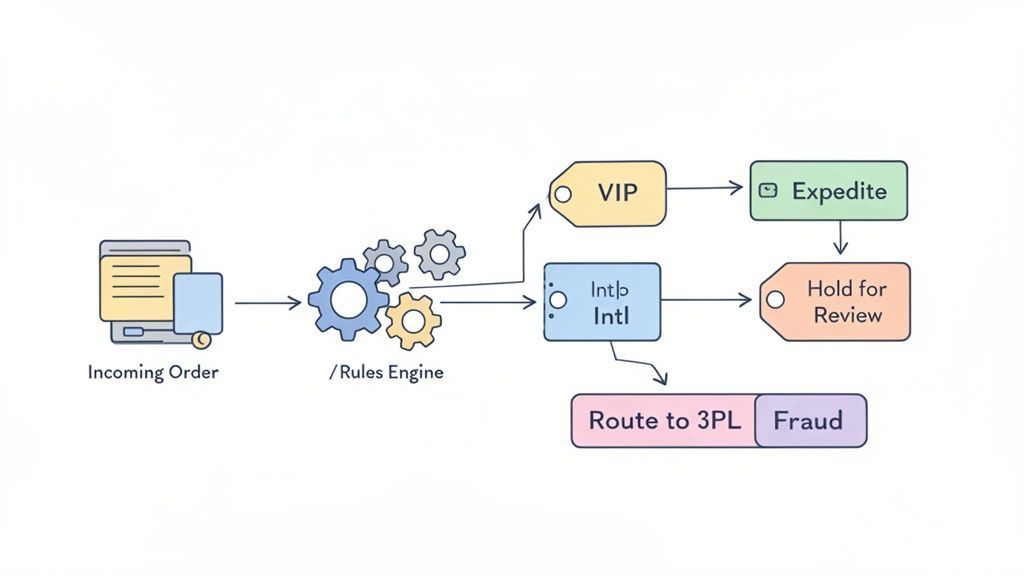
The easiest place to start is with simple, rule-based workflows. You might have heard this called "If-This-Then-That" (IFTTT) logic. A proper Order Management System (OMS) is built for exactly this, letting you create rules that trigger actions based on the data in each order.
You can build rules to automate the exact tasks that are draining your team’s time right now. For example:
- Smart Fulfilment Routing: An order from a customer in Scotland can be automatically sent to your Glasgow 3PL. Meanwhile, an order from London goes to your fulfilment centre in the South East. This cuts down shipping times and costs without anyone lifting a finger.
- Automated Order Tagging: A customer who has spent over £500 in the last year places a new order. It can be automatically tagged as 'VIP', which could then trigger another rule to add a free gift or upgrade their shipping.
- Fraud Analysis Flagging: Any order where the shipping address doesn't match the billing address can be automatically flagged for a manual review. This simple check can prevent thousands in fraudulent chargebacks before they ever happen.
These small, automated decisions quickly add up, saving you huge amounts of time and creating a much smoother, more professional operation.
The Rise of AI in Customer Communication
Automation isn’t just for your back-end operations; it’s also completely changing customer-facing communication. The constant flood of "Where is my order?" (WISMO) messages and questions about your returns policy can easily drown a small support team. This is where AI-powered chatbots have become so valuable.
The numbers speak for themselves. With UK e-commerce revenues projected to hit $285.60 billion by 2025, customer expectations for instant service are rising just as fast. In fact, a staggering 96% of retailers are now using AI in their customer service to handle things like product recommendations and instant support. You can see more on these trends in a recent benchmark report on the UK market.
A modern AI chatbot, like Marvyn, can be trained on your entire product catalogue, shipping policies, and returns information in minutes. It essentially acts as a 24/7 sales assistant and support agent, answering pre-sale questions and handling post-purchase queries instantly.
This frees up your human agents to focus on the genuinely complex issues that require a personal touch. If you want to dive deeper, we have a full guide on using automation in customer service to your advantage.
Building an Automated Ecosystem Through Integrations
Real automation happens when all your different systems can talk to each other. Your OMS should be the central nervous system of your tech stack, connecting every tool you use.
Think about how the data should flow:
- Order Placed: A customer places an order on your Shopify store.
- OMS Receives Data: Your OMS instantly pulls in all the order and customer information.
- Rules Engine Activates: It runs the order through your predefined rules—tagging it, checking for fraud, and picking the best fulfilment location.
- Information Pushed to 3PL: The order is automatically sent to the right 3PL's Warehouse Management System (WMS) for picking and packing.
- Shipping and Tracking: Once shipped, the 3PL sends tracking info back to the OMS. The OMS then updates Shopify and triggers a notification to the customer.
This whole process can happen in seconds, with zero manual input. By connecting your tools, you create an automated ecosystem that’s not only efficient but also far less prone to human error. This is how you build an operational machine that can handle ten times your current order volume without needing to triple your headcount.
Here’s the rewritten section, designed to sound like it was written by an experienced human expert.
Avoiding Common Order Management Pitfalls
The smartest merchants I know didn't just get good at doing things right. They got great at avoiding the mistakes that sink other stores. When it comes to order management for ecommerce, a handful of common slip-ups can torpedo your profits and shatter the customer trust you’ve worked so hard to build.
Let's walk through the most frequent and expensive traps. Think of this as your preventative playbook—a way to spot and fix these problems before they ever take root in your business.
The Black Friday Overselling Nightmare
Picture this: it’s the biggest sales day of the year. Orders are flying in. The problem? Your Shopify store isn't syncing with your Amazon listings in real-time. Before you know it, you've sold the same last-in-stock item five times over. Now you're cancelling orders and dealing with furious customers, all while your brand is getting its most visibility.
This is a classic symptom of bad inventory synchronisation. It’s what happens when you rely on manual updates or have systems that just don't talk to each other fast enough across all your sales channels.
- The Fix: You need a single source of truth for your stock, and that's exactly what a dedicated Order Management System (OMS) provides. A proper OMS ensures that when an item sells anywhere, the stock level is instantly updated everywhere. It makes overselling a thing of the past.
The Wrong Address Disaster
A simple typo—one wrong digit in a postcode or a missed house number—can send a package on a wild goose chase to the wrong city. Or worse, it ends up in a courier's "undeliverable" black hole. This usually happens because of manual data entry errors or a checkout process that lacks any form of address validation. The result? A terrible customer experience and doubled shipping costs to send the order out all over again.
A single shipping error can transform a profitable order into a loss. The costs of the returned package, customer support time, and reshipping the item can easily wipe out your entire margin on the sale.
The Fix: Your order capture process absolutely must include automated address verification. Most good ecommerce platforms and shipping software have this built-in. It works by checking the customer's input against official postal databases in real-time, flagging any potential mistakes before a shipping label is even printed.
The Silent Delay Communication Breakdown
You know a supplier issue has put a key product on backorder. You know a sudden surge in sales has pushed your fulfilment queue from one day to three. The problem is, your customers don't. All they see is that their package hasn't shipped when they expected it to. Soon enough, your support inbox is flooded with anxious "Where is my order?" messages.
Silence during a delay is a massive source of customer frustration. People are surprisingly understanding about operational hiccups, but only if you keep them in the loop. Radio silence just looks like incompetence or, worse, like you don't care.
The Fix: Use your OMS or email marketing platform to build automated communication workflows. If an order contains a backordered item or if you're running behind, trigger an automatic, personalised email. Proactively tell the customer about the delay and give them a new estimated shipping date. This one simple action turns a potentially negative experience into a moment of transparent, excellent service. This is what effective order management is all about.
Your Order Management Questions, Answered
Even with a solid growth plan, the day-to-day realities of managing orders can throw up some tricky questions. We get it. Here are the straight-up answers to the queries we see most often from founders trying to get their operations under control.
What Is an Order Management System?
An order management system (or OMS) is basically the air traffic controller for your entire business. It's a single piece of software that sits in the middle of everything, connecting your Shopify store, marketplaces like Amazon, your warehouse, and your couriers.
Instead of a mess of separate apps and spreadsheets, an OMS gives you one central dashboard to see exactly what’s happening from the moment a customer clicks ‘buy’ to the second a package lands on their doorstep.
Why Is Order Management Software Important?
Early on, you can get by with spreadsheets. But as you scale, that manual approach becomes a ticking time bomb. Relying on disconnected tools is how you end up shipping the wrong product, overselling out-of-stock items, and spending your entire day putting out fires.
Good order management software takes all those repetitive, error-prone tasks off your plate. It’s what allows you to sell on your site, on TikTok Shop, and on a marketplace at the same time without the wheels falling off. It's less about a fancy tool and more about building a reliable customer experience that keeps people coming back.
A solid OMS is what separates brands that scale smoothly from those that get crushed by their own success. It turns your fulfillment from a constant headache into a genuine competitive advantage.
What Features Should I Look For in an OMS?
Don't get distracted by a long list of shiny features. When you're choosing an OMS, focus on what actually solves the most painful operational problems. For most growing brands, that means a few non-negotiables:
- Real-time inventory visibility: You need one source of truth for your stock levels, synced across every single place you sell. No more overselling.
- Multi-channel integration: The system must connect seamlessly with the platforms you already use, like Shopify, Amazon, and TikTok Shop.
- Automated order routing: Smart rules that automatically send orders to the right warehouse or 3PL based on things like stock availability or customer location.
- Robust reporting: You can't fix what you can't see. Look for clear dashboards that track critical KPIs like order accuracy and time-to-fulfil.
These are the foundational features. They're what will directly impact how accurately and efficiently you can get orders out the door.
Stop drowning in customer support tickets. Marvyn AI is a free, 24/7 AI chatbot that automates over 70% of your customer service by instantly answering questions about orders, products, and policies. Install it in one click from the Shopify App Store and turn your support from a cost centre into a sales driver. Get Marvyn for free.