Payment in Ecommerce: A 2026 Shopify Guide
In UK ecommerce, payments sit in the path of almost every important outcome. Revenue, conversion, trust, support volume, cash flow, margin. They all pass through checkout.
That matters more than many new Shopify merchants realise. Product and creative usually get the attention first. Payments get treated like plumbing. But bad plumbing leaks money all day, even when ads are working and traffic is healthy.
A practical way to think about payment in ecommerce is this. Every payment choice does one of three things. It either lowers friction, lowers cost, or lowers risk. The strongest payment setups do all three without making the customer work harder.
Why Mastering Payment in Ecommerce Matters More Than Ever
The UK is a huge ecommerce market. The UK stands as the world’s third largest ecommerce market, with ecommerce sales reaching $0.7 trillion in 2025 and accounting for 35% of total retail sales, according to Clearly Payments.
That stat changes how you should look at payments.
In a market that large, checkout isn't an admin task. It's a growth lever. If your store makes it easy for a shopper to pay in the way they trust, you keep more of the demand you've already paid to acquire. If the payment journey feels clumsy, slow or uncertain, you lose sales at the most expensive point in the funnel.
Payments shape more than approvals
Most new merchants think payments are just about whether the card goes through. That's too narrow.
Payments influence:
- Conversion: the shopper completes the order instead of hesitating
- Margin: you keep more of each sale after fees
- Trust: the checkout feels safe and familiar
- Support load: fewer people ask avoidable questions before buying
- Cash flow: you know when funds settle and where delays happen
A store owner usually sees these as separate problems. They aren't. They're linked through the payment stack.
Practical rule: If a payment decision doesn't improve conversion, reduce cost, or reduce risk, question why it's in your setup at all.
Good payment operations are visible in sales, not just settings
Many Shopify stores frequently encounter a standstill. They install a gateway, switch on a few methods, and move on. That gets you operational. It doesn't get you optimised.
The merchants who perform well treat payment in ecommerce like merchandising. They choose methods based on customer behaviour, review fees like a buyer reviews supplier costs, and fix checkout friction before it becomes abandoned revenue.
That's the frame for everything that follows. Payment systems aren't back-office tools. They're part of the sales engine.
The Core Components of Online Payments
A lot of confusion comes from the vocabulary. Gateway. Processor. Acquirer. Merchant account. They sound interchangeable, but they do different jobs.
The easiest analogy is a restaurant.
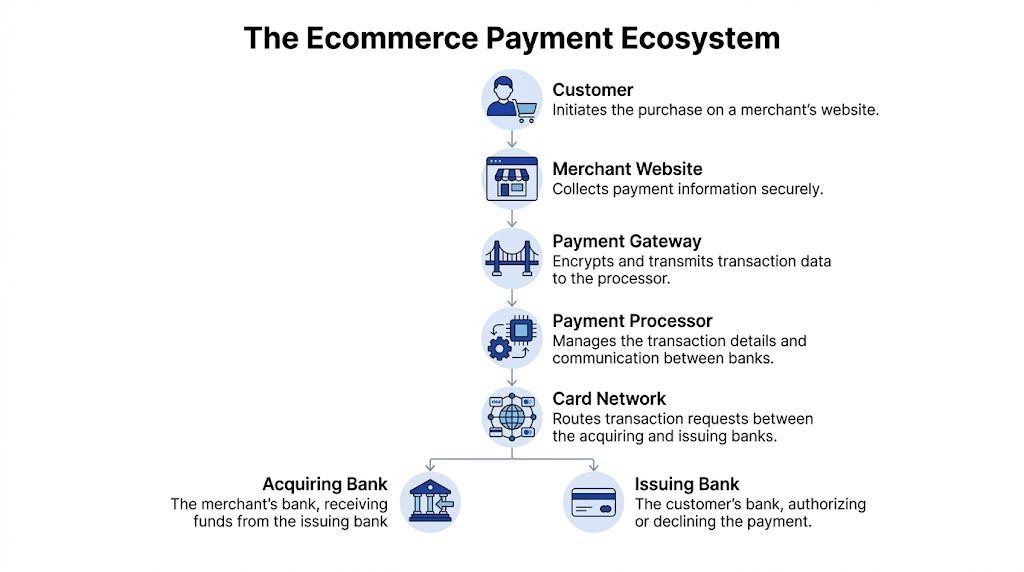
Your customer is the diner. Your Shopify checkout is the table. The payment gateway is the waiter taking the order securely. The processor is the kitchen and till system passing information to the right places. The banks are the cardholder's bank and your business bank, deciding whether the payment is approved and where the money goes.
What each component actually does
Payment gateway
The gateway handles the secure handoff of payment details from your checkout to the payment infrastructure.
Its job is to:
- Collect details securely: card data, wallet credentials, or another payment input
- Encrypt the information: so sensitive data isn't exposed in transit
- Pass the request onward: to the processor or acquiring side for authorisation
For a merchant, the gateway affects the customer experience directly. If authentication feels awkward or redirect-heavy, conversion suffers.
Payment processor
The processor moves the transaction through the network and coordinates the approval process.
In plain terms, it:
- Talks to the card network
- Passes the authorisation request
- Returns an approve or decline response
- Helps move funds through settlement
When payments fail, the processor is often where the operational clues live. Decline patterns, retries, routing issues, and soft failures all show up here.
Merchant account and acquiring bank
Approved funds are held and then settled to your business bank account.
For many Shopify merchants, this sits behind the scenes because bundled providers simplify it. But it still matters because the acquiring side affects settlement timing, fee structure, reserve policies, and dispute handling.
Why merchants should care about the distinction
You don't need to become a payments engineer. You do need to know where a problem likely sits.
If shoppers say checkout feels awkward, that's often a gateway or front-end issue. If approved orders settle unpredictably, that's often on the acquiring side. If lots of legitimate payments decline, the processor setup may need scrutiny.
A useful habit is to map every payment problem to the layer that controls it. Customer-facing friction, transaction approval, fund settlement, and disputes usually don't live in the same place.
What this means inside Shopify
Shopify simplifies a lot of the stack, which is good for speed. But simplicity can hide trade-offs. A bundled setup is easier to launch, yet you still need to understand what your provider controls and what a third-party app or method changes.
That applies to invoicing as well. If you sell through manual orders, draft orders, or bespoke B2B workflows, keeping your payment and billing flow tidy matters. A simple tool like this invoice generator can help keep customer-facing payment documents consistent with what happens at checkout.
The point isn't to add complexity. It's to know which moving part you're changing when you switch a gateway, add a wallet, or question a decline rate.
Choosing the Right Mix of Payment Methods
The best question is simple. Which payment mix removes the most friction for your customers and protects margin at the same time?
Customer preference has already moved. In Europe, digital wallets were projected to account for 30% of ecommerce payment methods by 2024, and Buy Now, Pay Later was projected to reach 13.6% of ecommerce spending, according to GoCardless. For a Shopify merchant, that matters because the right method mix changes three things fast: checkout completion, average order value, and payment cost per order.
A useful way to judge payment methods is by business outcome, not by feature list.
Cards give broad coverage. Wallets reduce mobile checkout effort. BNPL can increase conversion on higher-priced products. Bank transfer options can lower fees or suit buyers who do not want to use cards. The right mix depends on who buys from you, what they buy, and how much hesitation shows up at checkout.
Start with the methods that remove the most friction
For a new Shopify store, cards are the base layer. Shoppers expect them, and a card option signals that your store works like every other legitimate online store they use.
Wallets solve a different problem. They cut out typing. On mobile, that matters a lot because every extra field gives the shopper another chance to stop, get distracted, or hit an error. Apple Pay and Google Pay often act like an express lane at checkout. Manual card entry is the regular queue.
BNPL changes the maths in the shopper's head. A £120 order feels different when it becomes four smaller payments. That can help if you sell fashion, homeware, beauty devices, gifts, or other products where customers pause before committing.
Payment Method Comparison for UK Merchants
If you are comparing providers as well as methods, review local pricing and service differences alongside E-commerce merchant gateway rates. Method choice affects conversion. Provider choice affects approval rates, fees, reserves, and support when something goes wrong.
What usually works for Shopify merchants
Cards are required, but they rarely give you an edge on their own. They are the minimum a customer expects.
Wallets are often the first upgrade worth adding because they improve checkout speed without changing your offer, product pages, or fulfilment process. That makes them one of the cleaner tests for a new store owner. If mobile traffic is high, wallet uptake is worth watching closely.
BNPL should match the product economics. If your average order value is already low and customers convert without hesitation, BNPL can add cost without adding much value. If your store sells higher-ticket or giftable products, BNPL can increase completed orders and sometimes average basket size.
Too many payment logos can also create clutter. A checkout should feel complete, not crowded.
Build the mix around customer behaviour, then automate the decisions
Start with the shortest list that covers how your customers already want to pay.
A practical setup for many Shopify stores looks like this:
- Get cards working properly.
- Add Apple Pay and Google Pay early.
- Test BNPL only if price hesitation shows up in sessions, cart behaviour, or support questions.
- Add bank transfer or account-to-account options when a clear customer segment needs them, especially for B2B or larger orders.
AI tools can help you tighten this mix instead of guessing. Use them to segment buyers by device, basket size, and payment preference. Use session analysis tools to spot where mobile users abandon card forms. Use automated checkout testing to compare wallet placement, BNPL messaging, and express checkout buttons. The practical benefit is clear. You spend less time chasing anecdotes and more time acting on patterns that improve conversion or reduce unnecessary payment cost.
The goal is not to offer every method. The goal is to offer the few that make paying feel easy for the right customer.
Decoding Ecommerce Payment Processing Fees
Payment fees reshape margin on every order. For many Shopify stores, the difference between a healthy contribution margin and constant cash pressure sits inside rates, fixed transaction charges, cross-border markups, and avoidable declines.

The practical point is simple. Customer acquisition costs can rise and fall by channel. Payment costs hit every successful sale. If your store runs on tight product margins, small fee changes have an outsized effect on profit.
What you're usually paying for
A payment fee has several parts, even if your provider shows only one blended rate.
- Interchange: the base cost tied to the card and issuing bank
- Scheme fees: charges from card networks such as Visa or Mastercard
- Processor or acquirer markup: the provider's fee for authorisation, routing, settlement, and service
Gateways and processors are often confused here. A gateway works like the secure checkout pipe carrying payment data from your store to the provider. The processor or acquirer handles the actual movement and approval of the transaction. Some Shopify merchants buy these as one bundled service. Others deal with separate providers, which can add flexibility but also more fee lines to monitor.
Flat rate versus interchange-plus
Flat-rate pricing
Flat rate is easier to run in the early stage. You can forecast fees quickly, reconcile statements faster, and avoid spending hours decoding processor language.
The trade-off is hidden variance. A blended rate can be fair at low volume, then become expensive once order count grows or your customer mix changes. Premium cards, international cards, and certain wallets can still affect your true cost even if the headline pricing looks simple.
Interchange-plus pricing
Interchange-plus gives you more visibility. You see the underlying card costs and the provider markup separately.
That detail matters once volume increases. It becomes easier to negotiate the provider margin, spot expensive transaction types, and compare providers on a like-for-like basis. Merchants with steady volume, larger average orders, or more international payments often benefit from that clarity.
What to audit first
Start with the places where money leaks without helping conversion.
- Payment method mix: remove or rethink methods that add cost but deliver little usage
- Card mix: check whether premium, commercial, or international cards are pushing fees up
- Cross-border charges: review currency conversion and foreign card surcharges
- Refund costs: find operational errors that create preventable refunds and unrecoverable fees
- Decline patterns: repeated soft declines can create support load and lost revenue
- Chargeback costs: include dispute labour, not just the visible chargeback fee
A broader benchmark can help you pressure-test your rates. Webby's guide to E-commerce merchant gateway rates is useful for seeing how providers package fees and where merchants often miss the actual cost.
One quick margin check helps. Pull the last 60 to 90 days of orders, group them by payment method, and calculate total fee dollars by method, not just total fee percentage. That usually shows which options earn their place and which ones add expense.
Where AI can reduce payment cost
Manual fee reviews are slow, especially once order volume climbs. AI tools can classify payment statements, flag unusual fee spikes, and group high-cost transactions by card type, country, device, or checkout path. That gives Shopify merchants a faster route to action.
For example, an AI reporting layer can detect that international mobile orders have a lower authorisation rate and higher fee load than domestic desktop orders. That points to a business decision, not just a technical one. You might route those orders differently, add a local payment method, or change which markets you target with paid traffic.
AI can also help with operational waste. It can spot duplicate retries, identify products with refund-heavy payment patterns, and surface dispute trends before chargeback fees spread. If you use customer data to automate any of this, your workflows should still align with your customer data and privacy practices.
What usually does not work
Switching providers based only on the advertised rate often disappoints. Lower fees on paper can be offset by weaker authorisation rates, slower settlements, limited wallet support, or more support tickets for failed payments.
Judge payment cost against business outcomes. A provider that costs a little more but approves more good orders, supports the payment methods your customers trust, and creates less admin work can leave you with more profit at the end of the month.
Securing Transactions and Maintaining PCI Compliance
Security affects sales long before fraud appears on a report. Shoppers decide whether your checkout feels safe in seconds. If the experience looks off, trust drops immediately.
For most Shopify merchants, the good news is that the platform and payment providers handle much of the heavy lifting. But "handled for you" doesn't mean "ignore it". You still need to know what protects the transaction and where your own responsibilities start.
What PCI compliance means in practice
PCI DSS is the standard for handling card data safely.
For a Shopify merchant, the practical aim is straightforward. Keep card data out of your own systems as much as possible. Use approved checkout flows, trusted apps, and secure integrations instead of trying to collect or store anything sensitive yourself.
That means being cautious with:
- Third-party apps: only install ones with a real payment purpose
- Custom scripts: avoid hacks that interfere with checkout security
- Manual workarounds: don't ask staff to handle payment details outside approved flows
- Site-level security: keep your storefront secure from the browser onward
If your store setup still needs work at the site level, a practical guide on how to install an SSL certificate is useful background for understanding the trust layer customers expect before they even reach payment.
Why 3DS2 and tokenisation matter
Security tools are only valuable if they reduce risk without destroying conversion.
UK SCA enforcement via 3DS 2.0 has helped frictionless flows approve 90% of transactions while helping to slash card fraud by an estimated 70%, according to Checkout.com.
That matters because older security thinking treated protection and conversion as opposites. Modern payment in ecommerce should do both.
Tokenisation helps by replacing sensitive card data with a substitute value that can't be used in the same way if intercepted. 3DS2 helps by adding smarter authentication, often with less visible friction than older methods.
Here’s a useful overview of the concepts in action.
Chargebacks are an operations issue, not just a fraud issue
A chargeback rarely begins at the dispute stage. It often starts earlier with a missed expectation, unclear fulfilment, poor order communication, or a checkout that leaves the customer uncertain.
Watch for these operational triggers:
- Mismatch between product page and delivered item
- Slow or unclear delivery communication
- Unrecognised billing descriptors
- Customer confusion after authentication prompts
Store owners should also know what data is available to support disputes and privacy handling. If you're reviewing how customer and payment-related interactions should be governed internally, your policy framework needs to be clear. Shopify brands usually benefit from comparing that with a live customer-facing reference such as a privacy policy structure.
Treat payment security like store lighting in a physical shop. Customers may not comment when it's done well, but they'll notice quickly when something feels wrong.
Optimising Your Checkout for Maximum Conversion
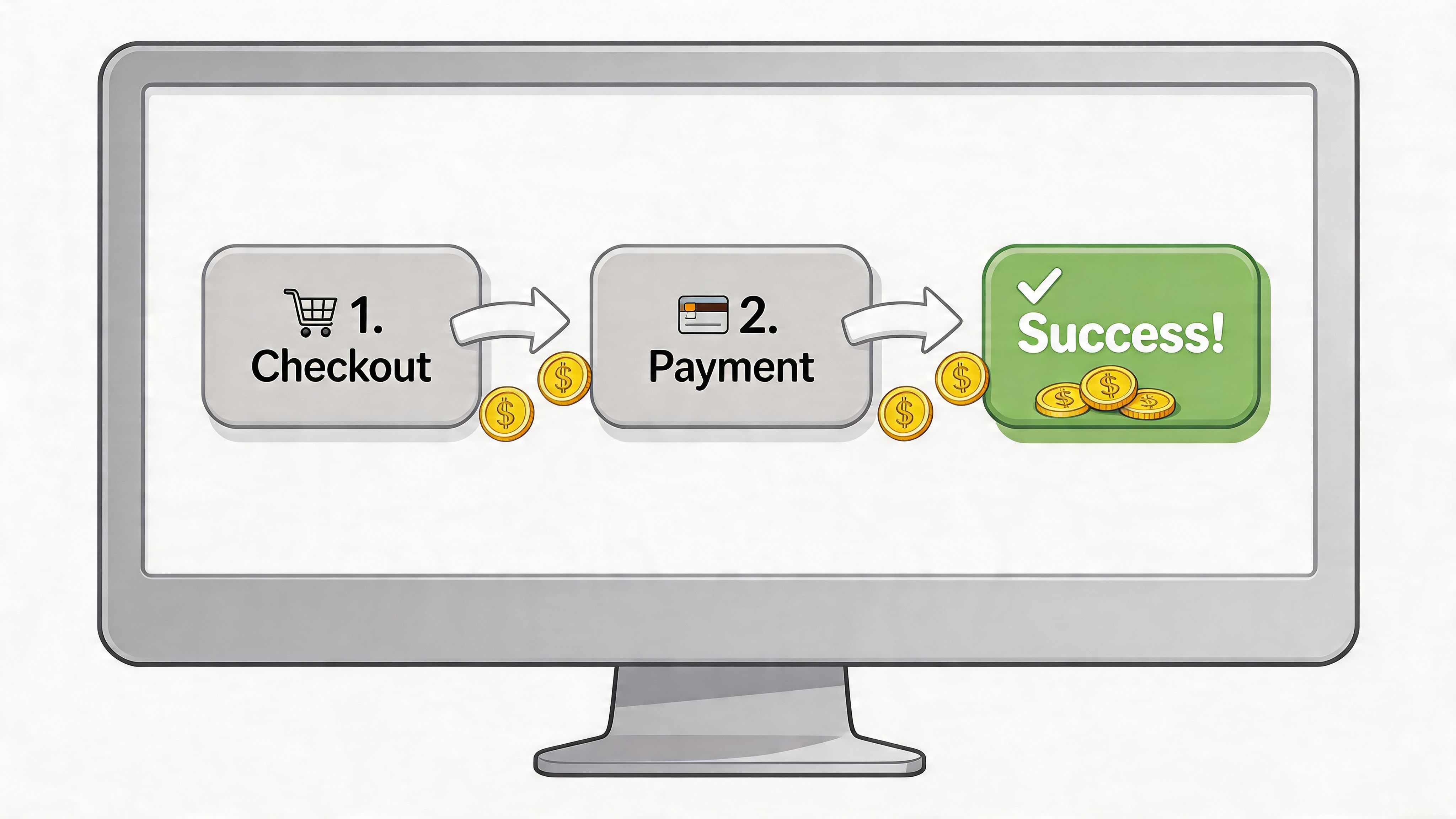
Checkout is where intent becomes revenue. That's why it deserves more attention than most storefront tweaks.
Payment conversion rate is a critical KPI, and UK data indicates that integrating diverse payment methods can boost it by 15-20%. Top DTC brands achieve 4-6% overall conversion versus the 2-3% industry average by optimising every step of the payment journey, according to Vendo Services.
Those numbers tell you something important. Conversion gains don't always come from more traffic. Often they come from removing small moments of doubt.
Friction usually hides in ordinary details
A shopper rarely abandons because of a single dramatic problem. More often, they hit a sequence of minor annoyances.
Common ones include:
- Forced account creation: the customer wanted to buy, not register
- Slow mobile form entry: too much typing on a small screen
- Surprise costs late in the flow: delivery or fees appear too late
- Missing trust cues: payment options look unfamiliar or incomplete
- Last-minute unanswered questions: shipping, returns, sizing, or compatibility remain unclear
This is why checkout design and pre-sale support belong in the same conversation. A clean payment form helps. So does answering the one question that stops the customer from clicking "Pay now".
What a high-performing Shopify checkout usually includes
Guest checkout
If someone is ready to buy, don't turn the purchase into a membership application.
Account creation can happen after the order, once trust is established.
Wallets displayed clearly
If Apple Pay, Google Pay, or BNPL are enabled, surface them properly. Hidden convenience doesn't convert.
Mobile-first field design
Use autofill, reduce manual entry, and keep the path obvious. A desktop checkout squeezed onto a phone is where many stores lose otherwise willing buyers.
Clear policy access
Returns, shipping and delivery expectations should be visible before payment anxiety kicks in.
Measure checkout like a funnel, not a page
A lot of merchants ask whether their checkout "looks good". That's the wrong test.
Ask instead:
- Where do people stop?
- Which method gets used most?
- Do mobile users behave differently?
- Are support questions clustering around payment-stage concerns?
If you're building a review process for this, a practical conversion rate optimisation checklist can help organise what to inspect before you start changing themes or apps.
The best checkout isn't the one with the most features. It's the one that asks the customer to make the fewest decisions.
What tends to work fastest
For most Shopify stores, the quickest wins are boring.
Remove unnecessary fields. Keep guest checkout available. Show familiar payment methods early. Make total cost clear. Tighten policy wording. Fix mobile spacing. Reduce redirects.
None of that sounds glamorous. But payment in ecommerce rewards simplicity more than novelty. Customers don't want a clever checkout. They want a smooth one.
Tactics to Reduce Payment Related Abandonment
Many merchants treat failed payments as background noise. That's expensive thinking.
Payment failure rates act as a hidden tax on revenue, with some UK SMEs seeing 20-30% higher failure rates than EU peers. Merchants could cut these failures by 10-15% with smarter checkout flows and proactive support, according to Optimus.
A failed payment doesn't always mean the customer changed their mind. Often it means the payment path failed the customer.
Treat payment failure as recoverable revenue
The practical response shouldn't be "transaction declined". It should be guided recovery.
That means building a flow that helps the customer complete the order instead of dumping them back into confusion.
When a payment fails, do this next
- Explain the failure clearly
Avoid technical language. The customer doesn't need gateway jargon.
- Offer an immediate alternative
If card payment fails, present a wallet or another available method cleanly.
- Preserve the basket
Don't make the customer rebuild what they already chose.
- Keep support within reach
A fast answer can rescue a sale that would otherwise disappear.
The failures worth fixing first
Some payment issues are random. Many are patterned.
Focus on:
- Redirect-heavy checkouts: customers lose trust or lose their place
- Poor mobile payment flows: the method exists, but the experience is awkward
- Weak retry logic: soft declines get treated like final refusals
- No alternative path: one failure ends the buying session
- Confusing error messages: customers think the problem is your store, not their bank
A decline message without a recovery path is often just an abandonment message in disguise.
Support can rescue payment intent
Payment friction often triggers a support moment. The customer wants to know whether the order went through, whether they've been charged, whether another method will work, or whether they should try again.
If support only happens by email hours later, the sale is usually gone.
That's why proactive onsite assistance matters. A guided prompt at the moment of failure can do more than a post-abandonment email. It can redirect the customer to another method, answer a policy question, or clarify what happened in plain language.
If this is a recurring issue in your store, it's worth reviewing your wider cart abandonment reduction approach so payment-related drop-off isn't handled in isolation from the rest of checkout behaviour.
For subscriptions and repeat billing
Subscription merchants need an even stricter approach. Failed recurring payments aren't just one missed order. They can become churn.
What usually works:
- Staggered retries: don't retry blindly at the same moment
- Clean customer prompts: ask for an updated method with minimal friction
- Alternative payment availability: make switching easy
- Internal tagging: identify repeated payment friction by cohort or provider
What doesn't work is assuming retries alone will solve it. Recovery works best when payment logic and customer communication support each other.
A Practical Guide to Shopify Payments Setup
A strong setup in Shopify isn't complicated, but it does need to be deliberate. Most payment problems start with default settings left unreviewed.
If you're new, don't try to build the perfect payment stack on day one. Build a clean one. Then improve it as customer behaviour becomes clearer.
Start in Shopify admin with the basics
Open your payment settings and check the obvious things first.
Activate your primary payment route
For many merchants, that means enabling Shopify Payments if it's available and suits the business. The advantage is administrative simplicity. Reporting, order flow, and checkout behaviour tend to be easier to manage when the core stack is integrated.
Review:
- Business details: make sure legal and banking information is accurate
- Payout settings: confirm where funds land and who monitors them
- Statement details: reduce customer confusion where possible
- Test mode or sandbox checks: verify that the checkout behaves as expected
Add your essential methods
Don't switch on every method because it's available.
Choose methods based on your customer and product:
- Cards first: the baseline
- Wallets early: especially if mobile traffic is strong
- BNPL selectively: useful when order hesitation suggests it
- Other methods only with a reason: don't clutter checkout
Configure the experience, not just the provider
Inside Shopify, payment setup isn't only about activation. It's also about how the customer experiences the flow.
Check these areas carefully:
- Express checkout buttons: are they visible in the right places?
- Checkout language: does it feel clear and trustworthy?
- Shipping and returns visibility: can shoppers find key answers before paying?
- Error handling: what happens when a payment doesn't complete?
A lot of merchants focus on what they've enabled and forget to test what the customer sees.
Prepare for international and multi-market growth
If you're selling beyond one domestic audience, payment in ecommerce gets more sensitive. Method preference, currency presentation, and customer trust can change quickly across markets.
In Shopify, keep an eye on:
- Local currencies
Customers convert better when prices feel native and clear.
- Local methods
Some markets expect methods that aren't central in the UK.
- Tax and duty clarity
Payment confidence falls when the final cost feels uncertain.
- Settlement and reconciliation
Finance and operations need clean reporting as complexity grows.
Build a review rhythm
A solid payment setup isn't "set and forget". Review it on a schedule.
A practical rhythm looks like this:
- Weekly: scan declines, customer complaints, and checkout oddities
- Monthly: review fee trends, payment method usage, and support issues
- Quarterly: assess whether the provider mix still fits your size and markets
If you want a broader Shopify operating reference while doing this work, this guide on how Shopify works is a useful companion for connecting payment choices to the rest of the platform setup.
The main thing is to keep the stack understandable. If your team can't explain how money moves from checkout to payout, the setup is already too opaque.
Marvyn AI helps Shopify merchants remove buying friction before it turns into lost revenue. It answers product, shipping, and returns questions instantly, guides shoppers towards the right items, and supports customers at the moments where hesitation usually kills conversion. If you want a faster way to automate pre-sales support and recover more checkout intent, take a look at Marvyn AI.