Automate customer service: Boost Shopify support with AI chatbots
To automate customer service properly on Shopify, you need more than a basic chatbot that just spits out FAQ answers. Real automation means having a smart AI assistant that works like a 24/7 sales representative, actively guiding shoppers from the moment they land on your site right through to checkout.
Why Automating Customer Service Is Non-Negotiable
The way customers shop and ask for help has completely changed. Waiting 24 hours for an email response just doesn’t cut it anymore. Today's online shoppers expect instant answers, recommendations that feel personal, and support that’s totally effortless.
For any growing Shopify or DTC brand, trying to meet these expectations with a purely manual support team is a fast track to burnout and a ton of missed sales. This is where the need to automate customer service stops being a "nice-to-have" and becomes a must-do. It’s no longer a luxury for huge companies but a core requirement for any brand that wants to stay in the game.
Shifting from a Cost Centre to a Revenue Driver
Customer service has traditionally been seen as a cost centre — a necessary expense for handling complaints and questions. But modern automation completely flips that script. An AI-powered chatbot, like Marvyn AI, doesn't just solve problems; it actively creates new sales opportunities.
Think about a customer browsing one of your product pages. An AI can proactively pop up and engage them, asking questions just like a skilled sales assistant would in a physical shop:
- "Are you looking for a gift, or is this for you?"
- "What sort of budget did you have in mind for a new jacket?"
- "Do you need a skincare product for sensitive or oily skin?"
Based on their replies, the AI can point them to the perfect products, handle any last-minute questions about shipping, and even offer a one-time discount to a hesitant buyer. This turns your support function from a reactive team putting out fires into a proactive sales engine that’s working for you around the clock. To get a better sense of the bigger picture, it's worth understanding the real benefits of automation in business.
Let's do a quick comparison to see what this really looks like.
Manual Support vs. Automated AI Support
This table breaks down the limitations of sticking with old-school manual support versus what modern AI automation brings to a Shopify store.
The difference is stark. Manual support just can't keep up with the scale, speed, or sales potential that AI automation offers.
The Widening Gap Between Adoption and Execution
The move to automate customer service is happening fast across the UK. By the end of 2025, it's estimated that 80% of customer care organisations will be using generative AI in some form. Yet, there’s a huge difference between just having the tools and actually using them well.
While 88% of contact centres say they use AI solutions, only a mere 25% have deeply woven that automation into their day-to-day operations. This gap proves that many businesses are buying the software but struggling to get past a very basic setup.
The goal isn't just to buy an AI tool; it's to build an intelligent system that understands your brand, your products, and your customers. The difference between a simple FAQ bot and a fully autonomous AI agent is the difference between saving a little bit of time and unlocking a powerful new revenue channel.
The good news? For Shopify merchants, modern tools have made this level of automation more accessible than ever. With the right strategy, you can close that implementation gap and give yourself a serious competitive edge. If you're curious about the broader trends, we cover more on the landscape of automation in customer service in our detailed guide.
Building Your Automation Playbook
Jumping straight into choosing a tool to automate customer service is like buying building materials without a blueprint. Before you even look at a single Shopify app, you need a clear playbook. This strategy is your north star, making sure every automation you build serves a specific, measurable purpose for your brand.
It all starts with a simple but powerful exercise: a support ticket audit. Spend a week manually tagging every single incoming customer query. I promise you, patterns will emerge fast. You’ll quickly see that a huge chunk of your team’s time is spent on just a handful of repetitive questions.
Pinpointing Your Top Automation Candidates
Once you've got a week's worth of data, start grouping the tickets into categories. You're hunting for the high-volume, low-complexity tasks. These are the quick wins that will give you the most immediate impact and free up your team.
For most DTC brands, the usual suspects are:
- Order Status: "Where is my order?" (WISMO) queries are famously time-consuming.
- Policy Questions: Enquiries about your return, refund, or shipping policies.
- Product Details: Basic questions about sizing, materials, or care instructions.
- Stock Availability: "When will this be back in stock?"
By identifying these, you’re not just finding tasks to offload; you're mapping out the exact pain points your automation needs to solve. This step ensures you automate what’s truly necessary, not just what’s possible.
This visual shows the ideal flow for automated support, guiding a customer from initial discovery through to a successful checkout.
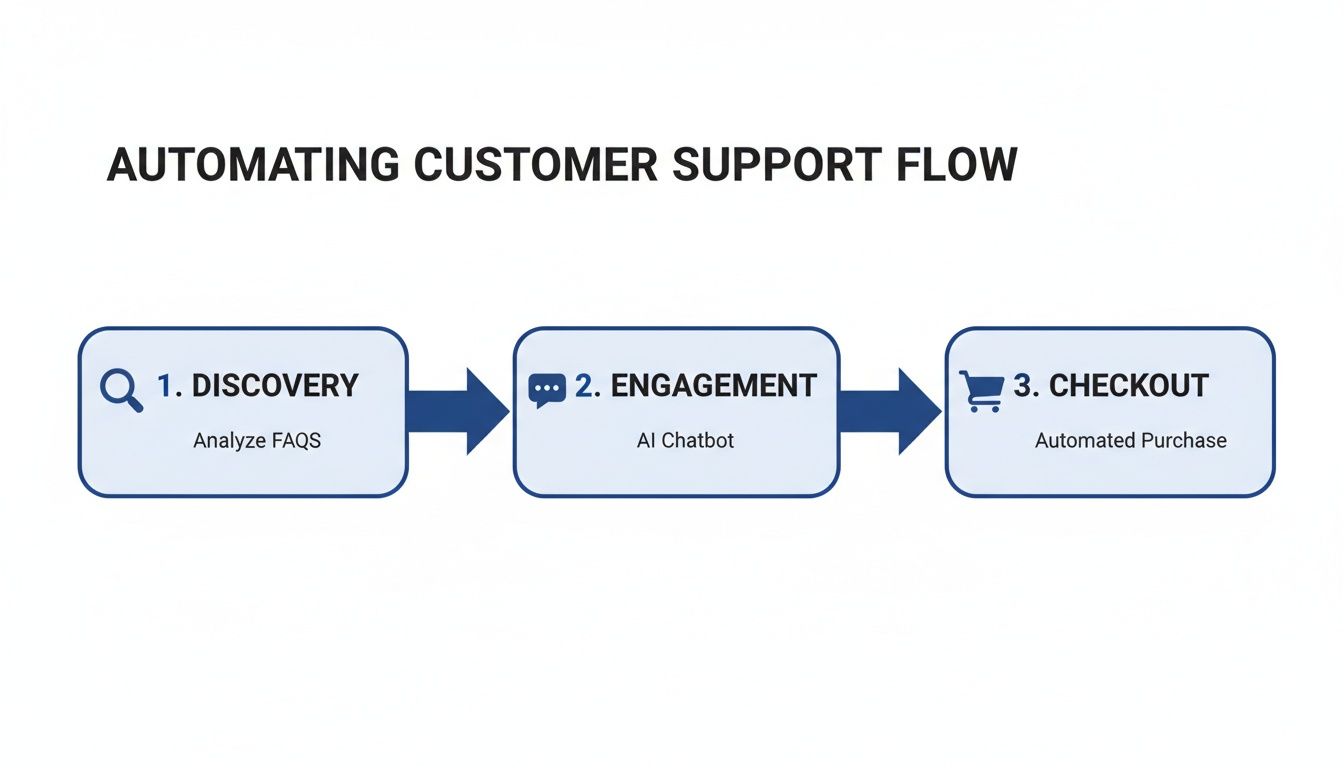
The key insight here is that automation should cover the entire journey, not just post-purchase support. It should be actively engaging customers to drive conversions, too.
Setting Clear and Measurable Goals
With your automation candidates identified, it's time to define what success actually looks like. Vague goals like "improve customer service" are useless. You need specific, quantifiable targets you can track over time.
A well-defined goal moves you from hoping for results to engineering them. It's the difference between saying "I want faster support" and "I will reduce first-response time for all policy questions to under 5 seconds."
Your goals will be unique to your business, but they should be ambitious yet achievable. For instance:
- Reduce Ticket Volume: Aim to deflect 40% of all WISMO and return policy questions within the first 60 days.
- Increase Conversion Rate: Use proactive chat on top product pages to boost conversion by 5% in the next quarter.
- Improve Efficiency: Cut your team’s total time spent on repetitive queries by 10 hours per week.
These concrete goals don't just justify the investment; they give you clear benchmarks for measuring the ROI of your efforts. For a broader look at automation strategies, it can be useful to review resources from adjacent fields, like a guide to marketing automation for B2B, which often share similar principles of workflow design.
Choosing the Right AI Partner
Now, and only now, are you ready to choose a tool. With your goals in hand, you can evaluate platforms based on your specific needs, not just flashy features. For any Shopify brand, a few capabilities are non-negotiable.
Your chosen AI chatbot must have:
- Seamless Shopify Integration: Look for a one-click install that instantly syncs with your product catalogue, collections, and pages.
- Instant Knowledge Sync: The AI should automatically learn your shipping, return, and other policies without needing manual programming.
- Deep Customisation: You need control over the AI's tone of voice, appearance, and the logic of its conversations. Your AI should feel like a part of your brand.
For example, a tool like Marvyn AI is designed with these principles in mind, connecting directly to your store's data to get up and running in minutes. This kind of deep integration is essential. Without it, you’ll spend countless hours manually updating your bot every time you add a new product or change a policy—completely defeating the purpose of automation. Your goal is to create a self-sufficient system, and that starts with having an organised knowledge base. If you need tips on structuring your support content, explore our guidance on creating an effective Shopify help centre.
Bringing Your AI Chatbot to Life
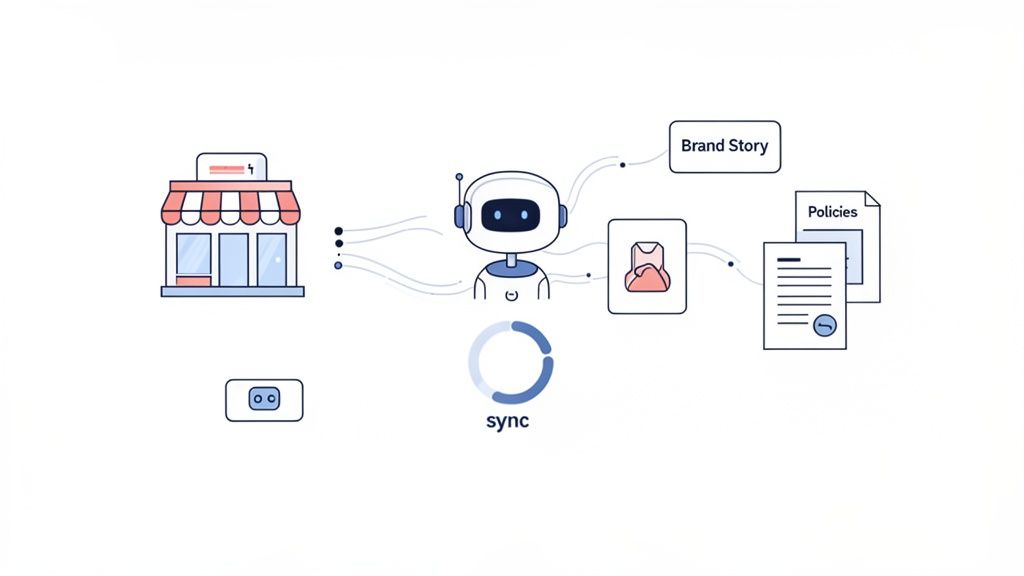
Getting your AI assistant up and running shouldn't feel like a huge technical headache. Thankfully, the days of needing a developer to automate customer service are long gone. Modern tools, especially for Shopify stores, are built for an 'instant-on' experience.
It usually starts with a simple one-click installation from the Shopify App Store. Once you connect it, the AI gets straight to work, automatically crawling your site to learn everything about your business. This initial sync is where the magic really starts.
In just a few minutes, the AI chatbot has absorbed your entire product catalogue, understood your page content, and memorised your shipping and returns policies. This gives you an incredible head start. The bot is already about 80% ready to handle real customer queries before you’ve had to manually type a single FAQ.
Training Your AI to Be a Brand Expert
That initial sync provides the raw data, but the real art is in refining that knowledge and injecting your brand’s unique personality. This is how you turn a generic helper into a true brand expert — an invaluable member of your team.
Your first job is to feed it the knowledge that isn't written explicitly on your website. This is the stuff your human support team knows off by heart: your brand story, specific troubleshooting guides, or common workarounds. Think of it like onboarding a new employee.
Most modern AI platforms let you upload documents directly. This could be things like:
- Your Brand Story: A document detailing your mission, values, and what makes your products special.
- Internal Troubleshooting Guides: Step-by-step instructions for solving common product issues that customers run into.
- Sizing and Fit Advice: Detailed guidance that goes beyond a standard size chart, like "our t-shirts have an athletic fit, so we recommend sizing up for a looser feel."
By providing these custom documents, you give the AI the power to answer nuanced questions with the same depth and confidence as your best support agent. This step is absolutely crucial if you want to automate customer service effectively.
Defining Your Chatbot’s Personality
Knowledge is only half the battle. For an AI to truly represent your brand, its personality has to be a perfect match. A chatbot for a skateboard company should sound completely different from one for a luxury watch brand.
This is where you get to adjust the AI's tone of voice. Do you want it to be witty and fun, using emojis and casual language? Or should it be more polished, professional, and empathetic?
Your chatbot is often the first 'voice' a customer interacts with. Defining its personality isn't just a cosmetic choice; it's a critical part of maintaining a consistent and authentic brand experience across all touchpoints.
Most platforms give you a simple slider or a dropdown menu to set the tone, ranging from "formal" to "playful." For instance, a response to a shipping query could go from this:
- Formal: "Your order will be dispatched within 1-2 business days. You will receive a tracking number via email."
To something more like this:
- Playful: "Awesome! We'll get your order packed and out the door in a day or two. Keep an eye on your inbox for that tracking link!"
Taking the time to fine-tune this personality ensures the automation feels like a natural extension of your brand, not some generic, third-party tool. Our article on the wider use of chatbots for customer service explores this idea of brand alignment in much more detail.
Ultimately, bringing your AI chatbot to life is a mix of automated learning and thoughtful human guidance. The technology handles the heavy lifting of pulling in all the data, while you provide the strategic direction, brand knowledge, and personality that make the interactions feel genuinely helpful and authentic.
Designing Conversations That Actually Sell
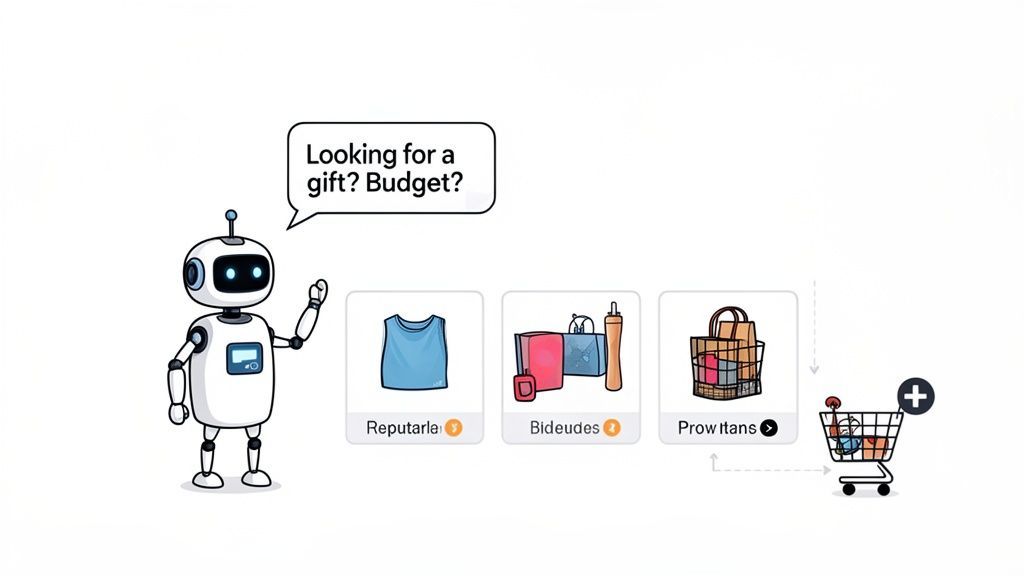
Right, you’ve got an AI chatbot that knows your products and policies inside and out. The next step is where the magic really happens. You need to turn it from a passive Q&A tool into an active sales assistant.
This is about designing conversational journeys that don't just answer questions, but guide shoppers towards a purchase. Instead of waiting for a customer to ask for help, your AI should be programmed to spot opportunities and step in, just like a top-notch personal shopper. Get this right, and you're not just offering support; you're building an entirely new sales channel you control.
From Passive Helper to Proactive Sales Assistant
Think about a customer landing on a product page for a high-end coffee machine. A standard chatbot just sits there, waiting. A sales-focused AI, on the other hand, waits a few seconds and then proactively pipes up.
It could start with something simple and genuinely helpful: "This is one of our bestsellers! Are you curious about the different brew types or have a question about the warranty?"
That single prompt opens a dialogue. From there, your AI can be designed to navigate the usual hesitations people have before buying, asking smart questions to steer them in the right direction.
- "Are you looking for a machine for your home or a small office?"
- "What's your favourite type of coffee drink? Espresso, filter, or something else?"
- "Do you have a budget in mind for your new machine?"
Based on the replies, the AI can either confirm the current product is a great fit or suggest a better alternative from your catalogue. It’s a consultative approach that builds trust and makes the experience feel genuinely personalised, not robotic.
The goal is to replicate the experience of talking to your most knowledgeable and helpful in-store employee. This transforms the interaction from a simple query into a guided shopping journey that increases confidence and drives sales.
Crafting Smart Upsells and Cross-Sells
A well-designed conversation doesn't stop at selling one product. It intelligently increases the average order value by making suggestions that feel natural and add real value.
For instance, once a customer adds that coffee machine to their cart, the AI can immediately follow up with a relevant cross-sell. "Great choice! To get the best flavour, we recommend pairing it with our freshly roasted espresso beans. Would you like to add a bag to your order?"
This is miles more effective than a generic "You might also like..." banner. The suggestions are contextual, timely, and feel like genuine expert advice.
Here are a few other powerful scenarios:
- Completing the Look: If someone buys a dress, the AI can suggest matching shoes or a handbag from your collection.
- Offering a Bundle: For a skincare product, it could propose a discounted "essentials kit" that includes a cleanser and moisturiser.
- Suggesting Protection: When a high-value electronic is purchased, it can offer an extended warranty plan.
The numbers back this up. UK organisations already report a 27% reduction in average handle time when pairing human agents with virtual assistants. More importantly, 34% see revenue increases and 40% report improved client ratings, proving the direct link between smart automation and growth. You can dig into more of these AI in customer service statistics.
Overcoming Objections and Reducing Cart Abandonment
So many sales are lost to last-minute hesitation. A proactive AI can spot a shopper who’s hesitating—maybe they’re lingering on the checkout page or viewing the same product multiple times—and intervene before they abandon their cart.
Imagine a user has had an item in their cart for over five minutes. The AI can pop up with a message like: "I see you're considering the hiking boots. Do you have any questions about sizing or our return policy? We offer free returns for 30 days!"
By tackling common worries like shipping costs, delivery times, or return policies head-on, you remove friction from the buying process. You can even empower your AI to offer a small, one-time discount code—"Use code SAVE10 for 10% off your first order"—to give that final nudge. Mastering these conversations is a lot easier with a solid foundation, which is why we always suggest reviewing our guide on creating effective customer service scripts.
Optimising Performance and Knowing When to Escalate
Getting your AI chatbot live is just the starting line, not the finish. The real magic happens in what comes next: a constant cycle of refining your AI's performance and knowing exactly when to bring in a human.
Think of it less like a "set it and forget it" tool and more like a new team member that gets smarter with a bit of coaching. This ongoing work is what turns a good chatbot into an incredible one that can handle more and more customer questions with pinpoint accuracy. It all starts with getting your hands dirty in the analytics.
Turning Data into Actionable Insights
Your AI's analytics dashboard is where you'll find the raw material for making it smarter. This isn't just a bunch of charts; it’s a direct feed of your customer conversations. You can see every transcript, which questions the AI nailed, and—more importantly—which ones it fumbled.
Set aside an hour or so each week to dig through this data. You’re looking for patterns in the "unanswered" or "low confidence" pile. Are shoppers suddenly asking about a new product you haven't trained the AI on yet? Are they using slang or abbreviations that the AI doesn't recognise?
By regularly reviewing conversation logs, you're not just fixing errors; you're gaining a direct line into your customers' minds. You'll uncover product feedback, identify points of confusion on your website, and discover new sales opportunities you might have otherwise missed.
This analysis lets you stop playing defence and start playing offence. For instance, if you notice a spike in questions about the ethical sourcing of your materials, that’s your cue. Create a detailed knowledge base article on your sourcing practices and upload it. Problem solved.
Creating Intelligent Escalation Rules
Let's be clear: no AI is perfect, and you shouldn’t be aiming for 100% automation. The goal is a smart hybrid system where your tech and your people work together, each playing to their strengths. The most crucial part of this setup is defining the exact moment a conversation should be passed over to a human agent.
This ensures your customers never hit a dead end, especially when things get complicated or emotional. Your AI should be the first line of defence, handling the high-volume, repetitive queries and freeing up your human experts for the interactions that genuinely need their skills.
This hybrid model is fast becoming the standard. As UK businesses automate customer service, they’re learning to balance technology with the reality that many customers still want human help for complex issues. It seems to be working, too, with overall customer satisfaction in the UK climbing to 78.2 out of 100. For Shopify merchants, this means building a system that delivers both seamless automation and a genuine human touch. You can read more about these CX trends and their impact.
When to Hand a Chat to a Human
So, what are the triggers for a smooth handoff to a person? You can build rules based on specific keywords, customer behaviour, or the type of query. A solid escalation strategy is a non-negotiable part of any plan to automate customer service well.
Here are a few real-world scenarios where you should automatically pass the chat to a person:
- Signs of Frustration: Set up keyword triggers for words like "frustrated," "annoyed," "useless," or any time a customer asks for a "real person" or "manager." This stops a bad experience from spiralling.
- High-Value Sales Leads: If someone asks about bulk orders, customisation, or shows strong interest in your most expensive items, route them straight to a sales specialist. Let a person give them the high-touch experience needed to close the deal.
- Complex Technical Issues: An AI can handle basic troubleshooting, but a fiddly, multi-step technical problem with a product needs the problem-solving-on-the-fly skills of a human agent.
- Sensitive Information: Any conversation touching on sensitive personal data, payment security, or a tricky billing dispute should go to a human immediately. This is about privacy and reassurance.
- Repeated Unanswered Questions: If the AI fails to answer the same customer's question two or three times in a row, that’s a clear signal it’s stuck. Handing off here prevents the customer from getting trapped in a frustrating loop.
By setting up these clear pathways, you create a safety net. Your AI handles the heavy lifting, but your customers always know a capable human expert is just a click away when they really need one.
Common Questions About Automating Support
Thinking about AI support for your Shopify store? It’s a smart move, but it also brings up some big questions. Let's be honest, you're probably worried about the AI sounding like a robot, the tech being a nightmare to set up, or what happens when it just gets stumped.
These are all fair concerns. Any store owner I talk to has them. So, let’s tackle these head-on and clear up some of the biggest myths around AI today.
Will an AI Chatbot Sound Robotic and Hurt My Brand?
Not a chance. The days of clunky, script-reading chatbots are long gone. Modern AI is built for deep customisation, which is just a fancy way of saying you have total control.
You get to teach the AI your brand’s personality. Whether you’re fun and a bit quirky or more formal and reassuring, you can dial in the exact tone of voice.
By feeding it your brand story, the specific phrases you use in your marketing, and your internal policies, the AI learns to speak like a genuine member of your team. It’s less about programming and more about teaching it to be an authentic extension of your brand.
Is Setting Up an AI Chatbot Too Technical?
This is a common fear, but with today’s Shopify apps, it’s completely unfounded. The best solutions are built for merchants, not developers. In most cases, installation is a one-click affair from the Shopify App Store.
For example, a tool like Marvyn AI plugs into your store and instantly syncs your entire product catalogue, collections, and policies. Within minutes, it's about 80% of the way there without you touching a single line of code.
The customisation part is just as simple. You’ll use intuitive text boxes and toggles to tweak the personality, upload new documents, and define how it should talk. If you can run a Shopify store, you can absolutely manage a modern AI chatbot.
How Much Time Does It Take to Manage?
The initial setup is quicker than you’d think. You'll want to block out a few hours upfront to get the customisation right—setting the tone, uploading any unique documents, and just checking its initial knowledge base. This is the foundation, and it’s worth doing right.
After that initial push, ongoing management is a tiny time commitment with a huge payoff. We’ve found that spending just one to two hours a week reviewing conversations and making small tweaks pays massive dividends in performance.
This weekly check-in is your chance to spot new customer questions, see where the AI could be sharper, and keep refining its accuracy. It’s a minimal effort that makes sure your automation gets smarter over time, saving your team more hours and driving better results week after week.
What If The AI Cannot Answer A Question?
This is where the real strategy comes in. No AI is meant to handle 100% of questions, and frankly, it shouldn't. The goal is to build a seamless partnership between your AI and your human team.
You can set up smart escalation rules that automatically hand a conversation over to a person at the right moment. For instance:
- A customer shows frustration: Keywords like "annoyed" or "useless" can trigger an instant handoff.
- The query is too complex: A tricky, multi-part technical issue can be routed straight to an expert.
- A high-value sale is at stake: An enquiry about bulk orders can go directly to your sales team.
This ensures no customer ever hits a dead end. The AI takes care of the huge volume of repetitive questions, which frees up your team to provide that high-touch, empathetic support where it truly counts. It really is the best of both worlds. For those weighing up different platforms, you can check out our analysis of Marvyn AI versus Zendesk.
Ready to see how a fully autonomous AI can transform your support and drive sales? Marvyn AI automates over 70% of customer service, handles unlimited conversations 24/7, and turns browsers into buyers—all for free. Get started in minutes.