Build a Shopify Help Centre That Drives Sales and Cuts Costs

Let's get one thing straight. A Shopify help centre isn't just a boring page for deflecting support tickets. It's one of the most underrated, around-the-clock sales engines you can have. The top DTC brands aren't just using it to cut costs; they're using it to tackle pre-purchase anxiety, a massive reason for abandoned carts, by giving customers instant answers and building trust right when it matters most.
Why Your Shopify Help Centre Is a Sales Engine
Most store owners I talk to see their help centre as a reactive tool—a chore they have to do to handle complaints. But what if you flipped that thinking on its head? A well-built Shopify help centre can be one of your most effective conversion tools, directly pumping up your bottom line.
Put yourself in your customer's shoes. They're on a product page, finger hovering over the buy button, but they're hesitating. "Will this actually fit me?", "How long does shipping to Manchester really take?", "What’s the return policy if this isn't right?". Without instant answers, that hesitation almost always turns into a lost sale. A huge chunk of cart abandonment comes down to nothing more than unanswered questions and a bit of uncertainty.
From Cost Centre to Revenue Generator
By serving up clear, easy-to-find information, your help centre becomes a 24/7 sales assistant. It works tirelessly, removing all the little points of friction that get in the way of a purchase. Here’s how that mental shift actually plays out in real revenue:
- It kills pre-purchase anxiety: Instantly answering questions about shipping, returns, and product details gives a customer the confidence they need to click 'buy'.
- It boosts conversion rates: When people find answers fast, they're far more likely to finish their purchase instead of bouncing off your site to search for info (or worse, go to a competitor).
- It increases Customer Lifetime Value (CLV): A smooth, supportive buying journey creates happy customers. Happy customers trust your brand and come back again and again.
- It frees up your support team: When all the common questions are handled automatically, your human agents can focus on high-value, revenue-generating chats, like giving personalised product advice or helping with complex orders.
The key is to change your mindset. Your help centre isn't just solving problems post-purchase; it's building the confidence and trust needed to turn browsers into buyers and first-time customers into loyal fans.
This strategic approach transforms your Shopify help centre from a simple FAQ page into a core part of your sales funnel. When you anticipate what your customers need and provide answers before they even have to ask, you create a seamless path to purchase. It’s a proactive support system that doesn't just improve the customer journey—it directly grows key e-commerce metrics. For more on this, you might want to check out our guide on increasing Shopify sales.
In the next sections, we'll walk through exactly how to build a help centre that does all of this.
Laying Your Help Centre Foundation in Shopify
Building a Shopify help centre doesn't need to be some monumental project. You can get a solid foundation in place pretty quickly, no matter your budget or technical chops. The trick is to pick the right starting point for your store right now—either a simple, native solution or a more powerful, feature-rich app.
The first move is always the most important. Before you write a single FAQ, you need a plan for how to build a knowledge base that people will actually use. That means thinking like a customer from day one and making every decision with clarity and ease-of-use in mind.
It’s not just about reducing support tickets. A good help centre directly boosts sales by tackling pre-purchase anxiety head-on.
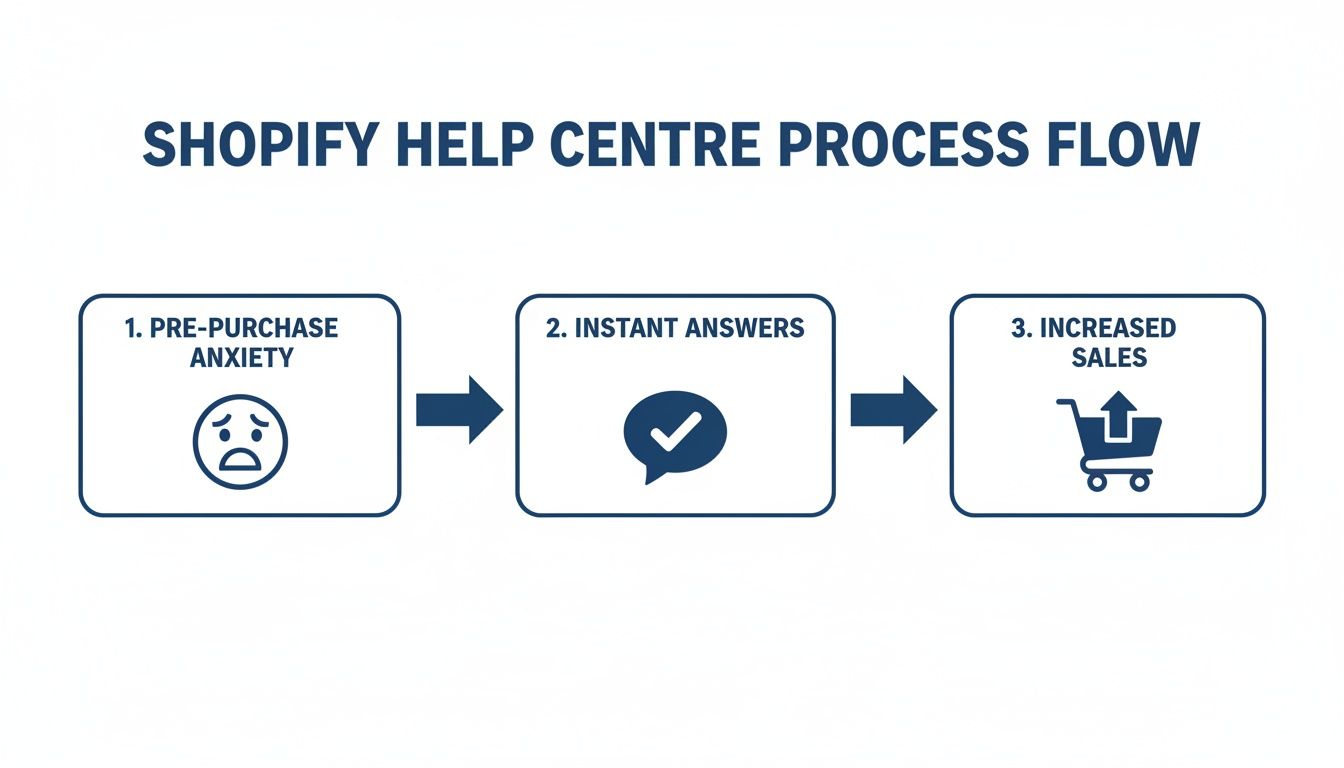
When a customer gets an instant answer, their confidence goes up, and they're that much closer to clicking "buy."
The No-Cost Starting Point: Shopify Pages
If you're just starting out or running on a shoestring budget, Shopify's built-in 'Pages' feature is a fantastic, zero-cost way to get a basic help section off the ground. Think of it as a manual, no-frills knowledge base.
You simply create a new page for each question, like "Shipping Policy" or "How do I start a return?". To keep things from becoming a mess, create one central 'Help' or 'FAQ' page that links out to all these individual answer pages. This becomes your main index.
Here’s how you’d set it up:
- Create your pages: Head to `Online Store` > `Pages` in your Shopify admin and start writing.
- Link them together: Create a main 'Help' page and use it as a table of contents, linking to each individual answer page.
- Make it visible: Go to `Online Store` > `Navigation` and add a link to your main help page in your website's header and footer. Don't hide it!
This method is dead simple and works perfectly for new stores. But let's be honest, it has its limits. It has no search function, no analytics, and gets unwieldy fast as your brand grows.
Upgrading to a Dedicated Help Centre App
Once you're tired of manually updating pages and customers start asking questions you've already answered, it’s time for an upgrade. A dedicated app from the Shopify App Store is the logical next step. These tools are purpose-built to be powerful, searchable knowledge bases.
They offer a much slicker solution that can scale with your business and seriously level up your Shopify customer service guide.
An investment in a dedicated help centre app is really an investment in the customer experience. It sends a clear signal that you value your customers' time by making it incredibly easy for them to find their own answers, 24/7.
When you start looking at apps, there are a few non-negotiable features you should be looking for. A good app does more than just host articles; it gives you insights to make your support even better.
Key Features to Look For in an App
As you browse the Shopify App Store, keep an eye out for these must-have capabilities:
- A killer search bar: This is everything. Customers expect a fast, forgiving search that delivers relevant results instantly. If it can't handle typos, it's not good enough.
- Article feedback: Look for simple "Was this helpful?" thumbs-up/down buttons. This feedback is pure gold for figuring out which articles are hitting the mark and which ones need a rewrite.
- Real analytics: You need data. The best apps show you what people are searching for, what they search for and find nothing (hello, content gaps!), and which articles get the most views.
- Simple categorisation: The app has to make it easy to group articles into logical categories and subcategories. This creates an intuitive path for people who prefer to browse rather than search.
Choosing the right app early on sets your Shopify help centre up for success. It ensures your self-service support can handle more traffic and a bigger library of content without cracking under the pressure.
Creating Content That Genuinely Solves Problems
Effective help content isn’t created in a vacuum; it’s born directly from real customer frustrations. If you want a Shopify help centre that actually solves problems, you have to stop guessing what your customers want and start listening to what they’re already telling you. Think of yourself as a detective.
Your mission is to uncover the most common, recurring sticking points that stand between a curious browser and a happy, paying customer. This means digging into the data you already have. Your support tickets, live chat transcripts, and even the comments on your social media posts are absolute gold mines of information.

Uncovering Your Customers' Most Pressing Questions
First things first: identify the top 5-10 questions your support team answers over and over and over again. These are your priority one articles. What themes keep cropping up? Is it shipping costs? Return processes? Product sizing?
Get a simple spreadsheet going and start tracking these recurring queries. Don't just count tickets; try to understand the why behind them. This initial research will form the backbone of your entire help centre, ensuring that from day one, you’re addressing real what customers' needs really are.
These questions often point to serious friction in the buying journey. For UK merchants, this is especially true. Recent data from SQ Magazine reveals a staggering 70.6% average cart abandonment rate for UK Shopify stores, a figure that climbs to 78.4% on mobile. Given that 79% of UK traffic now comes from mobile, that’s a massive loss in potential revenue—often caused by simple, unanswered questions about things like Royal Mail delivery times or VAT.
Writing for Clarity and Action
Once you know what to write about, the next challenge is how to write it. The goal isn’t to sound like a corporate manual. It's to be a helpful, clear-voiced guide. Your customers are often a bit stressed or confused when they land on a help article, so your language needs to be simple, direct, and reassuring.
Here are a few core principles I swear by for writing content that actually works:
- Use Your Customers’ Words: Write your titles and content using the exact phrases your customers use when they contact support. If they ask, "Where's my stuff?", title your article something like "How to Track Your Order."
- Keep It Scannable: Nobody reads walls of text. Use short paragraphs, bullet points, numbered lists, and bold text to make information easy to digest at a glance.
- Show, Don't Just Tell: A picture is worth a thousand words, and a GIF is worth ten thousand. Use screenshots, annotated images, and short video clips to walk customers through processes step-by-step.
Remember, the person reading your help article is looking for a quick fix, not a novel. Structure your content to give them the answer in the first few seconds, with more detail available for those who need it.
For example, when writing a guide on initiating a return, don't start with a long preamble about your returns philosophy. Start with a clear, bold heading like "Start Your Return Here," immediately followed by a direct link to your returns portal. Get them to the solution instantly.
Tailoring Content for Different Needs
Not all help content is created equal. Your Shopify help centre will house different kinds of articles, and each serves a distinct purpose. You need to adapt your writing style accordingly.
Essential Content Types
- FAQs: These are for quick, factual answers to common questions. Keep them short and to the point. An FAQ might be, "Do you ship internationally?" with a simple answer: "Yes, we ship to over 50 countries. See the full list here."
- Step-by-Step Guides: For more complex tasks like using a product or navigating a software feature, use numbered lists with clear action steps. A guide on "How to Apply a Discount Code" should have numbered steps with corresponding screenshots of your checkout page.
- Policy Pages: Your Shipping, Returns, and Privacy Policies need to be comprehensive but also easy to understand. Use clear headings and simple language to break down all that legal and logistical information. Ditch the jargon wherever you can.
For UK-based merchants, creating specific, localised content is crucial for building trust. Articles explaining your process for handling Royal Mail shipments, clarifying how VAT is calculated at checkout, or detailing returns via local drop-off points can significantly reduce pre-purchase anxiety and support tickets. It shows you understand and cater to the specific needs of your local market.
Optimizing Your Help Centre for Easy Discovery
Look, creating brilliant, problem-solving content is a great start. But what’s the point if your customers can't find it? An disorganised Shopify help centre is almost as bad as having no help centre at all. Smart organisation and a bit of search engine optimisation (SEO) are what turn a knowledge base from a dusty library into a tool customers actually use.
Your goal should be to make finding an answer completely effortless. A customer should be able to land on a solution whether they prefer typing in a search bar, browsing categories, or even stumbling upon your content from a Google search. This is how a simple FAQ page becomes a powerful, organic traffic machine for your store.
Structuring Your Categories Like a Customer
First things first, you need a logical category structure that actually mirrors the customer journey. Don't organise your help centre based on your internal departments—that’s a classic mistake. Instead, think about the questions a real customer has at each stage of their relationship with you.
A solid structure usually looks something like this:
- Before You Buy: This is where you tackle all that pre-purchase anxiety. Think categories like "Product Information," "Sizing & Fit Guides," and "Payment Options."
- Shipping & Delivery: Everything related to getting the order into their hands. This means "Order Tracking," "Delivery Times & Costs," and "International Shipping."
- After You Receive Your Order: This covers everything that happens post-purchase. You'll want categories for "Returns & Exchanges," "Product Care," and "Warranty Information."
- Account Management: For any questions about customer accounts, loyalty points, or managing subscriptions.
When you’re naming these categories and the articles inside them, use the exact language your customers use. Go dig through your support tickets. If people are constantly asking, "Where's my parcel?", then an article titled "How to Track Your Order" is going to be far more effective than something generic like "Order Fulfilment Status."
Boosting Discoverability with SEO
Your Shopify help centre isn't just an internal tool; it’s a public-facing part of your website that search engines like Google can, and will, index. With a little SEO effort, you can start attracting new customers who are searching for solutions your products happen to provide.
Start with some basic keyword research. Use free tools to see what terms people are searching for around the common problems your products solve. For instance, if you sell leather boots, you'll probably find people searching for "how to clean leather boots" or "best leather protector spray." These are perfect topics for your help articles.
Then, you’ll want to weave these keywords naturally into your:
- Article Titles: Keep them clear and question-based (e.g., "How Do I Clean My Suede Trainers?").
- Article Content: Use the keywords and related phrases throughout the text, but don't force it.
- Image Alt Text: Describe your images accurately. This is great for accessibility and gives SEO a nice little boost.
Internal linking is another big one. When you mention your return policy in an article about shipping, link out to the full policy page. This creates a connected web of information that helps both users and search engines understand your content better, making your entire help centre feel more authoritative.
Think of every help article as a potential new entry point to your brand. By optimising for search, you're not just supporting existing customers; you're acquiring new ones by demonstrating your expertise and helpfulness.
Keeping Pace with a Growing Market
Optimising your Shopify help centre is especially vital in a rapidly expanding market like the UK. The UK Shopify ecosystem has absolutely exploded, hitting over 208,000 live stores as of Q2 2026—that’s an impressive 18% year-over-year growth. This surge makes it the second-largest market globally and proves why self-service tools are now indispensable.
As thousands of new merchants come online, the volume of common queries about shipping, returns, and product issues skyrockets. A searchable, 24/7 help centre becomes a critical asset for managing this influx. You can dive deeper into these trends in the 2026 UK market report from Dewsign.
This growth means more customers are out there searching for answers. A well-optimised help centre ensures they find those answers on your site, not a competitor's. By making your content dead simple to discover, you provide immediate value and build the trust needed to secure a sale in an increasingly crowded marketplace.
Enhancing Support with AI and Automation
A well-organised Shopify help centre is a fantastic foundation, but it’s still a passive one. Customers have to stop what they're doing, find a new page, and actively hunt for their own answers. It’s time to connect that knowledge base to a smart, dynamic system that brings the answers directly to them.
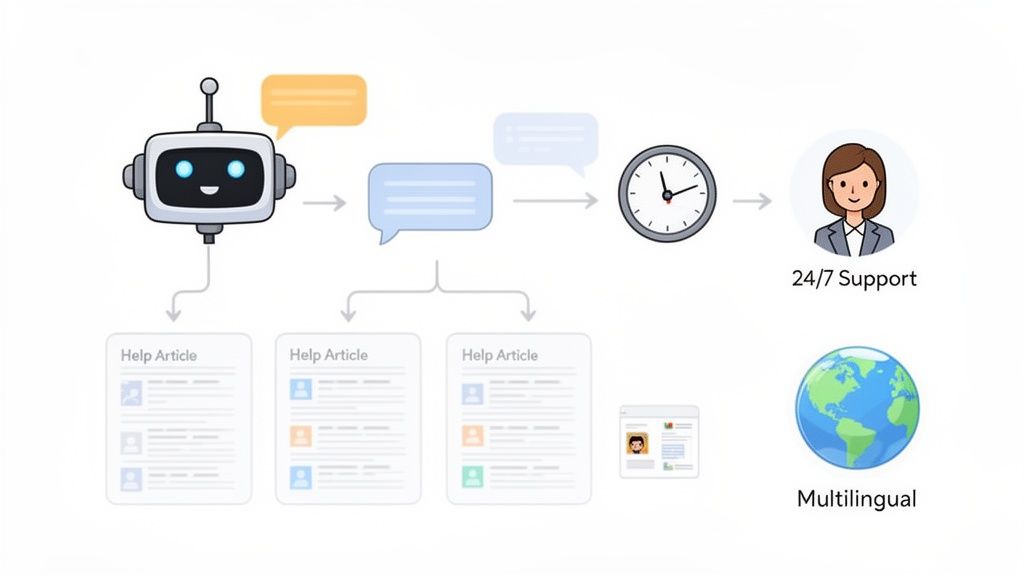
This is exactly where AI and automation come in. Think of an AI chatbot like Marvyn acting as the friendly, hyper-efficient front door to all your support content. Instead of making customers search for articles, the bot pulls information from your help centre and delivers it instantly within a natural, conversational chat.
The Power of an AI Front Door
Let's look at a typical customer journey. A shopper has a quick question about your return policy. Rather than clicking away to find your FAQ, they can just ask the chatbot right there on the product page. The bot, which is already trained on all your help articles, gives them a clear answer in seconds. This keeps the customer on the page and moves them one step closer to making a purchase.
This isn't just about deflecting tickets; it's about creating a seamless, immediate support experience. For instance, a customer might ask, "Can I return sale items?" The chatbot can instantly pull the relevant line from your returns policy and present it clearly, removing that friction point without any human help. This proactive approach is fundamental for growing brands. If you want to dive deeper, you might be interested in our article about how AI sales agents work.
Seamless Escalation and 24/7 Support
Of course, not every question can be solved with an article. The real power of an AI-driven system is its ability to know when to escalate a conversation to a human. A good AI chatbot understands context and intent.
When it successfully answers a common question, your ticket volume drops. But when it spots a more complex issue or a high-intent sales query ("I need help choosing between these two dresses for a wedding"), it can intelligently route the conversation to a human agent, complete with the full chat history.
By automating the repetitive questions, you free up your human team to focus on what they do best: consultative selling, handling complex problems, and creating those 'wow' moments that build real customer loyalty.
This creates a powerful hybrid model that offers the best of both worlds:
- 24/7 Availability: The bot is always on, answering questions at 3 AM on a Sunday.
- Multilingual Capabilities: Instantly support customers across the globe in their native language.
- Reduced Repetitive Work: Frees your team from answering "Where is my order?" a hundred times a day.
AI's Role in a Scaling Market
This level of automation is fast becoming essential, especially in high-growth markets. In the UK, Shopify Plus has skyrocketed, tripling from 1,000 stores in 2023 to an expected 5,700 by 2026. This is fuelling an incredible 126% average year-over-year growth, making Britain Europe's largest Plus market. For these scaling businesses, automating access to support knowledge isn't just a nice-to-have; it's a real competitive advantage.
And it’s not just about customer interaction. AI can also improve your help centre's accessibility through tools like an AI alt text generator for your images. By automating this, you ensure your visual content is accessible to all users, strengthening your site's overall user experience. Integrating AI isn't some futuristic idea—it's a practical strategy for providing better support, driving sales, and scaling your brand efficiently.
Measuring Success and Driving Continuous Improvement
Your Shopify help centre isn’t a one-and-done project. If you just set it and forget it, you’re leaving money on the table. The best help centres are living, breathing assets that evolve right alongside your business and your customers' needs.
To make that happen, you need a way to measure what’s working and what isn’t. Without data, you’re just guessing. Measuring the right key performance indicators (KPIs) is what separates a world-class self-service experience from a dusty, outdated FAQ page. This is the feedback loop that drives real, continuous improvement.
Key Metrics to Track for Your Help Centre
Don't get bogged down by vanity metrics like total page views. Instead, focus on the data that tells you whether your content is actually solving problems. Here are the most important KPIs to keep an eye on:
- Ticket Deflection Rate: This is the big one. It measures the percentage of customers who found an answer in your help centre instead of creating a support ticket. Most dedicated help centre apps will calculate this for you automatically.
- Search Success Rate: What percentage of searches on your help centre result in a customer actually clicking on an article? A low rate here is a massive red flag. It usually points to a clunky search experience or major gaps in your content.
- Article Helpfulness Score: Those little "Was this article helpful?" buttons are gold. Track the ratio of 'yes' to 'no' votes to instantly spot underperforming articles that need a rewrite.
- Top and Bottom Performing Articles: It’s great to know your most-viewed articles, but your least-viewed and lowest-rated articles are where the real opportunities lie. These are the articles that need your immediate attention.
The goal isn't just to publish answers. It's to create a feedback system where customer behaviour directly shapes your content strategy. This is how your help centre becomes a valuable asset that boosts customer satisfaction and actively drives down support costs.
Turning Insights into Action
Data is only useful if you act on it. Whether you’re using a dedicated app or digging into Google Analytics, your numbers will start to tell a story. For example, a high number of searches for a term that returns zero results is a glaring signal. It’s your customers literally telling you what content they need you to create. Get on it.
Likewise, an article with tons of views but a terrible helpfulness score is a high-priority problem. The topic is clearly important, but your current content isn't cutting it. That’s your cue to rewrite the article for clarity, add some visuals, or update the information.
Beyond just your articles, it's vital to track broader customer sentiment to get a complete picture of your brand's health. For a deep dive on this, you can learn more about how to calculate your NPS score to measure overall customer loyalty.
By regularly checking these metrics, you can spot emerging customer trends and get ahead of them. This ensures your support content is always relevant, genuinely helpful, and actually effective.
Frequently Asked Questions
When you're building a help centre, a few common questions always come up. Here are my thoughts on the ones I hear most often from Shopify merchants.
Do I Really Need a Paid App for My Help Centre?
Honestly, not at the very beginning. If you're just launching, Shopify's built-in 'Pages' feature is a perfectly good, no-cost way to get a simple FAQ page up. It gets the job done.
But as soon as you start getting real traffic and repeat questions, you'll feel the limitations. A dedicated app gives you proper search, analytics, and much better organisation. That investment pays for itself quickly, both in the time you save and the massively improved customer experience.
How Many Articles Should We Launch With?
Forget about quantity. Focus entirely on quality. Start with 10–15 solid articles that solve your top 5–10 most common customer questions. The best place to find these is in your support emails and DMs.
It’s far better to have a handful of genuinely useful articles than a hundred short, vague ones that don't actually solve anything. You can, and should, add more over time as new questions pop up.
The most effective help centres are built from real customer data. By launching with articles that address your most common support tickets, you guarantee your content delivers immediate value to both your customers and your team.
How Can I Get Customers to Actually Use the Help Centre?
You have to make it impossible to miss and incredibly valuable. First, add a clear 'Help' or 'FAQ' link to your store's header and footer. Don't hide it.
Then, start integrating it into your communications. Link to relevant articles in your order confirmation emails. If you use an AI chatbot, it can proactively suggest articles when a customer asks a question. Your support team should also get in the habit of sharing links directly—it trains customers to look for answers themselves next time.
Ready to automate your support and drive sales 24/7? Marvyn AI is a free, fully autonomous chatbot that syncs with your Shopify store in minutes to provide instant, expert answers. Start turning browsers into buyers today by exploring Marvyn AI.