Best Inventory Management Software Ecommerce for 2026

Your sale goes live at 9:00. By 9:14, your best-selling size has sold through on Shopify. At 9:16, two more orders come in from Amazon. At 9:19, a customer opens a support chat asking whether the same item will still ship this week. You say yes, because your stock number still looks healthy.
By lunch, you realise the number was wrong.
Now you’re refunding orders, writing apology emails, and trying to work out whether the problem started in Shopify, your spreadsheet, your warehouse count, or a delayed marketplace sync. That’s the point where most founders stop thinking about inventory as “admin” and start seeing it for what it is. It’s a sales system, a cash flow system, and a customer trust system.
That’s why inventory management software ecommerce has become such a serious category for growing merchants. UK online sales are large enough that operational mistakes scale fast, and UK firms are leading European adoption of these tools. The global inventory management software market was valued at USD 3.9 billion in 2024 and is projected to reach USD 7.3 billion by 2034, while merchants adopting these systems can reach 99.5% order fulfilment accuracy according to GM Insights.
If cart drop-off is already hurting your store, stock accuracy sits right in the middle of that problem. A shopper who doesn’t trust your availability won’t buy. If you want a broader view of that side of the funnel, this guide on reducing cart abandonment is worth pairing with your inventory work.
The Ticking Clock of an Online Sale
The operational damage from bad inventory rarely arrives as one dramatic event. It arrives as a chain reaction.
One wrong stock number becomes five problems
A customer places an order for an item you no longer have. Your warehouse spots the issue after the pick list prints. Someone on your team checks the system, then checks the shelf, then checks another sales channel. Nobody trusts the data, so everyone starts working manually.
That single miss usually creates:
- A cancelled order: You lose revenue and spend time processing the refund.
- An upset customer: They ordered because your site said “in stock”.
- A support ticket: Someone now has to explain what happened.
- A marketplace risk: If the oversell happened off Shopify, channel performance can suffer.
- A planning error: You still don’t know whether to reorder or hold.
For a small UK merchant, that’s not just inconvenient. It can consume the afternoon.
Inventory software is your operating system
Founders often think inventory software is just a stock counter with a nicer interface. It isn’t. In practice, it acts more like the operating system behind your products.
It tells you what you have, where it is, what’s committed to orders, what’s incoming from suppliers, and what needs attention before a stock issue reaches the customer.
Practical rule: If your team has to ask “Which number is right?” more than once a week, you don’t have an inventory process. You have competing guesses.
The bigger your catalogue and the more channels you add, the faster manual fixes stop working. A spreadsheet can survive a handful of SKUs and one sales channel. It struggles when you add bundles, returns, marketplace sales, and purchase orders arriving in partial deliveries.
Why this matters more in ecommerce than many founders expect
Physical retail can sometimes absorb a stock mismatch with a quick conversation in store. Ecommerce can’t. The product page, checkout, order confirmation, warehouse workflow, and post-purchase message all rely on the same stock truth.
When that truth is wrong, the customer sees the symptom before you do.
That’s why founders move into inventory management software ecommerce. Not because feature lists look impressive, but because growth without stock control gets chaotic very quickly.
What Is Ecommerce Inventory Management Software Really
Think of Shopify’s native stock count as the departure board at one airport. It shows what’s happening in that one place. Useful, but limited.
A proper inventory system is more like air traffic control for your products. It doesn’t just show what’s on the shelf. It tracks what’s allocated to orders, what’s in transit, what’s available across channels, and what’s likely to be needed next.
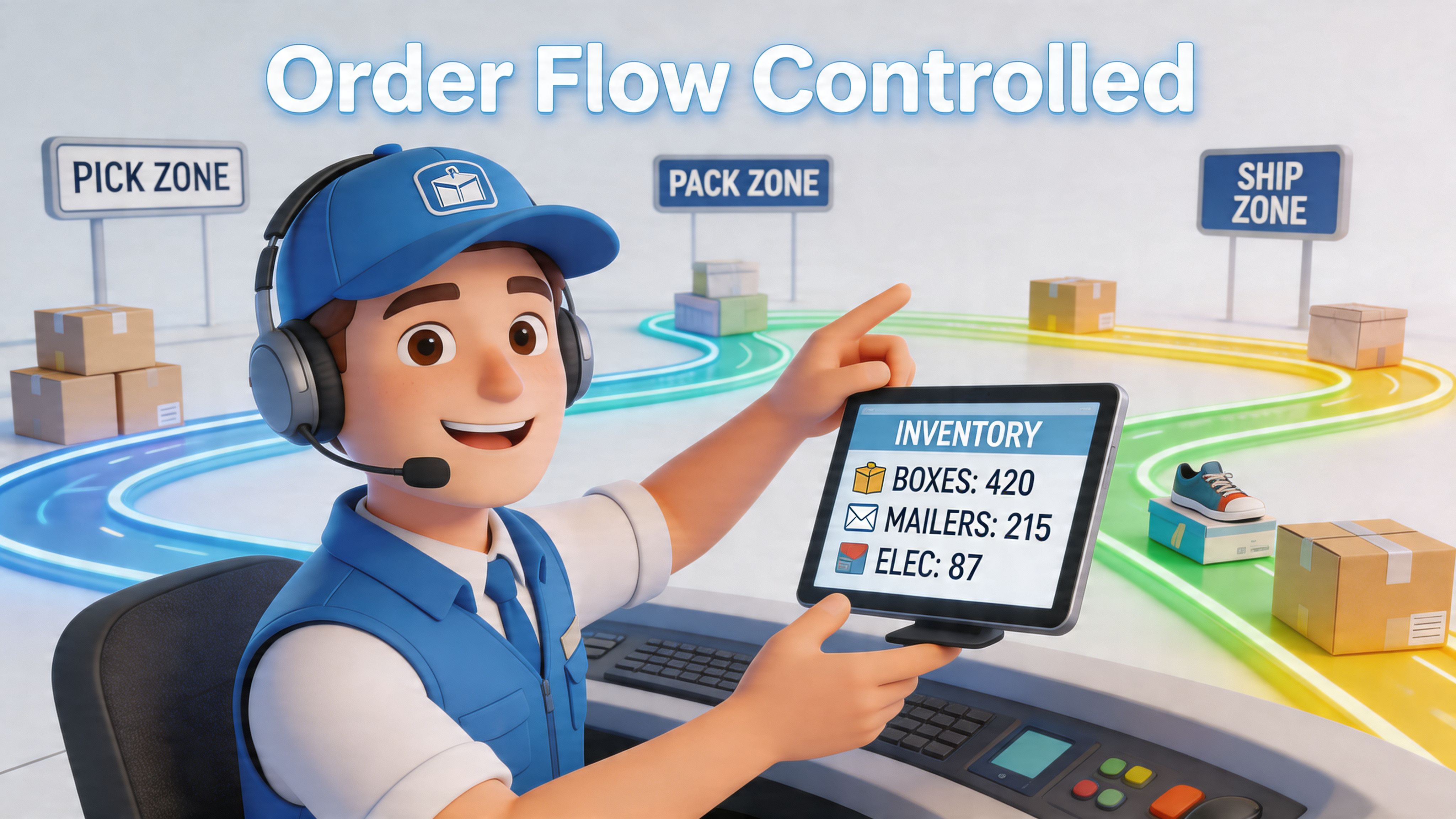
What the software actually does day to day
At its core, the system creates one usable source of truth for stock.
That means it should help you answer questions like:
- What’s on hand: The physical units you can count now.
- What’s available: Stock not already committed to open orders.
- What’s incoming: Purchase orders and deliveries still on the way.
- Where it sits: Your warehouse, a retail location, a 3PL, or transit.
- What changed: Sales, returns, transfers, and adjustments.
That sounds basic until you try doing it across Shopify, Amazon UK, eBay UK, and a warehouse team that’s receiving stock at the same time orders are leaving.
Why spreadsheets and native tools start to break
A spreadsheet is static. Ecommerce inventory is not.
The moment a sale lands, a return arrives, a bundle sells, or a supplier sends a partial shipment, the numbers change. Native ecommerce tools can handle some of that. They usually become strained when your business needs stronger purchasing controls, clearer warehouse workflows, or better multi-channel visibility.
That’s where a dedicated system starts to earn its keep.
If your operation also depends on suppliers, freight, and overseas production, this primer on international supply chain management helps frame the bigger picture around stock flow, not just shelf counts.
Inventory and order management are related, but not identical
Founders often lump these together. That’s understandable, but the distinction matters.
Order management focuses on what happens after a customer buys. Routing, fulfilment, shipping status, exceptions.
Inventory management focuses on what you can sell, where it is, and how to keep enough of it without choking cash flow.
The two systems should talk to each other constantly. If you want a plain-English breakdown of that connection, this guide to order management for ecommerce is a useful companion.
A short explainer helps make the difference clearer:
The simplest definition that holds up in real life
Inventory management software ecommerce is the tool that helps a merchant keep product availability accurate while controlling purchasing, receiving, storage, and replenishment across sales channels.
Or in founder language: it stops you selling what you don’t have, helps you buy what you do need, and gives your team a number they can trust.
If your sales channels move faster than your stock records, the software isn’t optional anymore.
The Core Features That Power Growing Brands
Some tools sell themselves on long feature lists. That’s not the useful way to evaluate them. A growing brand needs a small set of functions that solve expensive problems.
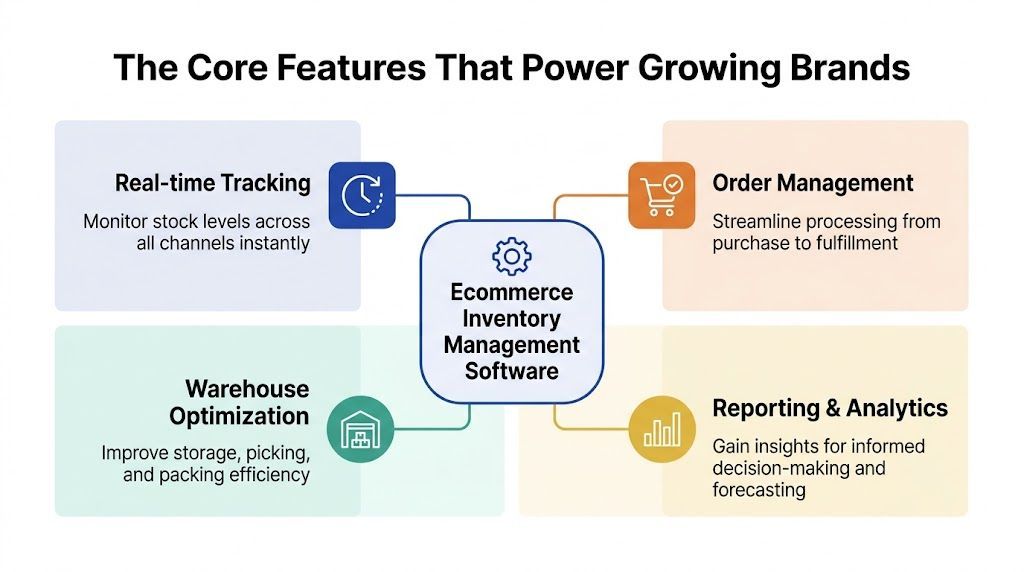
Real-time synchronisation
This is the feature founders ask about first, and for good reason.
Real-time multi-channel inventory synchronisation helps prevent the stock discrepancies behind an estimated £1.5 billion in lost sales annually for UK online retailers, and it can reduce cart abandonment by up to 15% when stock is accurate at the point of purchase according to GetCarro’s overview of ecommerce inventory software.
If you sell on Shopify and one or two additional channels, this is often the line between calm operations and weekly firefighting.
What it should handle well:
- Channel updates: A sale on Amazon UK should affect available stock elsewhere quickly.
- Returns and cancellations: Stock shouldn’t disappear or reappear incorrectly.
- Bundles: If one bundle contains three underlying SKUs, the system needs to deduct each component correctly.
- Multiple locations: Stock at your warehouse and stock at a 3PL must stay distinct.
Forecasting and automated purchasing
The second job is less visible, but it has a bigger effect on cash.
Forecasting tools look at sales history and help you decide when to reorder and how much to buy. Good software doesn’t just shout “low stock”. It gives you context. Lead times, velocity, seasonality, and purchase planning all matter.
Without this layer, founders often make one of two mistakes. They reorder too late and cause stockouts, or they buy too much and trap cash in shelves full of slow movers.
Operator’s view: A reorder alert without lead-time logic is just a panic notification.
Some systems also automate purchase order creation once a product reaches its reorder point. That reduces mental load, especially for merchants managing stock themselves.
Warehouse controls that reduce human error
As soon as you’re receiving regular purchase orders, simple stock counts stop being enough. You need warehouse discipline.
That usually means:
- Barcode scanning: Staff scan what arrives instead of typing counts manually.
- Location tracking: Products have a known shelf, bin, or warehouse location.
- Transfers: Moving stock between locations creates a recorded transaction.
- Kits and bundles: The system understands assembled or grouped products.
At this point, software stops being a reporting tool and becomes an execution tool.
Reporting that helps you decide, not just observe
A lot of dashboards are decorative. You want reporting that changes buying behaviour.
Useful reporting tends to answer:
You’ll often hear about inventory turnover, sell-through, or stock ageing. Those matter because they connect operations to finance. They tell you whether inventory is working for you or blocking growth.
A merchant that also wants better customer data alongside stock data should think about where these systems connect. Inventory is one pillar, but customer context matters too. This guide on CRM in ecommerce helps if you’re building that wider stack.
The feature test that matters most
When you assess any feature, ask one question: what manual task does this remove, and what mistake does it prevent?
If the answer is vague, the feature probably won’t help much in practice.
How to Choose the Right Software for Your Shopify Store
Most founders start this process the wrong way. They compare logos, read feature grids, then drift towards the platform with the longest list.
That’s how people buy software built for someone else’s business.
The right choice depends less on “best overall” and more on fit. A lean Shopify brand with one warehouse and a few hundred active SKUs doesn’t need the same system as a merchant juggling wholesale, Amazon UK, and a 3PL.
Start with your stage, not the market leader
If you’re still early, simplicity matters more than breadth. You need clean syncing, dependable stock adjustment, and basic purchasing controls.
If you’re growing, complexity shifts. You may need stronger receiving workflows, multi-location logic, kits, transfers, and more detailed purchasing.
If you’re unsure where your business sits, this refresher on how Shopify works is useful because it clarifies what Shopify handles natively and where outside systems become necessary.
The five filters that matter most
Shopify integration quality
A vendor can claim Shopify integration and still deliver a clunky experience.
You want to know:
- How orders sync: Fast, clearly, and with line-item accuracy
- How products map: Variants, SKUs, bundles, archived products
- How adjustments behave: Returns, refunds, edits, and partial fulfilments
- How stable the app is: Stable enough for daily use, not just demos
Channel complexity
A single-channel store can tolerate more simplicity.
A multi-channel seller cannot. Once Shopify, Amazon UK, eBay UK, retail, or wholesale all enter the picture, your software has to track inventory movement without creating duplicate records or timing gaps.
Purchasing depth
Some systems are great at stock display and weak at purchasing. That’s a problem if your real issue is reordering discipline.
Look for tools that support supplier records, purchase orders, receiving, and incoming stock visibility. If purchasing still happens in email threads and spreadsheets, you haven’t solved the root issue.
Team reality
Many UK merchants don’t have an in-house ops manager, systems admin, and warehouse lead. One person may wear all three hats.
So ask a blunt question. Can your actual team run this software every day without specialist support?
Total cost of ownership
Monthly subscription cost matters, but it’s only one part.
Implementation time, training effort, consultant help, and process redesign all count. The cheapest platform on paper can become the most expensive if nobody uses it properly.
A shortlist framework you can actually use
Use this table before booking demos:
Questions worth asking in every demo
Vendors are used to broad questions. Ask operational ones instead.
- What happens if an order is edited after sync?
- How do bundles affect component stock?
- How are partial deliveries received against a purchase order?
- What’s the fallback if channel updates are delayed?
- How does the system handle stock held at a 3PL versus your own site?
Those questions reveal much more than a polished product tour.
Buy for the next stage of complexity you can clearly see, not the fantasy version of your business three years from now.
Your Blueprint for Implementation and Daily Workflows
Buying the tool is the easy part. Getting reliable outputs from it is where the work starts.
Most implementation problems come from one issue. Merchants import messy data into a clean-looking system, then expect the software to fix the mess by itself. It won’t.
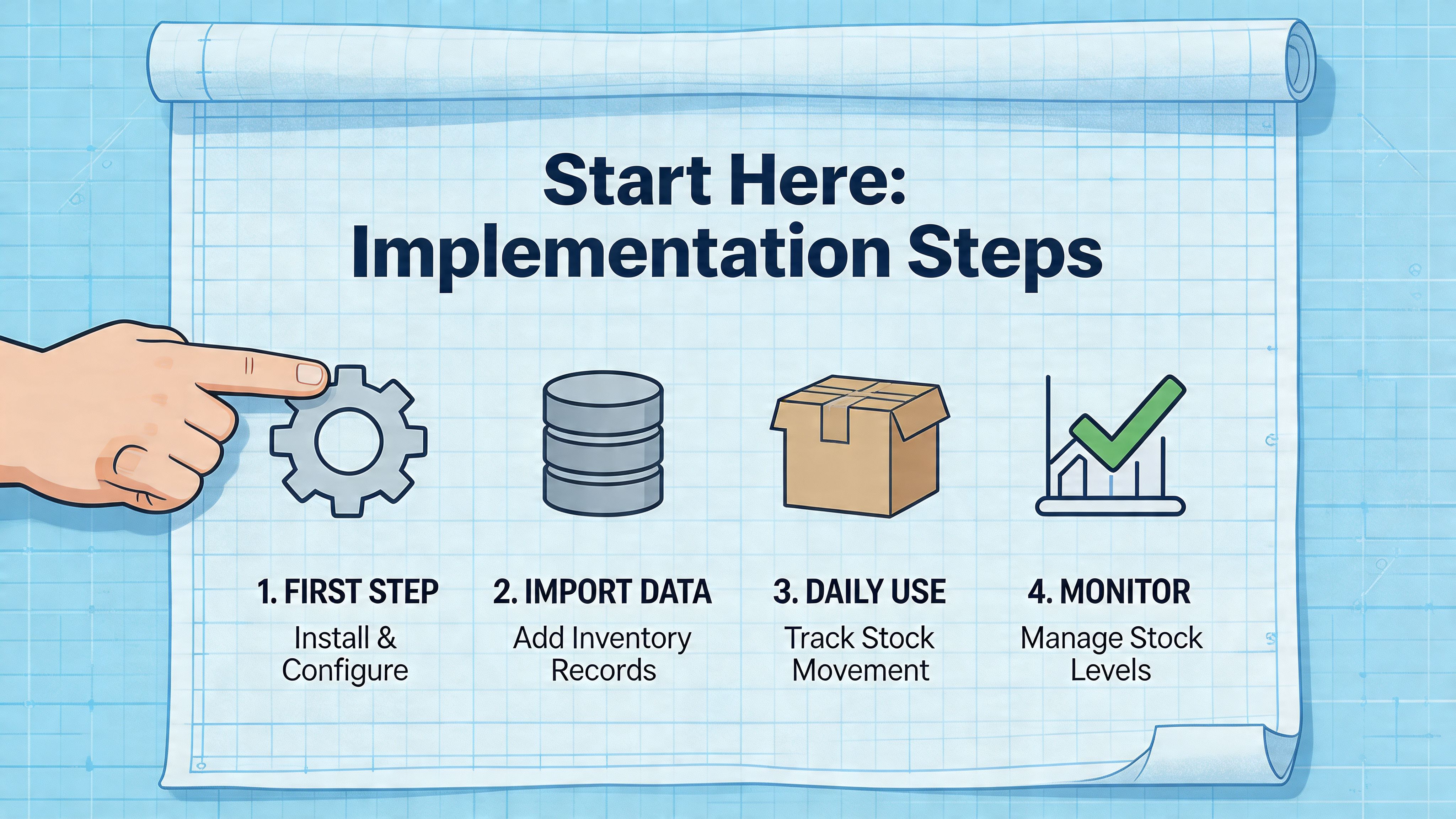
Step one is data clean-up
Before you switch anything on, sort the basics:
- SKU structure: One product, one consistent identifier
- Product names: Clear enough that your warehouse and support team won’t confuse them
- Supplier records: Current lead times, pack sizes, contact details
- Location logic: Decide how bins, shelves, or warehouses will be named
- Bundle definitions: Map parent products to component SKUs correctly
If your catalogue is messy, the software will make the mess visible faster.
Phase the rollout
The safest implementation usually happens in layers.
First layer
Get the catalogue, stock levels, and Shopify connection right. Don’t pile every workflow into week one.
Second layer
Add purchasing and receiving to begin properly controlling inbound stock.
Third layer
Bring in barcode scanning, location tracking, bundles, or additional channels once the core is stable.
That sequencing matters because each layer depends on the one before it.
Build the workflows people will actually follow
The strongest system in the world won’t help if the team bypasses it whenever things get busy.
Good daily workflows are usually simple.
Daily
Check exceptions, not everything. Look for failed syncs, low-stock alerts, pending receipts, and odd adjustments.
Weekly
Review incoming purchase orders, products approaching reorder point, and any inventory discrepancies found during fulfilment.
Monthly
Run a broader review of dead stock risk, supplier reliability, and whether reorder settings still fit current demand.
A workflow is healthy when a new team member can follow it without asking what the spreadsheet on someone’s laptop is for.
Use automation where it removes repeated judgement calls
Automated reordering in UK ecommerce systems can reduce stockouts by 28% and excess inventory by 22%, while barcode scanning during receiving can improve accuracy to 98% and save up to 15 hours per week on manual checks and vendor disputes according to RFgen’s review of inventory software features.
Those gains don’t come from “AI magic”. They come from replacing repeated manual checks with consistent rules.
Examples include:
- Reorder points: Trigger purchasing before stock becomes urgent
- Receiving scans: Confirm what arrived, not what was expected
- Low-stock alerts: Surface exceptions early
- Cycle counts: Check a subset of products regularly instead of waiting for a painful full stocktake
Why cycle counting beats heroic stocktakes
Many founders only count stock when something feels badly wrong. By then, the gap has widened.
Cycle counting is more practical. You count selected products on a schedule, especially fast movers and expensive items, so errors get found while they’re still small.
That creates trust in the system because the data gets corrected continuously.
Connect operations with customer-facing work
Implementation isn’t just back-office admin. It changes what your customers experience.
If your stock data is dependable, your support team can answer with confidence. Your sales tools can recommend available products. Your fulfilment promises get safer. That’s why this operational work pairs naturally with broader automation in customer service, where cleaner operational data reduces avoidable support volume.
Common Pitfalls That Can Silently Sink Your Profits
Most software demos show a smooth, elegant world. Orders sync instantly. stock is always correct. Every system speaks perfectly to every other system.
Real operations are messier.
The real-time myth
A critical gap in many systems is the delay between channel sales and inventory updates. Many platforms promise real-time sync, but delays of even a few minutes can cause major overselling during high-traffic periods, especially for smaller merchants without fallback plans, as noted by Fishbowl’s discussion of ecommerce inventory management techniques.
That matters because “real-time” often means “fast enough under normal conditions”, not “instant under stress”.
If you sell limited stock, run promotions, or see sudden spikes around launches, those small timing gaps become expensive windows.
What to ask vendors:
- What qualifies as real-time in practice?
- What happens if a channel connection fails?
- How are failed updates flagged to staff?
- Can the system reserve stock safely during volume spikes?
If the answers are fuzzy, assume the failure mode will become your team’s problem.
Data fragmentation hides profit leaks
A lot of merchants improve stock visibility and still struggle with margin visibility.
They know how many units are on hand. They don’t know which SKUs are tying up cash, which products carry hidden cost, or whether a “best seller” is earning enough after purchasing and fulfilment complexity.
Fragmented systems cause significant problems. Shopify may show sales. Your accounting platform may show totals. A spreadsheet may hold supplier notes. Someone else tracks warehouse adjustments elsewhere. Each tool has part of the picture, but nobody sees the full one quickly.
The result is a slower answer to questions that matter:
- Which SKUs should we reorder first?
- Which lines deserve clearance instead of another buy?
- Which channels create more operational friction than they’re worth?
Financing pressure makes bad inventory decisions worse
When cash gets tight, founders often make rushed stock decisions. They cut reorders too severely, then create stockouts. Or they overbuy one line to secure terms, then tie up cash where it can’t move.
That’s why inventory and funding decisions are closely linked. Even though the context is different from the UK, this piece on Inventory Financing for UAE SMEs is useful for thinking about inventory as a working-capital problem, not just an operations one.
Software doesn’t remove hard trade-offs. It helps you see them earlier, while you still have options.
The quietest failure is false confidence
The most dangerous setup isn’t obvious chaos. It’s a system that looks tidy while key assumptions are wrong.
A dashboard says stock is healthy. Orders still slip through. Purchasing seems organised. Then a supplier delay lands, a return is miscounted, or a bundle mapping breaks, and your “single source of truth” turns out to be a thin layer over disconnected processes.
That’s why the best merchants don’t just ask what the tool can do. They ask how it fails.
Conclusion Unifying Inventory and Customer Experience
Inventory work can feel like pure operations. Shelves, SKUs, purchase orders, receiving rules. But customers feel the result long before they ever see your warehouse.
They feel it when the product they want is available. They feel it when checkout reflects real stock. They feel it when an order ships without a follow-up apology. They also feel it when none of that happens.
In the UK, poor inventory management contributes to average inventory accuracy of 83%, and real-time systems can boost stock accuracy by 35% and customer satisfaction by 20% according to Anchor Group’s inventory management statistics. That’s the bridge between operations and growth. Better inventory data doesn’t just help the warehouse. It protects conversion and trust.
The founder takeaway
You don’t need the most complex platform on the market. You need a dependable system that matches your current stage, fits your team, and gives you numbers people can act on without hesitation.
For a small-to-midsize Shopify merchant, that usually means three things:
- One stock truth: Not Shopify in one tab and a spreadsheet in another
- Clear replenishment logic: So buying decisions aren’t just gut feel
- Daily operating discipline: Because software only works when people use it properly
Where the customer experience comes back in
The front end of your store and the back end of your inventory should support each other.
When inventory is accurate, customer-facing tools can confidently answer availability questions, suggest alternatives that are in stock, and reduce the support load created by uncertainty. When inventory is unreliable, every sales and support interaction gets harder.
That’s why good inventory management software ecommerce isn’t just an ops upgrade. It’s part of the buying experience.
Customers don’t separate “operations” from “service”. They just remember whether you kept your promise.
If you fix the stock truth, a lot of other problems get smaller. Refunds fall. Support gets easier. Purchasing gets calmer. Your team spends less time guessing and more time deciding.
If you want the customer-facing side of that system to work just as hard as the back end, Marvyn AI gives Shopify merchants a fast way to turn accurate catalogue data into better conversations and more sales. It syncs with your store, answers product and policy questions automatically, recommends relevant items, and helps shoppers move to checkout without adding more support workload to your team.