Messenger for Website: Maximize Sales in 2026

A lot of Shopify stores hit the same ceiling.
Sales come in, traffic looks healthy, and then the inbox starts eating the day. Customers ask about sizing, delivery times, returns, stock, bundles, shade matching, compatibility, and whether a product is right for them. Some of those people would buy if they got a fast answer. Many leave when they don’t.
That’s why a messenger for website matters. It isn’t just a chat bubble in the corner. It’s a choice about how your store sells, how your team works, and what kind of customer experience you can afford to deliver at scale.
For some brands, that choice should stay human-led. For others, a hybrid setup makes more sense. And for lean teams, full AI automation can be the difference between being stuck in support and running the business.
What Is a Website Messenger and Why Does It Matter Now
If you run a store yourself, this scenario is familiar. A customer lands on a product page, likes what they see, but has one question. They want to know if the item fits true to size, whether shipping is fast enough, or if they can return it easily. They don’t email. They don’t call. They leave.
A website messenger solves that moment.
It sits on your site like a sales associate on the shop floor. Not a pushy one. A useful one. It answers basic questions, points people to the right products, and keeps the conversation moving while the customer is still in buying mode.
More than a support widget
Most store owners first think about chat as a support tool. That’s too narrow.
Used properly, a messenger for website does three jobs at once:
- Pre-sales guidance: It answers buying questions before hesitation turns into abandonment.
- Support deflection: It handles repeat questions about shipping, returns, and policies.
- Conversion assistance: It recommends products, bundles, and next steps.
That’s why it belongs in the revenue conversation, not just the support conversation.
A good messenger should feel like your best staff member handling the first layer of every customer interaction, without needing a rota.
For brands that want to see how AI chat is being used more broadly across websites, Up North Media’s overview of AI Chat Bots is a useful reference point. It helps frame where automation fits when the goal is business efficiency, not novelty.
Why it matters now
Customer expectations have moved faster than most support teams. People shop late, compare options quickly, and expect answers inside the session, not the next morning.
That creates pressure on small teams. If you reply manually, coverage is limited. If you don’t reply, buyers disappear. If you hire aggressively, support costs rise before revenue catches up.
A messenger for website gives you a middle path. It keeps conversations active even when you’re offline, and it can turn product pages into guided buying experiences rather than static catalogues.
If you’re still weighing chat against traditional support channels, this breakdown of live chat on a website is a helpful companion because it shows where real-time conversation changes buyer behaviour most.
The Business Case for Conversational Commerce
The commercial case is straightforward. In the UK, online retail sales reached £127 billion in 2024, chat-based support can reduce cart abandonment by up to 20%, and over 40 million businesses use Messenger to automate customer service and product catalogue interactions according to DataReportal’s Messenger statistics.
Those numbers matter because they point to the same thing. Shoppers buy more easily when they can ask questions in the moment.
Conversion improves when friction drops
Most ecommerce friction isn’t dramatic. It’s small uncertainty.
A customer wonders whether a gift will arrive on time. Another isn’t sure which variant fits their use case. Someone else hesitates at checkout because they can’t find the returns policy quickly. None of that means the product is wrong. It means the path to confidence is incomplete.
A messenger closes that gap. Instead of forcing the visitor to hunt through menus, open a new tab, or wait for email support, it gives the answer in context.
That’s the difference between browsing and buying.
AOV rises when chat acts like assisted selling
The biggest missed opportunity in many stores isn’t support. It’s the lack of guidance.
In a physical shop, a good staff member doesn’t just answer questions. They ask one or two useful follow-ups, narrow the options, and suggest the obvious add-on. Ecommerce often skips that entirely.
A messenger can bring that behaviour online. It can help shoppers choose between products, explain trade-offs, and recommend complementary items when the timing is right.
Practical rule: If your products need explanation, comparison, or reassurance, your messenger should be part sales assistant, not just a help desk.
That matters even more for brands selling higher-consideration products, products with multiple variants, or collections that benefit from curation. If you’re exploring where AI fits into that wider sales workflow, this guide to AI for sales is worth reading.
Support costs fall when repetitive work is removed
A lot of support volume is predictable. Delivery times. Return windows. Exchange process. Product availability. Order policies.
When humans answer the same questions all day, the team becomes expensive and slow at exactly the wrong moments. They spend time on low-value repetition instead of complex issues, exceptions, or premium customers.
Conversational commerce shifts that workload. The messenger handles the repeated front-line questions, and humans step in where judgement matters. That’s the part many stores miss. The business case isn’t just “add chat”. It’s “reassign human attention to the work only humans should do”.
For lean brands, that can mean avoiding an early support hire. For larger teams, it can mean protecting service quality during busy periods without drowning in backlog.
Comparing the Three Main Messenger Approaches
Not every messenger setup solves the same problem.
Some stores need white-glove guidance. Some need after-hours coverage. Others need to stop drowning in repetitive questions. That’s why the right choice isn’t “which app has the nicest widget”. It’s which operating model fits your store.
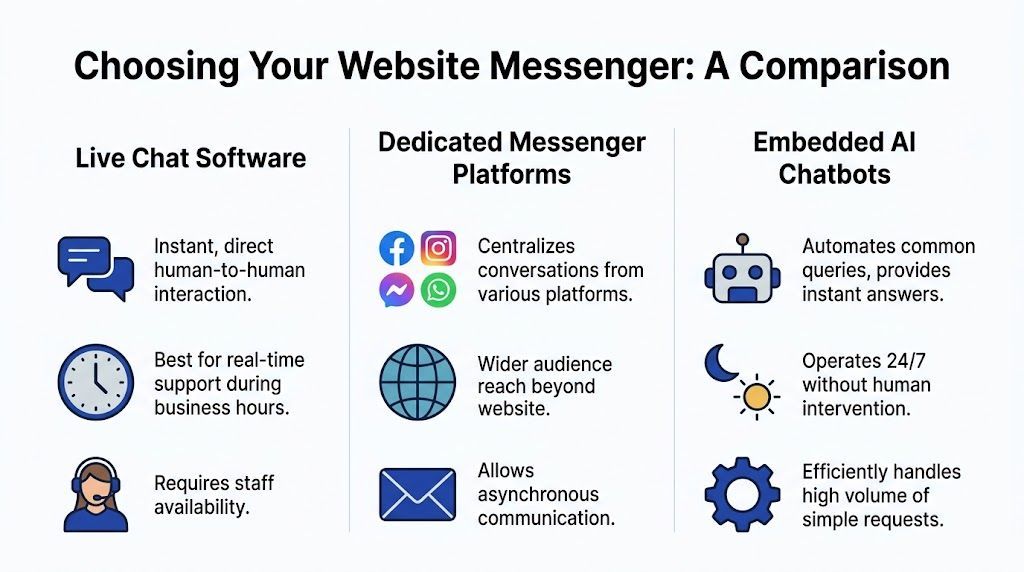
Three approaches that look similar but behave differently
The first model is live chat run by humans only. This works well when your brand promise depends on personal service and you have staff available to respond quickly. The upside is nuance. The downside is coverage and cost.
The second is the hybrid model. This usually combines scripted flows, FAQ automation, and human takeover. It’s common in tools that sit between classic support software and full automation. For many stores, it’s a practical middle ground.
The third is autonomous AI messaging. Here, the messenger handles a large share of conversations on its own, drawing on product data, policies, and website content. According to this system design analysis of messenger apps, AI-driven web messenger integrations on Shopify can achieve up to an 85% reduction in live chat ticket volume, respond in an average of 1.2 seconds versus 45 seconds for human agents, autonomously handle over 70% of inquiries, and boost conversion rates by as much as 22%.
Messenger Approach Comparison
What works and what usually doesn’t
Human-only live chat works when:
- Your average order is high: Buyers expect conversation and reassurance.
- Your team is trained in selling: Agents can guide, not just answer.
- You can maintain response speed: Slow human chat is worse than no chat.
It struggles when:
- Coverage is patchy: An unattended widget teaches visitors that help isn’t available.
- Questions are repetitive: Staff time gets wasted on policy copy-paste work.
Hybrid systems work when:
- You want a safety net: Simple questions are automated, edge cases go to a person.
- You already have support staff: Handoffs can be handled properly.
They struggle when:
- The bot is too shallow: If it only pushes canned answers, customers hit dead ends fast.
- Ownership is unclear: Nobody tunes flows, so the system decays.
Autonomous AI works when:
- Your catalogue and policies are well organised: The model needs clean information.
- You want 24/7 coverage without adding headcount: That’s the core use case.
- You sell products that benefit from guided recommendations: Chat becomes a sales channel.
It struggles when:
- The setup is lazy: If the tool hasn’t been trained on your real policies and product language, answers become generic.
- There’s no escalation path: Some conversations still need a human.
If you’re sorting through that trade-off from a support operations angle, this guide to chatbots for customer service helps clarify where automation carries the load and where people still need to stay in the loop.
How to Choose the Right Messenger for Your Shopify Store
Choose your messenger the same way you’d choose a fulfilment setup. Start with business reality, not features.
A lot of stores buy chat software because the demo looks polished. Then they discover they’ve bought a staffing problem, a compliance problem, or another app that nobody maintains. The better question is simpler: what role should conversation play in your business model?
Start with the pressure point
If your team spends the day answering the same support questions, you need deflection.
If your products need explanation before purchase, you need guided selling.
If your brand trades on concierge-level service, you probably need human conversations at key moments even if automation handles the front door.
That distinction matters because a messenger for website can be a cost-control tool, a revenue tool, or a service layer. It can do all three, but one of those goals should lead.
Ask yourself:
- Are most queries repetitive or consultative?
- Do customers need reassurance before buying, or mostly operational answers after buying?
- Do you have people available to respond quickly, every day?
- Would a delayed reply cost sales, or just delay resolution?
Compliance isn’t optional
For UK stores, security and privacy shouldn’t sit at the bottom of the checklist. According to the TI-Messenger specification referenced for secure messaging standards, UK GDPR mandates end-to-end encryption for web messengers handling personal data, and benchmarks show UK Shopify stores with E2EE messengers report 47% fewer phishing incidents while handling 500k daily encrypted messages with minimal performance overhead.
That changes the buying criteria.
A messenger isn’t just a front-end widget. It’s part of how customer data moves through your business. If a shopper shares an address issue, order detail, or personal information in chat, your tool choice becomes a compliance decision.
If you sell in the UK, treat messenger selection like payment gateway selection. Convenience matters, but security standards decide the shortlist.
Match the model to the store
A solo founder often needs automation first. A growing brand with a small CX team may need hybrid routing. A mature brand with high-touch service expectations may still anchor on people.
A practical approach is:
- Lean store, small team: Prioritise automation, easy setup, and strong FAQ handling.
- Mid-size DTC brand: Prioritise handoffs, catalogue sync, and workflow control.
- Premium or complex purchase journey: Prioritise consultative flows and clear human takeover.
If you’re building your stack more broadly, Wand Websites’ roundup of Best Shopify Apps to Increase Sales is useful because it places chat tools in the wider context of conversion-focused apps, not as a standalone add-on.
For stores evaluating support specifically inside Shopify, this guide to Shopify chat support helps map tool choice to team structure and customer expectations.
Your Step-by-Step Implementation Checklist
Most chat projects don’t fail because the idea is wrong. They fail because setup gets treated like installing a button.
1. Audit the questions you already get
Before you install anything, compile the questions customers ask.
Look at inboxes, live chat logs, contact forms, and DMs. Group them into themes such as shipping, returns, sizing, product matching, care instructions, and stock. That becomes the base knowledge your messenger needs.
Don’t start with every edge case. Start with the repeat questions that consume the most time.
2. Decide what the messenger should own
Not every conversation belongs in automation.
Write down three buckets:
- The messenger handles fully: FAQs, policy questions, product discovery, basic recommendations.
- The messenger starts, then hands off: nuanced pre-sales advice, order-specific issues, complaints.
- Humans handle from the start: sensitive cases, VIP accounts, escalations, unusual requests.
That one exercise prevents most bad chatbot experiences.
3. Choose a Shopify-friendly setup
For non-technical owners, ease of installation matters more than feature overload.
Look for:
- Native Shopify connection: Product catalogue, collections, pages, and policies should sync cleanly.
- Simple design controls: You should be able to match colours, logo, and tone without custom development.
- Clear escalation rules: If a customer needs a person, the route should be obvious.
If setup depends on too many manual workarounds, it’ll become brittle fast.
4. Train the messenger on your real store language
The messenger should sound like your brand, not like software.
Feed it your actual returns policy, shipping language, product descriptions, and FAQs. If your tone is plain and friendly, keep it that way. If your products need careful explanation, reflect that in the prompts and answers.
Messengers perform better when they answer like your store already speaks, not when they imitate generic support copy.
5. Configure prompts with restraint
A messenger should invite conversation, not interrupt it.
Use short prompts on pages where hesitation is common. Product pages, cart, delivery information, and bundle pages are the usual starting points. Skip the temptation to trigger pop-ups aggressively across every page.
6. Test handoffs before launch
Open the widget on desktop and mobile. Ask common questions. Try confusing phrasing. Trigger an escalation.
Check whether:
- Answers are accurate
- Links go to the right place
- Escalations reach the right person or form
- The widget looks clean on mobile
Most launch issues show up in these simple tests.
Best Practices for Driving Sales and Support
A messenger starts producing value when it stops acting like a passive help icon.
It should step in where buyer hesitation is highest, stay quiet where it isn’t needed, and route complex situations cleanly. That balance is what separates a useful sales channel from a widget people ignore.
Use page-specific prompts
The fastest way to make chat feel relevant is to match the prompt to the page.
Generic prompts like “Hi, how can I help?” rarely do much. Contextual prompts work better because they reflect what the shopper is already trying to do.
Examples:
- On product pages: “Need help choosing the right option?”
- On collection pages: “Want help narrowing this down?”
- On the cart page: “Any questions before you check out?”
- On shipping or returns pages: “Need a quick answer about delivery or returns?”
Keep prompts short. They should open the conversation, not front-load it.
Build a clean escalation path
The strongest automation setups know when to stop.
A customer asking whether an item suits a use case can stay in chat. A customer reporting a failed delivery with account-specific details may need a person. A customer frustrated about a damaged order definitely needs a person.
A simple routing model often works best:
- Answer the common question
- Ask one clarifying follow-up if needed
- Escalate when the issue becomes specific, sensitive, or emotional
That keeps the messenger helpful without forcing customers through a maze.
For a broader framework on balancing efficiency and service quality, these customer service best practices are worth reviewing.
Train for recommendations, not just replies
Support-only chat leaves money on the table.
If a customer asks whether a product is suitable, the messenger should be able to guide them to the correct option. If someone is comparing two products, it should explain the difference in plain language. If a complementary item improves the purchase, it should suggest it naturally.
That’s where an autonomous tool can be useful. Marvyn AI is one example of a Shopify-focused option that syncs catalogue and policy data, handles product and support questions, and routes more complex cases to humans when needed.
The best sales prompts don’t feel like upsells. They feel like competent advice from someone who understands the catalogue.
A quick walkthrough can help when you’re shaping that behaviour in practice:
Capture after-hours intent
If nobody is available overnight, the messenger should still move the conversation forward.
Good after-hours behaviour includes:
- Collecting the customer’s question clearly
- Offering relevant policy or product answers immediately
- Pointing to the next best action, such as a product page or contact route
- Passing context to the team if a human follow-up is needed
That way, the conversation doesn’t die just because the office is closed.
Measuring Success Key KPIs to Track
Most stores measure chat poorly.
They count conversations, glance at response time, and assume the widget is working. That misses the key question. Is the messenger making the store more efficient and more profitable?
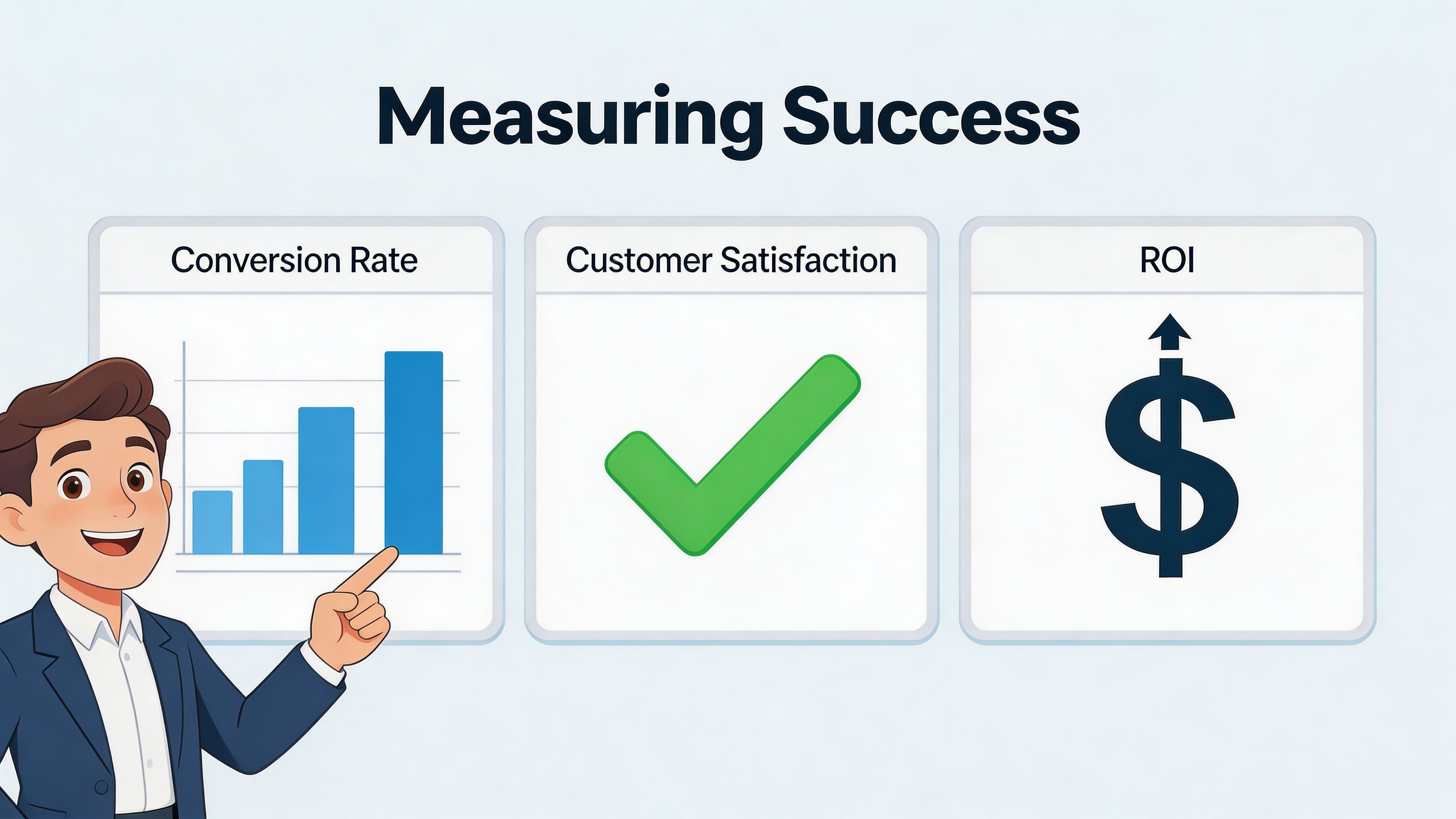
By April 2017, Facebook Messenger had reached 1.2 billion monthly active users, and UK case studies cited in this review note that consultative selling via chat can increase AOV by 15-25%, which is why these Messenger usage statistics still matter for ecommerce operators thinking about chat as a sales channel, not just a support tool.
The metrics that actually matter
Ticket deflection
This is the share of conversations resolved without a human.
If deflection is low, your messenger may be too shallow, badly trained, or missing obvious policy information. If it’s high but customers still contact support later, the answers may not be good enough.
Conversion rate from chat
Track how often people who interact with the messenger go on to buy.
This tells you whether the tool is reducing friction in the buying journey. It’s one of the clearest ways to see whether your chat experience is helping revenue or just creating activity.
Average order value of chat users
Compare AOV for visitors who use chat against visitors who don’t.
If the messenger is guiding choices well, surfacing the right products, and recommending add-ons sensibly, this number should move in the right direction.
First response time
Fast replies matter because chat is an in-session channel.
Even if your team is involved only for escalations, the opening experience should feel immediate. Customers don’t open a messenger because they want to wait in a queue.
Read the numbers together
No single KPI tells the whole story.
A messenger can deflect tickets but hurt sales if answers feel robotic. It can raise engagement but fail operationally if handoffs break. It can produce lots of chats but little commercial value if prompts are broad and untargeted.
Look for patterns:
- High chat volume, low conversion: prompts may be attracting low-intent conversations
- Strong deflection, poor satisfaction: the messenger is resolving too aggressively
- Good conversion, low AOV: it’s helping decisions but not recommending effectively
Treat messenger reporting like store reporting. Revenue, efficiency, and customer experience should all improve together.
Frequently Asked Questions
Is a messenger for website worth it for high-ticket products
Yes, often more than for low-consideration products.
High-ticket buyers usually need clarification before purchase. They want reassurance, comparison, and context. A messenger helps when it can answer detailed pre-sales questions and escalate to a human for nuanced advice.
What doesn’t work is using a shallow FAQ bot for an expensive purchase. That feels dismissive. For high-ticket stores, the messenger should qualify, explain, and hand off gracefully when needed.
Can a chatbot still feel on-brand
It can, if you train it properly.
Most robotic chat experiences come from generic setup. The language is bland, the answers are vague, and the tone has no relationship to the brand. If you load the messenger with your real policies, product language, and preferred style, it can sound far more natural.
Keep the writing plain. Short sentences usually work better than over-polished support copy.
Should I replace my support team with automation
Usually no. You should redesign what your team handles.
The strongest setups remove repetitive work from humans so they can focus on exceptions, edge cases, complaints, and valuable pre-sales conversations. That’s different from removing people entirely.
For many stores, the right model is not all-human or all-AI. It’s letting automation handle the front line and giving humans the conversations where judgement matters.
Do I need Messenger specifically, or just a chat widget
That depends on how your customers already communicate with you.
Some brands benefit from connecting with existing messaging behaviour. Others mainly need an on-site conversational layer tied tightly to Shopify product and policy data. The important decision isn’t the label. It’s whether the tool supports your sales process, support volume, and operating model.
What’s the biggest mistake store owners make
They install chat before deciding what success looks like.
If you don’t define whether the messenger exists to increase conversion, reduce ticket volume, support international customers, or preserve high-touch service, the setup becomes muddled. Prompts become random. Escalations break. Nobody knows whether it’s working.
A messenger should have a job description.
How do I stop customers getting stuck in loops
Keep fallback behaviour simple.
If the messenger can’t answer clearly after a reasonable attempt, it should acknowledge that and route the conversation onward. Don’t force repeated rephrasing. Don’t hide contact options. Don’t pretend the bot understands when it doesn’t.
That one decision protects trust.
Is this useful for B2B ecommerce as well
Yes, especially when buyers need product guidance, compatibility information, or quick access to policies and specifications.
B2B buyers also value speed. They may not want a sales call for every question. A messenger can handle early qualification and information gathering, then hand the conversation to sales or account management at the right point.
What if I’m non-technical
Then simplicity should be a buying criterion, not an afterthought.
Pick a tool with straightforward Shopify integration, clear content controls, and an obvious handoff process. Avoid setups that depend on ongoing technical fixes unless you have support for that internally.
A messenger should reduce operational burden. It shouldn’t create a new one.
If you want a messenger that’s built for Shopify and designed to automate a large share of support while helping shoppers choose products, take a look at Marvyn AI. It’s a practical option for stores that want conversational commerce to improve sales and reduce support load without turning setup into a development project.