Shopify App Creation: A Complete 2026 Guide

You’re probably here because Shopify almost does what you need, but not quite. There’s a workflow that still lives in spreadsheets, a customer question that keeps hitting your inbox, or a store process that breaks as soon as volume picks up. That’s usually where shopify app creation starts. Not with code, but with friction.
Founders often approach app ideas from one of two directions. They either need to solve a painful internal problem for their own store, or they’ve spotted the same gap across multiple merchants and want to turn that insight into a product. Both are valid. The important part is knowing whether you’re building an operational tool, a product business, or a one-off custom solution before you open your editor.
A strong Shopify app isn’t just technically correct. It fits merchant behaviour, respects Shopify’s constraints, and creates enough value that merchants keep it installed after the first week.
The Opportunity in Shopify App Creation
A common starting point looks like this. A merchant keeps answering the same pre-sales questions, patching together apps that don’t speak to each other, or manually moving data between systems. After a while, buying another tool stops making sense. Building one starts to look more sensible.
That instinct isn’t niche. The Shopify ecosystem is large enough now that a focused app can solve a very specific problem and still find a market. According to Shopify App Store statistics collected by Uptek, the App Store grew to over 11,905 apps by late 2024, and developers have collectively earned over $1.5 billion. The same source notes that 87% of merchants rely on apps and use an average of 6 apps to run their stores.

That doesn’t mean “build anything and it will sell”. It means demand already exists for tools that remove friction inside real merchant workflows. The best opportunities usually aren’t broad ideas like “marketing dashboard” or “AI tool”. They’re narrow, costly problems tied to revenue, support load, fulfilment, merchandising, or compliance.
Where the real opportunity sits
Three patterns tend to produce better app ideas than brainstorming in a vacuum:
- Operational pain inside a live store. If a merchant repeats the same manual task every day, there’s app potential.
- A pattern across several merchants. If five stores ask for the same workaround, that’s stronger than one clever idea.
- A missing bridge between existing systems. Apps often win by connecting tools rather than replacing them.
A good way to sanity-check demand is to study how successful merchants structure their stack and customer journey. Looking through practical Shopify store examples helps because you can often spot where apps create the true advantage behind the storefront.
Build for a painful workflow, not a trendy feature. Merchants keep paying for tools that save time, protect revenue, or reduce mistakes.
Your Blueprint Choosing the Right App Type
The first strategic decision in shopify app creation isn’t framework, database, or hosting. It’s distribution. You need to decide whether you’re building for the App Store, for one client, or for your own operation.
Pick the wrong app type and the business model breaks before the code does.
Public vs Custom vs Private Shopify Apps
Public apps suit product builders
If you want recurring revenue and broad distribution, you’re building a public app. This is the right path when the problem is common across merchants and your feature set can stay reasonably standard.
Public apps can scale well, but they demand discipline. You need onboarding, billing, support, documentation, release management, and a clear reason to exist among thousands of alternatives. You’re not just building software. You’re running a SaaS product inside someone else’s platform rules.
For developers who want a practical look at App Store expectations, this Shopify public app development guide is useful because it frames the public route as a product decision, not just a coding exercise.
Custom apps suit service businesses
Custom apps are often the best choice for agencies and freelancers. A merchant has a specific operational problem. You build exactly what they need. Scope is negotiated upfront, the revenue is clearer, and you don’t need to win App Store search.
This route works well when the workflow is too specific for a broad audience. Think internal stock allocation logic, bespoke ERP sync rules, or specialised customer service tooling. It’s also a strong route if you want to validate a problem before turning it into a broader product later.
Private apps are not the starting point anymore
Private apps still come up in conversations because older merchants and developers remember them. But for new builds, they’re not the route to optimise around. If you’re solving something for one merchant today, use the current custom app model rather than designing around a deprecated concept.
How to choose without overthinking it
Use this decision filter:
- Choose public if the same problem appears across unrelated merchants.
- Choose custom if one merchant will pay for a highly specific solution now.
- Avoid planning around private unless you’re maintaining a legacy implementation.
There’s also a practical behavioural clue. If your app idea depends heavily on merchant education and long setup, public distribution gets harder. If the value is obvious in a few minutes, public becomes more attractive.
A lot of founders overestimate how broad their first app should be. Narrow usually wins early. A customer-service workflow app for a defined merchant type often performs better than a general support tool that tries to serve everyone. If you’re exploring support-focused use cases, this look at chatbots for customer service is useful for understanding where merchants expect direct commercial value rather than nice-to-have automation.
Decision rule: Don’t pick the app type that sounds biggest. Pick the one that matches how you’ll acquire users, support them, and get paid.
Building Your Foundation The Tech Stack and Architecture
A founder gets the app idea right, signs up a design partner, and then loses two weeks rebuilding the project setup. I see that pattern a lot. The product decision was sound. The technical starting point was not.
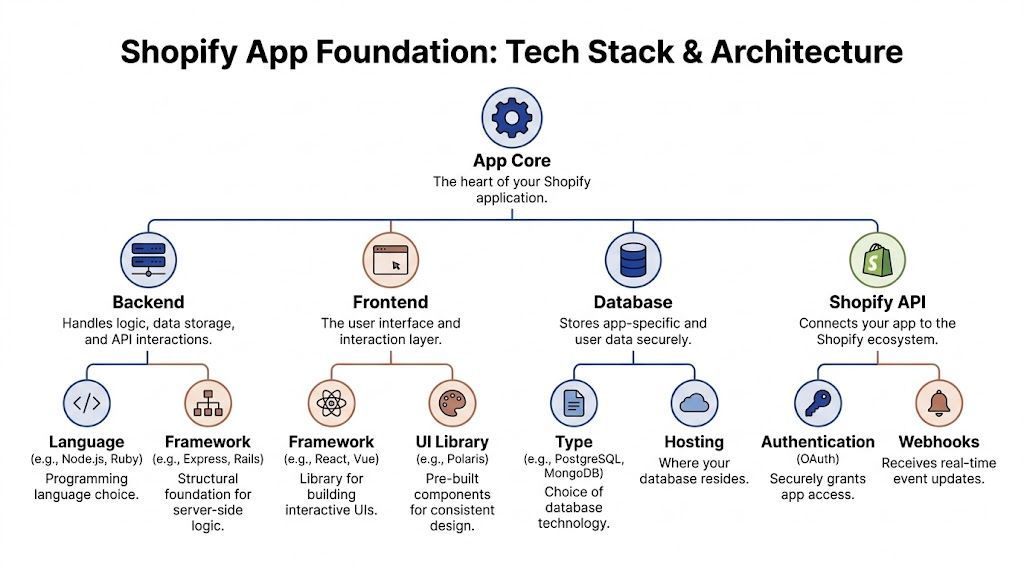
Your first architecture choice affects build speed, review risk, support load, and how hard the app is to change six months later. That is why this part matters to both founders and developers. It is not just about picking tools you like. It is about choosing a setup that matches the app type you chose in the last section and the business model behind it.
Start with the Partner setup, but treat it as a test environment
Create a Shopify Partner account and at least one development store before writing product code. Use that environment to test installs, permissions, billing flows, app navigation, and error states without risking a live merchant store.
This is also where good teams catch business problems early. If the onboarding feels confusing in a dev store, merchants will abandon it in production. If your app writes messy test data, your support burden will rise later. For teams working with UK or EU merchants, this is also the right place to verify cookie behaviour, consent flows, and how merchant data moves through the app under realistic conditions.
Pick the stack Shopify supports best
For a first Shopify app, the shortest path is usually:
- Node.js for the backend
- React for the admin UI
- Polaris for interface consistency
- Shopify CLI for scaffolding and local development
That stack is popular for a reason. It lines up with Shopify’s tooling, examples, and embedded app model, so setup friction stays lower.
Other choices can still be sensible. Rails is a strong option if your team already ships production systems in Rails and can move faster there than in Node. Laravel can work if you have deep PHP experience. The trade-off is straightforward. The further you move from Shopify’s common path, the more of the integration surface you maintain yourself, from auth edge cases to embedded app behaviour. Founders should care about that because custom integration work turns into slower iteration and a higher support cost.
Choose architecture based on merchant workflow, not personal preference
Most new Shopify apps should be embedded inside Shopify Admin. Merchants stay in the product they already use, context is easier to preserve, and the experience feels more trustworthy.
Standalone apps make sense in narrower cases. Analytics products with dense reporting, multi-store operations tools, or systems that also connect to Amazon, ERP, or retail POS workflows often need more screen space and a broader navigation model. That flexibility comes with a price. You have to manage authentication, merchant context, redirects, and session behaviour more carefully because Shopify is doing less of that work for you.
A lot of first-time builders choose standalone because it feels more familiar. Then they discover the cost: extra login friction, weaker onboarding, and more places for state to break.
A starter architecture that holds up under real use
A practical first version usually includes these pieces:
- Shopify CLI app scaffold
Use it to generate the app shell, local development flow, and the core platform wiring.
- Backend service
Handle OAuth, session management, API calls, billing logic, and webhook verification.
- React and Polaris frontend
Build onboarding, settings, usage views, and merchant controls in a way that fits Shopify Admin.
- Persistent database
Store installs, merchant settings, app state, and any data your product needs beyond a single request.
- Queue or background worker
Process imports, sync jobs, report generation, and other slow tasks outside the request cycle.
- Webhook processing layer
Receive store events, verify them, and update your app state reliably.
That may sound heavier than a simple MVP. In practice, it saves time. Teams that skip the database model, process long jobs in the request thread, or treat webhooks like ordinary controller actions usually rebuild those parts after the first few active merchants.
Build for boring reliability first. A merchant will tolerate limited functionality longer than broken installs, stuck syncs, or admin screens that spin forever.
Performance starts at architecture, not polish
Slow apps do not only frustrate users. They reduce trial-to-paid conversion, create support tickets, and make App Store review harder. The usual causes are architectural, not cosmetic: too much data fetched on first load, synchronous processing for long-running tasks, and UI screens that try to do everything at once.
A few decisions prevent that early:
- Keep the first screen narrow. Load the one action or insight the merchant needs first.
- Move heavy work to background jobs. Return a status update instead of making the browser wait.
- Query only what the screen needs. Broad API requests increase latency and complexity.
- Use Polaris with discipline. Consistent components help, but they do not fix wasteful rendering.
- Design around Shopify’s operating model. Merchant actions in Admin, app logic, and store events all interact. This guide on how Shopify works behind the scenes is useful if you want a clearer mental model before locking in architecture.
Good Shopify app creation is rarely about picking the fanciest stack. It is about choosing a foundation that helps you ship, pass review, support merchants, and keep the codebase changeable as the product finds its market.
Working with Shopify APIs and Webhooks
A Shopify app becomes useful the moment it can read store context, take action safely, and react to changes without polling everything all day. That work revolves around authentication, API selection, and webhooks.
Authentication and scopes
For public and custom apps, access starts with OAuth. The practical way to think about OAuth is permissioned entry. A merchant installs your app, Shopify asks what the app wants to access, and the merchant approves or denies that request.
The key decision is scope design. Ask for too much and merchants get suspicious. Ask for too little and your app can’t do its job. Good apps request the minimum needed for the initial use case, then expand only when the merchant enables a feature that requires more.
A sloppy scope request creates business damage, not just technical noise. Merchants read permission screens as a trust signal. If your app asks for orders, customers, products, and content access when it only needs one of those, you’ve made the sale harder.
Admin API and Storefront API
These two APIs do different jobs.
The Admin API is for store operations. Use it when your app needs to read or write products, orders, customers, discounts, content, or app-managed settings. If the app changes how the merchant runs the store, you’re probably in Admin API territory.
The Storefront API is for customer-facing buying experiences. It matters when you’re building headless storefronts, custom shopping flows, mobile buying interfaces, or external experiences that still need live commerce data.
A lot of beginners mix them up and then architect around the wrong boundary. If your app lives in admin and solves operational tasks, start with Admin API thinking. If you’re shaping what the shopper sees and does outside the standard theme layer, Storefront API becomes relevant.
Why GraphQL usually makes more sense
GraphQL fits Shopify well because it lets you ask for exactly the fields you need instead of dragging back oversized payloads. That’s good for performance, easier to reason about in the UI, and usually cleaner than overfetching through older patterns.
It also forces better thinking. You stop treating the API like a giant dump of objects and start designing specific data contracts for each screen and workflow.
A simple rule helps here:
- Use focused queries for UI rendering
- Use mutations for explicit actions
- Keep data requirements close to the feature that uses them
That usually produces cleaner code than large service layers that return everything “just in case”.
Webhooks are the app’s event nerve system
Webhooks let Shopify tell your app when something happened. An order was placed. A product changed. An app was uninstalled. A customer record updated.
Think of a webhook as a knock on the door, not the whole conversation. Shopify sends the event. Your app verifies it, acknowledges it quickly, then does the heavier work asynchronously. If you try to do too much before responding, you create retries, duplicate processing, and eventually data headaches.
A webhook setup that holds up in production
The basic production pattern looks like this:
- Verify the webhook signature before trusting the payload.
- Return success fast once the event is safely received.
- Push essential work into a queue for processing.
- Make handlers idempotent so retries don’t create duplicate effects.
- Log event outcomes so support and debugging aren’t guesswork.
This matters even more if you target larger merchants or event-heavy use cases. Peaks don’t announce themselves politely. They arrive all at once.
Most webhook problems aren’t about receiving events. They’re about what your app does after receipt, and whether it can do it twice without breaking anything.
Common API mistakes that cost time
Developers new to shopify app creation often hit the same traps:
- They over-request scopes and hurt install conversion.
- They make synchronous API chains inside user actions and create slow screens.
- They skip retry-safe design for webhooks.
- They couple app logic too tightly to one API response shape and make future changes painful.
- They ignore versioning discipline until an update breaks production.
Good Shopify apps aren’t the ones with the most API calls. They’re the ones with the cleanest data boundaries.
Designing the UI and Implementing Billing
A merchant installs your app, opens it, and hits a crowded screen with vague labels and a paywall in the first minute. That install is at risk, even if the backend is solid. In Shopify app creation, UI and billing are not polish tasks. They decide whether a merchant trusts the product enough to keep going.
Why Polaris is the sensible default
Polaris gives you a faster path to an app that feels at home inside Shopify Admin. Merchants already know how Shopify surfaces forms, banners, tables, and primary actions. Reusing those patterns lowers the learning curve, which matters more than showing off a custom design system.
That choice has a business upside too. Every hour spent inventing UI conventions is an hour not spent improving onboarding, reliability, or a feature merchants will pay for.
The strongest app UIs usually share a few habits:
- Group screens around merchant jobs, not your database structure.
- Label actions by outcome, such as “Start sync” or “Publish bundle,” instead of internal terms.
- Keep primary actions obvious so merchants do not have to scan the whole page to move forward.
- Show system state clearly for imports, syncs, approvals, and errors.
Originality has a cost. In most embedded apps, consistency wins.
Performance is part of product design
Slow screens make merchants question the app before they understand its value. That is a product problem, not only an engineering one.
Keep the first view light. Load the data needed for the first decision, then fetch secondary reporting, history, or diagnostics after the screen is usable. If onboarding asks for ten fields before the merchant sees an outcome, expect drop-off. The same thinking behind a good conversion rate optimisation checklist applies here. Friction reduces action.
A practical standard helps. The first screen should answer three questions quickly: what this app does, what the merchant should do next, and what happens after that action. Anything else can wait.
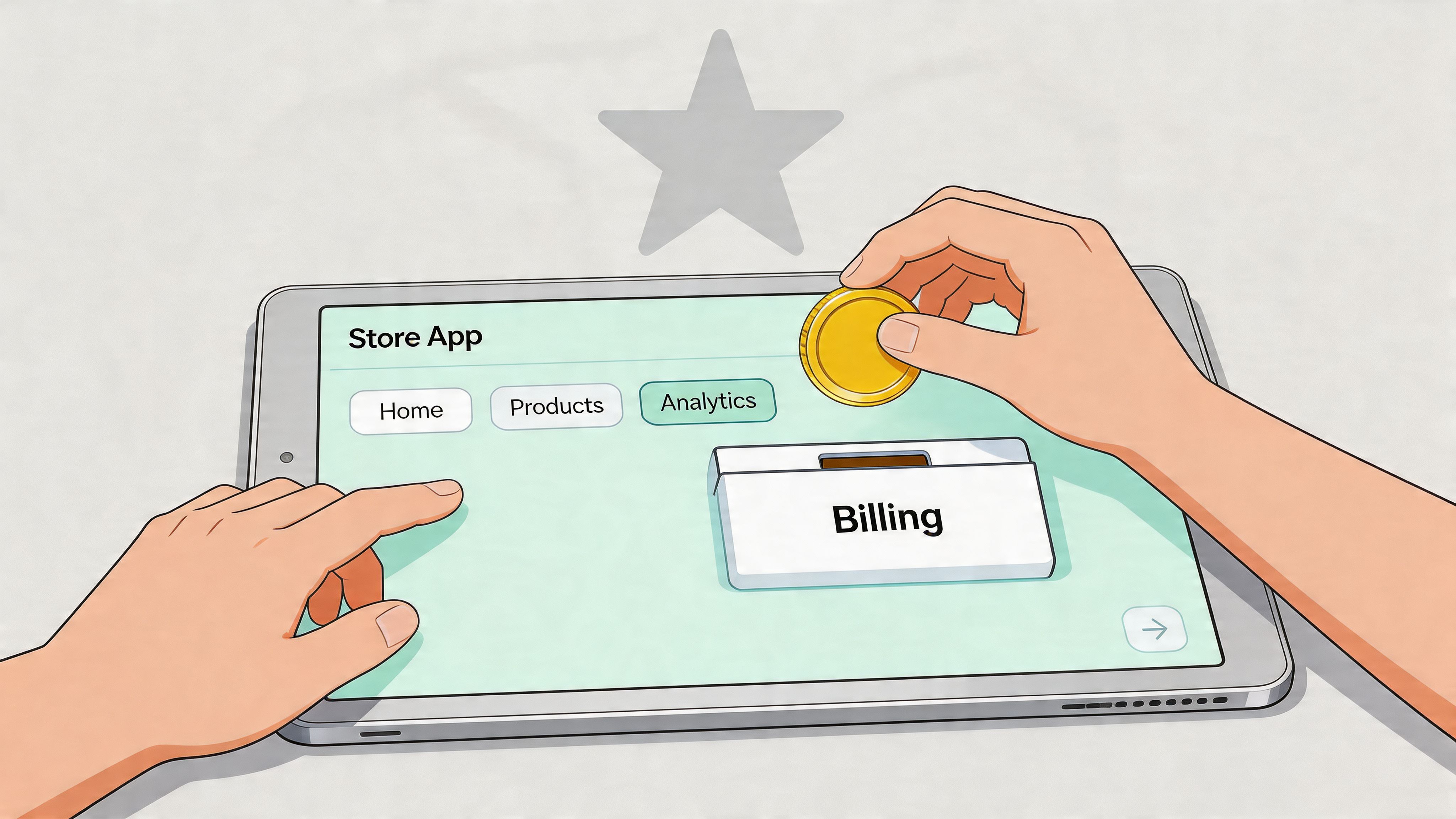
Billing should match how value is delivered
Billing is where strategy and implementation meet. Founders often start by asking which pricing model makes the most money. The better question is which model matches the value the merchant receives over time.
For public apps, Shopify’s Billing API is usually the right route because approval happens in an environment merchants already trust. Common options include:
- Recurring subscriptions for ongoing automation, monitoring, or support
- One-time charges for setup work, migrations, or a single paid action
The trade-off is straightforward. A recurring plan works when the product keeps producing value every month. A one-time charge fits a defined outcome with a clear finish line. If those do not match, churn or refund pressure usually follows.
Good billing UX is plain, not clever. Merchants should know what they are buying, when they will be charged, and which features require payment. They should also be able to tell what happens if a charge is declined, a trial ends, or a store changes plans.
A quick visual walkthrough can help before you wire the whole thing into production.
Onboarding and billing need to work together
The timing of the billing prompt matters as much as the pricing model. Charge too early and merchants have no reason to trust the app. Charge too late and they feel trapped after investing setup time.
The cleaner pattern is to let merchants reach a clear activation point first. Show the result, collect only the settings required to produce it, then present the charge when the next step is obvious. That flow respects the merchant’s time and usually converts better than aggressive prompts.
This is also where positioning matters. Clear feature naming, screenshots, and plan language help merchants understand why the app costs what it costs. Good app marketing strategies support billing because they set expectations before the merchant ever reaches the approval screen.
One rule is hard to ignore. Every field, click, and billing prompt should help the merchant get to value faster. If it does not, cut it.
Testing Deployment and App Store Submission
A lot of apps work in local development and fail in real use because the testing only covered the happy path. Shopify app creation gets serious at the point where installs, auth, billing, webhooks, background jobs, and merchant actions all meet at once.
Test the app the way merchants will actually use it
You need more than unit tests. Unit tests catch logic errors in small pieces, but they won’t tell you whether onboarding breaks after install, whether a webhook creates a duplicate record, or whether a billing confirmation sends the merchant to the wrong state.
A solid pre-launch checklist usually includes:
- Unit tests for helpers, validators, pricing logic, and transformation code.
- Integration tests for database access, API clients, auth, and billing workflows.
- End-to-end tests on a development store covering install, onboarding, feature use, and uninstall.
- Manual testing across edge cases that automated suites often miss, especially permission and lifecycle flows.
Design for load before you need it
If your app targets serious operators, you can’t assume traffic will stay gentle. Shopify’s own partner guidance notes that during peak periods such as Black Friday, UK Shopify traffic can spike 40% year on year, and apps serving high-volume merchants need to handle API rate limits and resiliently process workflows for multisite DTC brands handling 10,000+ daily orders through proper queueing and scale-aware design, as described in Shopify’s app-building guidance.
That changes how you deploy. You need worker separation, retry logic, queue visibility, and enough logging to know where jobs are stalling. A simple single-process app can be fine early on, but event-heavy workloads need more deliberate infrastructure.
Deployment choices matter less than operational discipline
Heroku, Vercel, and Render can all work depending on your stack shape. The better question is whether the platform makes it easy to manage:
- environment variables
- worker processes
- scheduled jobs
- rollback
- logs
- database connectivity
- webhook uptime
Developers sometimes spend too much time comparing platforms and too little time preparing a repeatable deployment process. Pick one that fits your stack and makes day-two operations manageable.
Submission is part compliance, part product marketing
App Store review isn’t only technical. Your listing, screenshots, privacy policy, support contact, and demo materials all shape how Shopify reviews and how merchants convert.
A few practical habits help:
- Write the listing around the merchant problem, not your architecture.
- Use screenshots that show outcomes, not only settings pages.
- Record a short demo that makes the first-use value obvious.
- Make support and documentation easy to find.
If you want a stronger listing after the technical launch, these app marketing strategies are worth reviewing because discoverability in app marketplaces is its own discipline.
The review team doesn’t only assess whether the app functions. They assess whether a merchant can trust, understand, and safely use it.
After the Launch Security Compliance and Growth
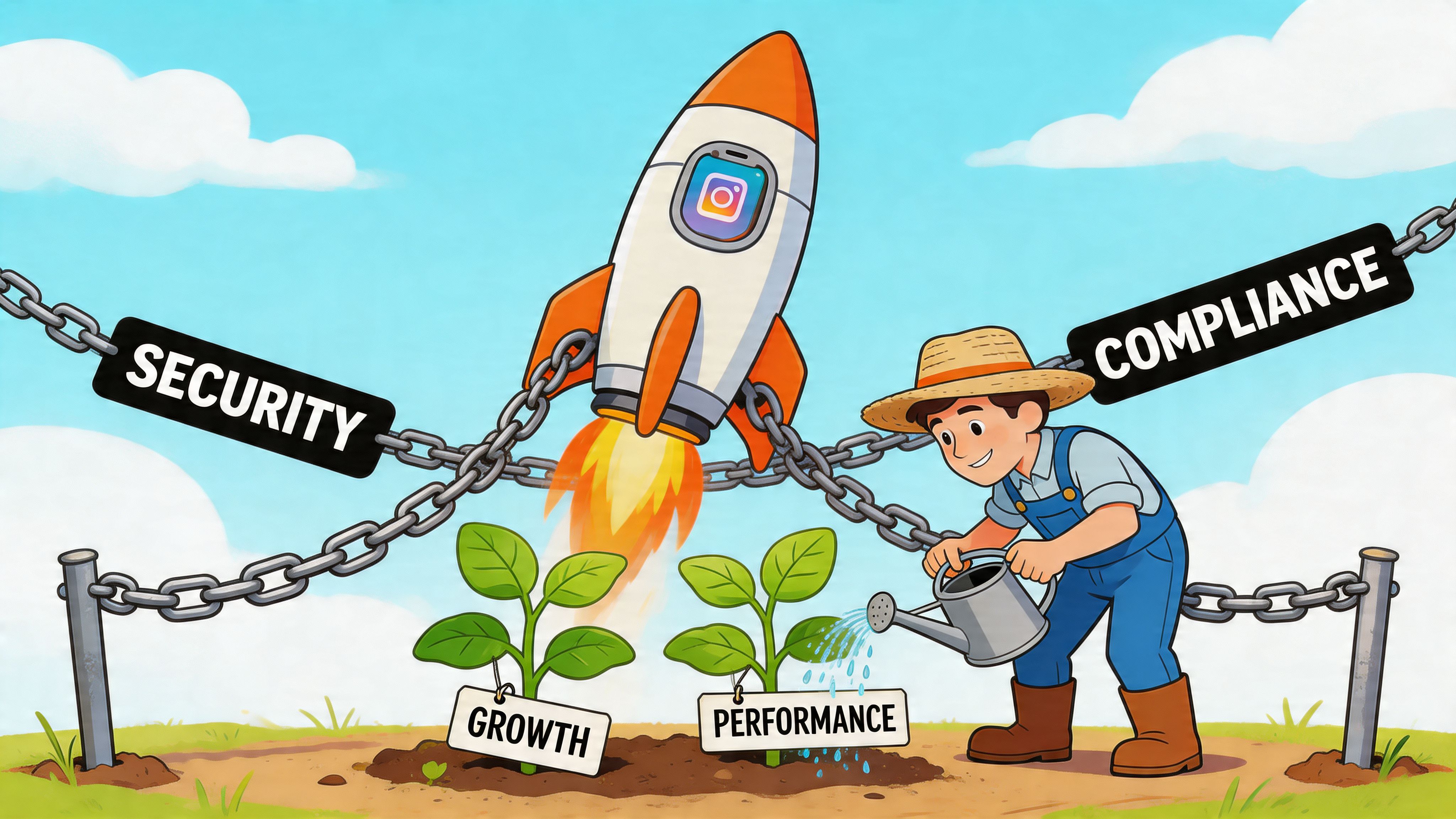
Launch day marks the transition from the build phase to the operating phase. Many promising apps stall at this stage. The code works, but the owner underestimates maintenance, compliance, support, and product refinement.
Security is a product feature
Merchants may not ask detailed questions about your session handling or webhook verification. They will care the moment something goes wrong. Good app operators monitor logs, review failed jobs, rotate secrets when needed, and keep API version changes on a schedule rather than as a panic response.
This also means deleting assumptions that were acceptable in MVP mode. Hard-coded fallback behaviour, broad internal access, weak audit trails, and unclear support escalation paths become real business risk once paying merchants depend on the app.
UK compliance can’t be an afterthought
For UK-focused apps, compliance needs product attention early. According to Shopify’s UK partner guidance, 22% of app rejections in the UK market fail on privacy grounds. The same guidance highlights the need to address GDPR, post-Brexit VAT handling, and accessibility standards such as WCAG 2.2, with potential fines of up to £20 million or 4% of global turnover for non-compliance.
That affects decisions across the app:
- Data collection should be limited to what the feature needs.
- Data retention should be documented and defensible.
- Privacy disclosures should match actual behaviour.
- Accessibility should be built into interface choices, not patched on later.
If your app touches payments, order data, customer records, or regulated merchant workflows, you need to treat compliance as part of feature design. The operational side of payments in ecommerce is a good reminder that trust, policy, and transaction flows are tightly connected.
Growth comes from reliability plus feedback
The easiest way to lose growth is to chase new features while ignoring current friction. Most app gains after launch come from simpler moves:
- Shorten time to first value
- Fix the onboarding step where merchants stall
- Improve empty states and support copy
- Track uninstall reasons
- Tighten slow queries and noisy jobs
There’s also an important strategic question for non-developers and lean teams. Not every problem deserves a full app. Sometimes Shopify Flow, Zapier, or an existing automation tool will solve the issue more cheaply and with less maintenance. Building a full app makes sense when the workflow is core to the business, needs a dedicated UI, or should become a product in its own right.
Growth usually doesn’t come from adding more features first. It comes from making the existing promise work consistently for more merchants.
Frequently Asked Questions about Shopify App Creation
Do I need to be a senior developer to build a Shopify app
No, but you do need solid basics. You should be comfortable with web development, authentication, APIs, frontend state, and backend debugging. The Shopify-specific parts are learnable. The harder part is building something merchants can install, trust, and keep using.
How long does shopify app creation usually take
It depends on scope. A narrow internal tool or custom merchant app can move quickly if the workflow is clear. A public app usually takes longer because you’re not only building features. You’re also handling onboarding, billing, support flows, error states, and review requirements.
A good first milestone is not “full launch”. It’s a working version that installs cleanly, solves one problem well, and survives real merchant use.
Should I build a public app first or start with a custom app
If you already have a paying merchant with a defined problem, a custom app is often the better first move. It gives you a sharper scope and faster feedback. If you’ve validated that many merchants share the same pain point, a public app can make sense earlier.
The mistake is trying to build a broad public product without proof that merchants care enough to install it.
What skills matter most besides coding
Three matter a lot:
- Merchant empathy. You need to understand how store teams work.
- Product judgement. You need to decide what not to build.
- Operational discipline. You need to maintain the app after launch.
Many technically sound apps fail because the builder didn’t think enough about onboarding, support, or pricing.
Can no-code or low-code tools replace a custom app
Sometimes, yes. If the goal is simple automation, internal notification, or moving data between tools, no-code can be enough. If the problem needs a dedicated merchant interface, secure deeper Shopify integration, or a reusable product, a proper app is the better route.
What causes new Shopify apps to struggle most
Usually one of four things. The app solves a weak problem. The install permissions feel excessive. The UI is slow or confusing. Or the builder underestimated support and compliance work after launch.
If your store is losing sales to unanswered questions, slow support, or inconsistent pre-sales conversations, Marvyn AI is worth a look. It’s a free autonomous Shopify AI chatbot built to turn browsing into buying, automate a large share of customer support, and help merchants deliver fast, consultative answers without adding headcount.