Boost Loyalty with email for customer service - Master Support
For any ecommerce brand, great customer service via email isn't just a nice-to-have; it's the very bedrock of building trust and keeping customers for the long haul. It's the documented, thoughtful, and accessible backbone of your entire support strategy.
Why Email Is Your Most Valuable Support Channel

While live chat and social media get all the buzz, email is the unsung hero of customer support. It's the reliable workhorse that, when you get it right, delivers huge strategic value — especially for UK ecommerce brands navigating a diverse customer base.
The secret to email's power is its asynchronous nature. Customers can fire off a query on their lunch break, on the train home, or late at night. They don't have to sit in a queue waiting for a live agent. This simple flexibility slots perfectly into their busy lives, offering a low-stress way to get help.
And for your team? It means you can manage your workload far more efficiently. You can batch similar requests together and dedicate proper, focused time to complex problems without the constant pressure of a blinking chat window.
The UK Consumer Preference for Email
The data backs this up, especially in the British market. Email remains a cornerstone of customer communication, with 33% of British consumers calling it their go-to method for contacting a business. That preference is remarkably stable across all age groups, even peaking at 36% among Gen X shoppers.
What's really telling for Shopify stores is that a massive 74% of UK consumers have actually used email to get in touch with a brand. This isn't just a preference; it's a deeply ingrained behaviour. It highlights just how vital email is as a touchpoint in the customer journey. If you want to dig deeper, the full findings on British customer service preferences offer a fascinating look at the market.
This presents a massive opportunity. A lot of brands treat their email support as a slow, secondary channel, which inevitably leads to a poor experience. The brands that get email right—with prompt, personal, and genuinely helpful replies — carve out a serious competitive advantage.
The gap between high customer preference and often-mediocre service quality is where your brand can truly shine. A brilliant email strategy isn't just about closing tickets; it's about proving you listen and care, which is the foundation of lasting loyalty.
Beyond Problem-Solving to Relationship-Building
A well-crafted email does so much more than just answer a question. It creates a written record of the conversation and the solution, something customers can easily refer back to. This clarity is priceless for anything complex, like detailed return instructions or multi-step troubleshooting.
More importantly, every single email is a chance to reinforce your brand voice and build genuine rapport. It's a space where you can:
- Show real empathy for a customer's frustration.
- Demonstrate deep product knowledge with useful advice.
- Personalise the interaction by referencing a past order or conversation.
- Turn a negative experience into a positive one with a thoughtful, well-explained solution.
Unlike a fleeting phone call, a great email interaction can be saved and even shared. It’s tangible proof that your brand is helpful, reliable, and trustworthy. And in the world of ecommerce, where trust is your most valuable currency, mastering this channel is simply non-negotiable.
Writing Support Emails That Build Customer Loyalty

Alright, let's move from theory to practice. Every single email for customer service your team sends is a direct reflection of your brand. A robotic, unhelpful message can send a customer straight to a competitor; a warm, effective one can create a fan for life.
The difference isn't complicated. It comes down to a few key components that transform a simple reply into a powerful loyalty-building tool.
It all starts before the customer even opens the message. Your subject line is the gatekeeper. Vague subjects like "Re: Your Request" get lost in a cluttered inbox and feel impersonal. Instead, make them clear and searchable.
- Good: "Update on your Order #UK54321"
- Better: "A quick update regarding your return for Order #UK54321"
This simple change helps the customer immediately identify the email and makes it easy for them (and you) to find later. It sets a professional, organised tone from the get-go.
The Anatomy of an Effective Support Email
Once they open the email, the real work begins. The goal is to balance empathy with efficiency — showing you understand their problem while guiding them toward a clear resolution. This isn't just about what you say, but how you structure it.
A great support email is built on a foundation of empathy. A customer reaching out is often frustrated or confused. Starting your email with a genuine acknowledgement of their issue can instantly de-escalate tension. Simple phrases like, "I can see how frustrating that must be," or "Thank you for bringing this to our attention," show you're on their side.
After building that initial rapport, the next step is to provide a clear, actionable solution. Ditch the long, rambling paragraphs. Use formatting to make the information digestible and easy to follow.
Remember, 70% of customers expect anyone they interact with to have the full context of their situation. A great email acknowledges their history and shows you've done your homework before replying, making them feel seen and valued.
Personalisation Beyond the First Name
True personalisation is the secret sauce of exceptional customer service emails. Using the customer's first name is table stakes now. Going deeper is what actually builds loyalty. With the right tools, your team can access a customer’s history to make the interaction feel truly individual.
For example, instead of a generic refund notification, try this:
- Before: "We have processed your refund."
- After: "Hi Sarah, I've just processed the refund for the blue floral dress from your order #9876. You should see the funds back in your account within 3-5 business days."
This level of detail confirms you're paying attention. To really nail this, exploring strategies for enhancing customer experience with personalization in customer service is invaluable. It’s how you turn a transactional update into a reassuring, personal conversation.
Another powerful technique is referencing past interactions. If a customer previously asked about sizing, you could say, "I remember you were deciding between sizes on your last order. I've double-checked the measurements for this new jacket to make sure it's a perfect fit for you." This proves you see them as a person with a history, not just a ticket number. This is where crafting excellent responses becomes an art, and using well-designed customer service scripts can give your team a fantastic starting point.
From Robotic to Relatable: A Before and After
Let's look at a common scenario: a customer’s package is delayed. A poor response can amplify their anxiety, while a great one can completely restore their confidence in your brand.
Before: A Robotic, Unhelpful Response
Subject: Your Inquiry
Dear customer,
Your package is in transit. Please check the tracking number for updates. Delays are possible.
Thanks,
Support Team
This email is cold, unhelpful, and dismissive. It provides no new information and shows zero empathy. Now, let's transform it.
After: A Warm, Effective Response
Subject: An update on your delivery for Order #UK11223
Hi Tom,
Thanks so much for getting in touch. I can see you’re waiting on your order #UK11223, and I understand it’s frustrating when a package doesn’t arrive as expected.
I’ve just checked the latest courier scans, and it looks like your parcel experienced a slight delay at the local depot, but it's now out for delivery today. You can follow its final journey here: [link to tracking].
We’re sorry for the slight hold-up. We really appreciate your patience!
Best,
Chloe at [Your Brand]
This revised email wins on every front. It’s empathetic, provides specific information, takes ownership of the issue, and ends on a positive, personal note. This is the kind of email for customer service that doesn't just solve a problem—it actively builds a stronger customer relationship.
The Must-Have Email Templates for Common Ecommerce Scenarios
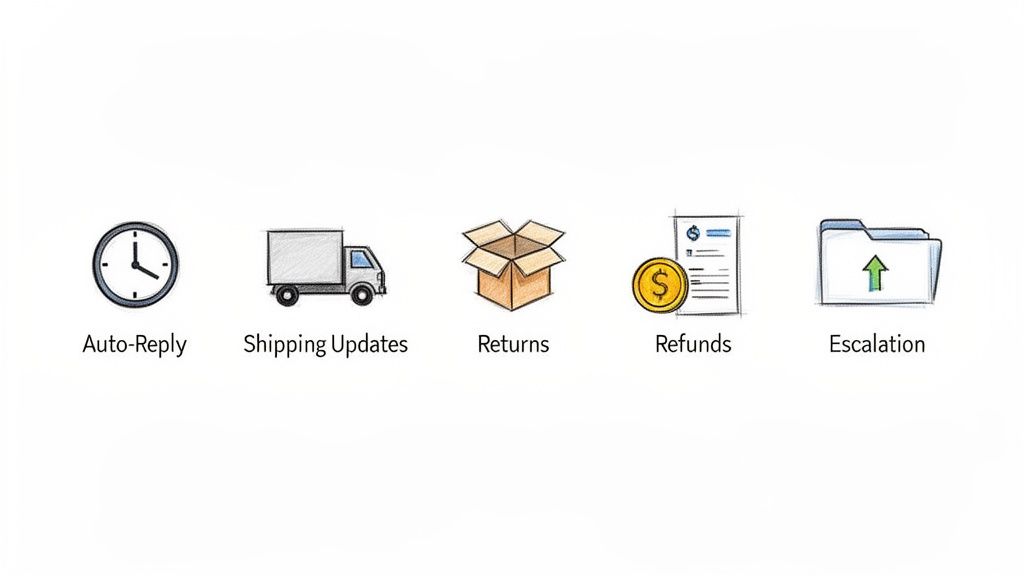
For any busy ecommerce team, having a solid toolkit of email templates is a complete game-changer. This isn't about sending robotic, one-size-fits-all messages. It’s about building consistency, boosting your response speed, and giving your team the confidence to handle the most common issues without starting from scratch every single time. A great template is a reliable starting point for every email for customer service, letting agents add that crucial personal touch where it matters most.
We've pulled together templates for the most frequent customer interactions you'll see as a UK Shopify store. Think of them as a strategic foundation you can customise and build on. It's always a good idea to see what others are doing, too—you can find some great examples in these ecommerce email templates that actually convert.
Remember, the goal is to adapt these to your brand’s unique voice. A playful, ahem, brand will sound very different from a high-end luxury one, but the core information and empathetic tone should always be there.
The Instant Auto-Reply That Buys You Time
This is, without a doubt, your most important email. When a customer sends a message, silence is their worst enemy. An immediate auto-reply does two things: it confirms you've received their message and, more importantly, it sets a clear expectation for when they’ll hear from a real person. This simple step can stop follow-up emails in their tracks and dramatically reduce customer anxiety.
Base Template:
- Subject: We've got your message (Order #{{order_number}})
- Body: Hi {{customer_name}},
Thanks for getting in touch! This is just a quick automatic note to let you know we've received your message and will get back to you as soon as we can.
Our team replies to all enquiries within 24 business hours. We're here Monday to Friday, 9 am - 5 pm GMT.
Thanks for your patience!
Best,
The [Your Brand] Team
Pro Tip: Pop a link to your FAQ or Help Centre into your auto-reply. This helps customers find their own answers—which a staggering 89% of them prefer to do anyway—potentially solving their problem before an agent even sees the ticket. To get this right, take a look at our guide on the perfect example of auto reply.
The Proactive 'Where Is My Order?' Update
"Where is my order?" (WISMO) tickets are the bane of every support team's existence. The best defence is a good offence: proactive shipping updates. Sure, sending an email when an order ships is standard practice. But the real magic happens when you send another one when it's actually out for delivery. It makes a huge difference.
Base Template:
- Subject: Good news! Your order #{{order_number}} is out for delivery
- Body: Hi {{customer_name}},
Get ready! Your order from [Your Brand] is on the final leg of its journey and should be with you today.
You can track the driver's progress right here: [Tracking Link]
We can't wait for you to get your new items!
Cheers,
The [Your Brand] Team
The Painless and Empathetic Return Instructions
Returns are just part of the game in ecommerce. Making the process a confusing nightmare is a surefire way to lose a customer for life. This template needs to be crystal clear, reassuring, and show a bit of empathy.
Base Template:
- Subject: Your return for order #{{order_number}}
- Body: Hi {{customer_name}},
We're sorry to hear the items in your order #{{order_number}} weren't quite right. Not a problem at all—we're here to make the return as simple as possible.
Here’s what to do:
- Securely package up the item(s) you're returning.
- Print the attached prepaid returns label and pop it on the front of the parcel.
- Drop the parcel off at your nearest [Courier Name] drop-off point.
Once we receive and inspect your return, we'll process your refund within 3-5 business days.
If you have any questions, just reply to this email!
Best,
[Agent Name] at [Your Brand]
The Timely 'Your Money's on Its Way' Refund Notice
Just as important as managing the return is communicating the refund. Once a customer has sent an item back, all they want to know is that their money is on its way. This email closes the loop on the whole interaction and helps rebuild their confidence in your brand.
Base Template:
- Subject: Your refund for order #{{order_number}} has been processed
- Body: Hi {{customer_name}},
Just a quick update for you: we've received your returned items and have processed your refund of £{{refund_amount}}.
The funds should appear back in your original payment account within 3-5 working days, though this can sometimes vary depending on your bank.
Thanks for shopping with us, and we hope to see you again soon.
All the best,
The [Your Brand] Team
The Seamless Escalation Handover
Sometimes, a frontline agent just can't solve an issue on their own. A clear escalation template is crucial for a smooth handover to a manager or senior team member. It makes the customer feel like they’re being prioritised, not just passed around in circles. This is critical, especially when you consider that over half of consumers will switch to a competitor after just one bad experience.
Base Template:
- Subject: An update on your query from our senior team
- Body: Hi {{customer_name}},
Thanks so much for your patience. I've reviewed your conversation with [Agent Name] about [briefly summarise the issue]. To get this sorted for you properly, I've escalated your case to my manager, [Manager's Name].
They have all the context and will be in touch with you directly within the next 4 business hours with a solution.
We're committed to getting this right for you.
Sincerely,
[Agent Name]
Using Automation and AI to Optimise Your Support Workflow
Let’s be honest: manually replying to every customer email is a losing battle. As your ecommerce brand scales, the support requests will pile up. The solution isn't to just hire more people to type faster; it's about working smarter by blending thoughtful automation with a genuine human touch. This hybrid approach is your secret weapon for scaling your email for customer service operations without letting quality slip.
The foundation of any smart workflow is managing expectations. This starts with a clear Service Level Agreement (SLA). Think of an SLA as your public promise on response times—for example, guaranteeing a reply within 12 business hours. It keeps your team accountable, but more importantly, it gives customers a reassuring timeline. That alone can stop a lot of those anxious "just checking in" follow-up emails.
Building Intelligent Routing Rules
Once you’ve set your SLA, the next step is getting the right emails to the right people, fast. This is where intelligent routing comes in. Instead of one person manually sifting through a crowded inbox, you can set up automated rules that direct emails based on keywords or what the customer actually wants.
Just think about the common themes you see every day. You can create rules that automatically tag and assign emails containing certain words:
- 'Refund', 'Return', 'Exchange': These can be routed straight to the team member who lives and breathes your returns process.
- 'Damaged', 'Broken', 'Faulty': These are urgent. Flag them as high priority and send them directly to a senior agent or manager who can take immediate action.
- 'Shipping', 'Tracking', 'Delivery': These go to an agent who has courier systems and order management tools at their fingertips.
This kind of simple automation instantly cuts down internal handling time. The first person to see the email is the exact person who can solve the problem. That’s a huge win for both your first response time and your overall resolution time.
UK consumer expectations for service quality are at a tipping point. With timely responses ranking as the most valued service element at 54%, automated routing ensures queries reach the right expert faster, directly addressing this core customer demand. You can learn more from the full research on UK consumer service expectations.
Integrating AI for Instant First-Line Support
Routing helps your human team, but what about the mountain of simple, repetitive questions? We're talking about the 70% of questions that clog up your inbox daily. This is where an AI-powered solution like Marvyn AI becomes a true game-changer for your Shopify store.
Integrating an AI chatbot isn't about replacing your team; it's about empowering them.
Marvyn can instantly handle the high-volume, routine queries that eat up your team's day. Questions like "What's your return policy?" or "Do you ship to Scotland?" get answered in seconds, 24/7. This frees up your skilled human agents to focus on the complex, high-value conversations that actually require empathy and critical thinking—like helping an upset customer or giving a detailed product recommendation. Our guide on automation in customer service dives deeper into how this balance can completely reshape your operations.
This screenshot shows how Marvyn can be configured to instantly handle common support questions directly on your Shopify site.
By setting up these automated responses, you deliver immediate value to customers looking for quick answers and dramatically cut down your overall ticket volume.
The Smart Handoff from AI to Human
The most powerful support systems aren't purely human or purely AI—they're a seamless blend of both. This is where the smart handoff becomes absolutely critical. While UK customers value speed, research shows that 61% want to see more human interaction in customer service. The goal isn't to eliminate humans, but to use AI for efficiency and save your people for connection.
A smart handoff works like this:
- A customer asks Marvyn a question. The AI gives an instant answer to any routine query it knows.
- If the query gets complex, becomes emotionally charged, or the customer just asks to speak to a person ("talk to an agent"), the AI knows it's time to pass the baton.
- Here’s the crucial part: the AI passes the full conversation context—the customer's name, order details, and the chat transcript—over to the human agent.
This transfer of context is everything. Your agent doesn't have to ask that dreaded question, "Can you please explain your issue again?" which is a major point of frustration for any customer. They can jump straight into the conversation with all the info they need, creating a smooth and impressive experience that perfectly marries the instant response of AI with the nuanced understanding of a human expert.
How to Measure Success and Drive Sales Through Service
Exceptional customer service isn't just a cost centre; it's one of your most powerful revenue drivers. But to prove that, you need to get past simply counting tickets and start measuring what really moves the needle. Proving the ROI of your support emails means drawing a straight line from your team's performance to your business's bottom line.
This means looking beyond the surface-level numbers and digging into the Key Performance Indicators (KPIs) that actually reflect customer happiness and how efficiently your team is operating. When you track the right data, you can clearly show how great service creates loyal customers who come back again and again.
Just look at the UK email marketing landscape. In 2025, delivery rates hit a staggering 98%, with B2C brands reaching an incredible 99.2%. Even better, unique click rates have climbed to 2.3%. This tells us one thing: customers are paying attention to brand emails. You can get more insights from the full 2025 UK email benchmarking report.
Key Metrics Beyond Ticket Volume
To get a true sense of your support team's impact, you have to track metrics that measure the quality and effectiveness of your email interactions. These KPIs paint a clear picture of what’s working and where you need to focus your efforts.
Here are the three foundational metrics you should be tracking:
- First Contact Resolution (FCR): What percentage of queries are you solving in a single email reply? A high FCR is a sign of an efficient, knowledgeable team, and it means your customers aren't getting trapped in frustrating back-and-forth exchanges.
- Customer Satisfaction (CSAT): This is usually measured with a simple "How satisfied were you?" survey at the end of an email chain. It gives you immediate, specific feedback on an interaction, helping you spot both star agents and moments that need improvement.
- Net Promoter Score (NPS): This one asks, "How likely are you to recommend our brand to a friend?" It's a measure of overall brand loyalty, not just a single interaction. When your NPS is on the rise, it’s a strong indicator that your customer lifetime value is growing too.
This process flow shows how you can design your support system—from the moment a customer gets in touch to the final resolution—using SLAs, smart routing, and a hybrid AI-human model.
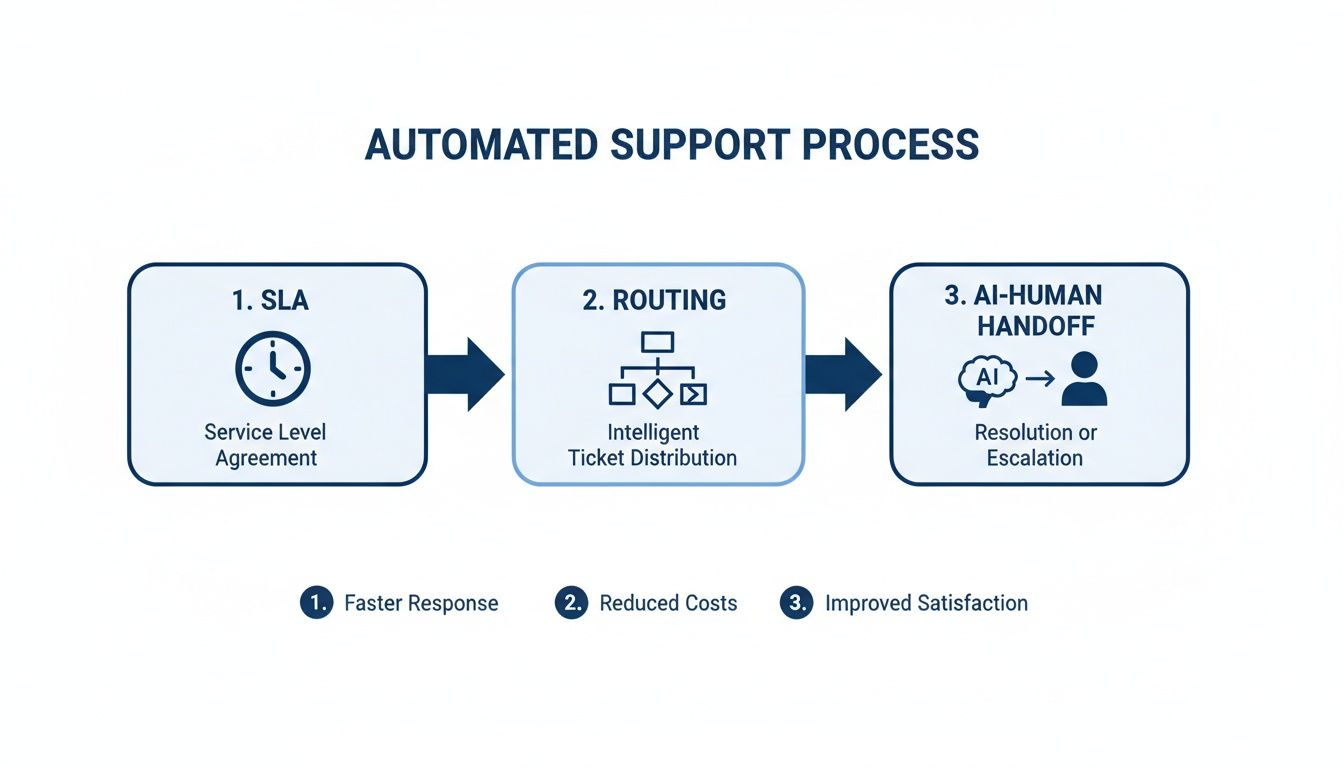
By automating those initial steps, you make sure every customer is heard and their query is sent to the right place, freeing up your human agents to handle the really tricky issues.
Linking Service Metrics to Business Outcomes
Tracking metrics is one thing, but the real magic happens when you connect them to tangible business results. When you start analysing your support data alongside sales data from your Shopify store, you can build a powerful business case for investing in world-class customer service.
For example, try correlating faster response times with a higher customer lifetime value (LTV). If you segment your customers based on how quickly their support tickets were answered, you'll often discover that those who get fast, effective help are the ones who make more repeat purchases.
One of the most revealing analyses you can run is to compare the LTV of customers who've had a positive support interaction (high CSAT) against those who haven't. This often proves that a single, well-handled problem can transform a one-time buyer into a loyal, high-spending advocate for your brand.
Turning Support Interactions into Sales Opportunities
Every support email isn't just a problem to be solved; it's a chance to drive revenue. Now, this isn't about aggressive, tacky upselling. It's about consultative selling that genuinely adds value.
When an agent has successfully fixed an issue, they’ve earned a huge amount of customer trust. That's the perfect moment to offer helpful, relevant advice.
Imagine a customer has just had a return processed for a pair of trousers that didn't fit right. After confirming the refund, a well-trained agent could add something like this:
"I'm so glad we got that sorted for you, Alex. Since you were looking at our smart-casual trousers, you might love our new Performance Chinos. They have a bit more stretch in the fabric, which many customers find gives them a more comfortable fit."
See the difference? It feels helpful, not pushy. It uses the context of the conversation to make a smart recommendation, turning what was a cost centre (a return) into a potential new sale. When you empower your team with deep product knowledge and the right communication skills, your support agents become trusted advisors who actively contribute to your bottom line.
Frequently Asked Questions About Email for Customer Service
As you start dialling in your email support, you're going to hit some practical snags. It happens to every growing store. Questions pop up around response times, how to organise your team, and whether any of this effort actually translates to sales.
We've been there. So, we've pulled together the most common questions we hear from Shopify store owners and ecommerce managers, with clear, no-nonsense answers. Let's get you unstuck and moving forward.
What Is a Realistic Email Response Time for an Ecommerce Brand?
Everyone wants an instant reply, but let's be realistic. For most ecommerce brands, aiming to respond within 1-3 hours during business hours is a strong, competitive goal. For anything less urgent, a 24-hour response time is generally the absolute maximum customers will tolerate.
The most crucial step here is setting clear expectations. Your automated acknowledgement email must state your Service Level Agreement (SLA). This simple act of communication manages customer expectations from the get-go.
Of course, for all those common "Where is my order?" questions, tools like Marvyn AI can provide instant, 24/7 answers, satisfying that need for speed. This frees up your human team to handle the more complex issues within your stated SLA.
Should I Use a Dedicated Email for Customer Support?
Yes. Absolutely. Ditch the generic Gmail or personal account right now. Using a professional address like `support@yourbrand.co.uk` is non-negotiable as you grow. Here’s why:
- Professionalism: It’s an instant signal of trust. It shows you’re a legitimate, organised business.
- Organisation: It keeps all customer queries in one central place, which is a lifesaver when you start using a helpdesk.
- Collaboration: It lets multiple team members access and manage the inbox without you having to share personal login details.
- Automation: It makes setting up routing rules and automated workflows infinitely simpler, keeping your general company inbox clean.
A dedicated support email isn't just a nice-to-have; it's a foundational piece for scaling your customer service. It sharpens your branding, streamlines your entire workflow, and even helps with email deliverability, making sure your replies actually land in the inbox.
How Do I Handle Angry Customer Emails?
When a frustrated email lands in your inbox, the temptation is to react emotionally. Don't. The best strategy is structured empathy. With over half of consumers ready to jump to a competitor after just one bad experience, getting this right is critical.
First, always acknowledge their frustration directly. A simple, "I can completely understand why you're upset about this situation" shows you're actually listening. Second, take ownership of the problem, even if it wasn't strictly your fault. Finally, tell them the specific action you are going to take to fix it.
This approach de-escalates tension fast. More often than not, it turns a potential one-star review into a story of excellent recovery they’ll share with others.
Can Customer Service Emails Really Increase Sales?
Yes, and quite significantly. Every single support interaction is a chance to reinforce your brand's value and build the trust that creates repeat buyers. When you solve a problem quickly and with a human touch, you’re not just closing a ticket—you're nurturing a long-term relationship.
Beyond that, a well-trained agent can pivot a support query into a consultative sales opportunity. Once the initial problem is solved, they can make a relevant product recommendation.
For example: "Now that we've sorted out the return, I noticed you were interested in our jackets—the fit on our new bomber style is much more flexible and might be perfect for you." Just like that, a support cost becomes a direct revenue driver.
Ready to transform your support and boost sales? Marvyn AI is a FREE, fully autonomous AI chatbot for Shopify that automates over 70% of customer service queries while driving consultative sales. Get live in minutes and free up your team to focus on growth. Get it now for FREE.
Related Articles
10 Customer Service Best Practices for Shopify Brands in 2026
Discover 10 actionable customer service best practices for DTC brands. Boost sales and satisfaction on Shopify with our 2026 guide to automation and support.
Ecommerce Growth with Automation in Customer Service
Learn how automation in customer service can grow your ecommerce brand. Discover strategies to reduce support tickets, increase conversions, and boost revenue.

Unlocking Growth With AI Sales Agents for Your DTC Brand
Discover how AI sales agents can transform your Shopify store. Learn to increase conversions, boost AOV, and enhance customer experience with our expert guide.

7 Top Chat Bot Examples for E-commerce Success in 2026
Discover the best chat bot examples for Shopify stores. See how Marvyn AI and others automate support and drive sales with real-world use cases.
A Shopify Guide to Reduce Cart Abandonment
Reduce cart abandonment on your Shopify store with this complete guide. Learn to diagnose causes, implement fixes, and use AI chatbots to recover lost sales.
Website Welcome Message: 20+ Examples & Templates (2026)
See 20+ real welcome message examples for websites, online stores, fashion boutiques, and more. Plus how to automate them with an AI chatbot.